GuidesTool vs tool
Salesforce vs Pipedrive Outbound: Why SDRs Are Switching
Outbound teams are quietly migrating from Salesforce to Pipedrive. Here's the real case for simpler CRM, lower seat costs, and cleaner sequences.

The tools compared
Entry prices from the pricing index, read Aug 12, 2026
Some links on this page are affiliate links. If you buy through them we may earn a commission at no cost to you; it never changes a verdict. How we make money
The short answer
For lean outbound teams under 50 reps, Pipedrive's sales-native UX, simpler automation, and dramatically lower seat costs make a stronger case than Salesforce's enterprise feature sprawl.
There is a quiet migration happening in outbound sales stacks right now, and it is not the one vendors are talking about. SDRs and AEs at sub-200-person B2B companies are not switching sequencers or enrichment tools. They are ripping out Salesforce and replacing it with Pipedrive. Not because Salesforce is bad at what it does, but because what it does is increasingly overkill for teams running a focused outbound motion. The frustration is specific: too many clicks to log a call, too much admin to change a workflow, too much budget absorbed by a platform built for enterprise complexity that a 15-rep SDR team will never use.
The real complaint is not features, it is friction
The Salesforce frustration I hear from RevOps practitioners almost never starts with pricing. It starts with a specific moment. A RevOps lead needs to add a new trigger to a lead routing workflow and realizes it requires opening a Salesforce Flow, navigating three layers of version control, and testing in a sandbox before pushing to production. That same change in Pipedrive is a five-minute Automations edit with an in-browser preview. I’d argue that moment, more than any pricing spreadsheet, is what finally tips teams toward evaluating alternatives.
Salesforce’s power is real. For enterprise teams running complex deal cycles with custom objects, territory management, CPQ, and multi-cloud data models, there is nothing else that scales the same way. But outbound sales is a volume, speed, and pipeline-hygiene game. Reps need to log calls fast, move deals between stages without leaving the pipeline view, and trigger follow-up sequences automatically when a prospect goes cold. Salesforce technically does all of this. The gap is that it takes significantly more configuration, admin time, and budget to get there.
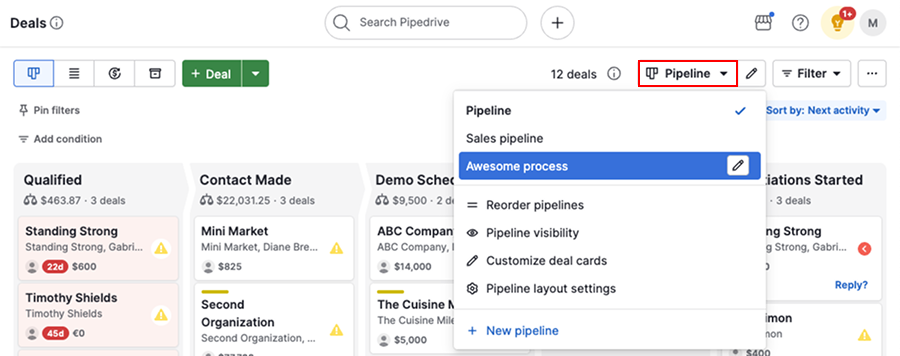
The pipeline view is not a cosmetic advantage. When reps can drag a deal card, inline-edit the next activity, and trigger a sequence without leaving the screen, they actually do it. The usual failure mode with Salesforce is that reps work around it rather than in it, logging calls in a notepad and batch-updating records at end of week. That is not a training problem. It is a UX problem.
Where Salesforce still wins (and you should not pretend otherwise)
My read is that the case for Pipedrive is strong for most pure outbound teams, but the honest version of this argument has to include what you give up.
Salesforce’s reporting depth is genuinely in a different tier. If your VP of Sales wants a waterfall analysis of pipeline coverage by rep, by segment, by source, broken down by quarter with rolling 90-day comparisons, you can build that in Salesforce. In Pipedrive you are exporting to Google Sheets or leaning on a BI layer. For teams already running Clay or Apollo for enrichment and intent, that reporting gap matters less because your source-of-truth for prospect quality lives upstream anyway. But if your exec team runs off Salesforce dashboards today, factor in the migration cost honestly.
Custom objects are the other real limiter. If your outbound motion touches multiple product lines, complex account hierarchies, or non-standard data models, Salesforce’s flexibility is not bloat. It is load-bearing infrastructure. Pipedrive’s data model is opinionated by design: contacts, organizations, deals, and activities. That simplicity is the feature for straightforward pipeline work, and a genuine constraint for anything more complex.
The trap teams fall into: Assuming that because Pipedrive is simpler, the migration is trivial. The real time cost is rebuilding your reporting logic, reconfiguring any Salesforce-native integrations (think DocuSign, Gong, or Outreach connectors), and getting reps to trust a new tool before the quarter closes. Underestimating this is how migrations fail silently.
The sequence trigger comparison:
Salesforce (with Outreach or Salesloft connected):
Lead Status = MQL
→ Outreach sequence "Cold Outbound Q4"
→ Requires: Salesforce Flow + Outreach trigger
  + field mapping + sync delay
Pipedrive native:
Deal moves to stage "New Outbound"
→ Automation triggers email sequence
→ No third-party bridge required
→ Average setup: under 10 minutes
That gap in sequence trigger complexity is where I see the most practitioner frustration. If you are running Outreach on top of Salesforce, you have a real integration to maintain with sync delays, field mapping, and version conflicts to manage. Pipedrive’s native automation is not as deep as Outreach’s, but for a 10-to-20-rep outbound team it covers 80 percent of the use case without the maintenance overhead. For teams where sequence depth matters more, pairing Pipedrive with Smartlead or Instantly still comes in cheaper than the full Salesforce plus Outreach stack. There is a broader cold email vs. LinkedIn outreach framing worth reading if your team is still deciding which outbound channel to prioritize.
Salesforce vs Pipedrive: Which fits your outbound team?
Choose Salesforce if
- Your team is 50+ reps with dedicated RevOps and Salesforce admin headcount
- You have complex data models, custom objects, or CPQ requirements
- Leadership runs strategic planning off Salesforce dashboards and switching reporting is a nonstarter
Choose Pipedrive if

- You are running a focused outbound motion with under 50 reps and no dedicated Salesforce admin
- Your sequences trigger off deal stage or lead status and you want that automation native, not bolted on
- Seat cost is a real line item and the per-seat delta needs to go toward headcount or tooling instead
The seat cost math is not subtle
A 15-rep outbound team on Salesforce Enterprise is spending roughly $2,475 per month on CRM seats alone before you add Outreach, your enrichment layer, or anything else in the stack. The same team on Pipedrive Professional is at $735 per month. That $1,740 monthly delta funds a solid Apollo seat package, a Smartlead account, and still leaves room for a data enrichment tool. The Salesforce State of Sales report notes that high-performing sales teams invest heavily in enablement tools, and the irony is that Salesforce’s own seat cost crowds out budget for exactly that.
The other cost teams undercount is RevOps hours. Maintaining Salesforce Flows, managing permission sets, handling sandbox refreshes, and debugging sync issues with connected tools is real ongoing overhead. For teams without a dedicated SFDC admin, that work falls on a generalist RevOps person who could be building better sequences or improving conversion playbooks instead. I’d rather see that time go toward playbook iteration than Flow debugging.
The shift is real, but so is the work
The migration from Salesforce to Pipedrive is not a weekend project. Data model differences, integration rebuilds, and reporting reconfiguration take real time, and the risk of doing it mid-quarter is obvious. But for teams that are genuinely underserving their reps with a platform that was bought for a scale they have not reached, the operational upside is meaningful. Cleaner pipeline hygiene, faster automation configuration, and a seat cost structure that leaves budget for the rest of the stack are not marginal improvements. They compound every month in rep productivity and reduced RevOps overhead. If your team is at the point where your CRM is slowing down your outbound program rather than supporting it, that is the real signal.
Sources
Frequently asked questions
Is Pipedrive good enough to replace Salesforce for outbound sales?
For SMB and mid-market outbound teams, yes. Pipedrive covers pipeline management, email sequences, and workflow automation without the admin overhead Salesforce requires.
How much cheaper is Pipedrive than Salesforce?
Pipedrive's Professional plan runs around $49 per seat per month versus Salesforce Sales Cloud at $165 per seat per month on the Enterprise tier most outbound teams actually need.
What do you lose moving from Salesforce to Pipedrive?
You lose deep custom object support, Salesforce's native CPQ integrations, and the reporting flexibility of Einstein Analytics. For pure outbound motion, most teams never miss these.
Does Pipedrive have sales sequences built in?
Yes. Pipedrive's Campaigns and Automations features support multi-step email sequences, activity triggers, and deal-stage-based branching without a third-party add-on.
What is the main reason outbound teams leave Salesforce?
The most common complaint is administrative overhead: Salesforce requires dedicated admins for even basic workflow changes, while Pipedrive lets a RevOps generalist configure the same thing in minutes.