GuidesMigration guide
Migrate ActiveCampaign to HubSpot: Keep Automations Intact
Step-by-step guide to migrating from ActiveCampaign to HubSpot without losing automations, list segments, or contact data. Real gotchas included.

The tools compared
Entry prices from the pricing index, read Aug 12, 2026
Some links on this page are affiliate links. If you buy through them we may earn a commission at no cost to you; it never changes a verdict. How we make money
The short answer
Migrating from ActiveCampaign to HubSpot takes 2 to 4 weeks if you audit automations first, export contacts with custom field mappings pre-built, and rebuild sequences in HubSpot Workflows before cutting over DNS.
The trigger I see most often is a pricing renewal notice. A team hits 10,000 contacts in ActiveCampaign, the bill jumps, someone in finance asks why the CRM and the email tool are separate line items, and suddenly “migrate to HubSpot” lands on the Q2 roadmap. That is exactly the moment this guide is written for. The actual migration is not technically hard. What it does, consistently, is destroy automations that teams assumed the export would carry. It never will.
Before you migrate: the prep checklist
I cannot overstate how much the audit phase determines whether your cutover takes two days or two weeks. Every team I have worked with through this at Homegrown Growth Co. who skipped the audit ended up with broken follow-up sequences, orphaned contacts sitting in no list, and a frantic weekend before their next campaign send. Do not be that team.
Before touching HubSpot, do all of this in ActiveCampaign first:
- Export your full contact list with all custom fields as a CSV. Include tags as a column, not just as metadata.
- Screenshot or document every active automation. Record the trigger, each action step, the conditions on each branch, and the goal event. A shared Notion doc or a Google Sheet works fine.
- Identify which automations are actually active. In my experience, roughly 40% of the automations in an average ActiveCampaign account are dormant artifacts. Only migrate what is live and generating engagement.
- List every segment. Note whether each is tag-based or field-based. Tag-based segments require a conversion step.
- Pause all active sequences at least 48 hours before cutover. Contacts mid-sequence will otherwise receive duplicate emails from both platforms.
- Verify your sending domain is unlocked and that you have DNS access. You will re-authenticate SPF and DKIM in HubSpot from scratch.
- Note your suppression list. Unsubscribes and bounces must be imported as suppressed contacts in HubSpot, not as marketable contacts.
This prep work is essentially identical if you are migrating from Mailchimp to Brevo or coming from GetResponse. The platforms differ. The logic does not travel in any CSV.
Go to Contacts > Export and select all fields including custom fields and tags. ActiveCampaign exports tags as a pipe-delimited string in a single column. You will need to split these into individual rows or use them to populate a HubSpot multi-checkbox property. Name your export file with a date stamp and keep the raw copy untouched. Work only on a duplicate.
In HubSpot, go to Settings > Properties > Contact Properties and create every custom field you used in ActiveCampaign before importing a single contact. Map field types carefully: ActiveCampaign 'dropdown' fields become HubSpot 'dropdown select', and 'date' fields must be formatted as MM/DD/YYYY in your CSV or the import will silently fail. Build a mapping spreadsheet with four columns: AC field name, AC field type, HubSpot property name, HubSpot property type.
Import your cleaned CSV using HubSpot's Contact Import tool. Map each column to the corresponding property you built in Step 2. After import, create Active Lists using the tag data you brought in as a contact property. If you had an ActiveCampaign tag 'trial-user', that is now a HubSpot contact property value, and your Active List filter reads 'AC Tags contains trial-user'. Do not use static lists here unless the segment is genuinely frozen in time.
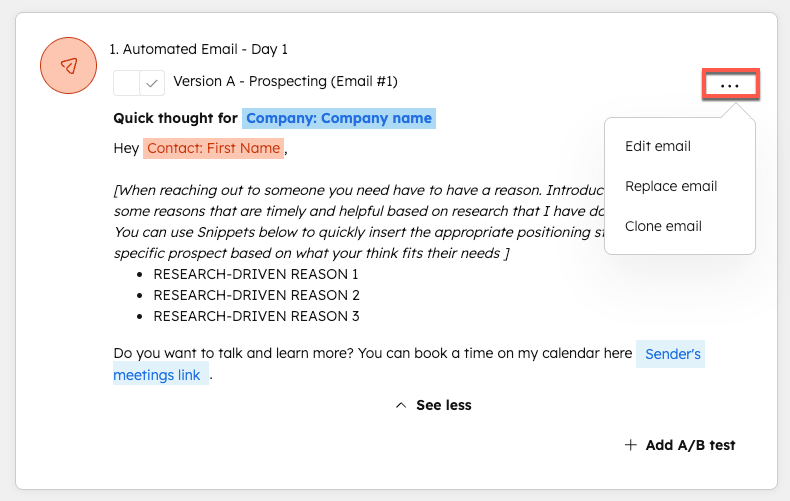
Work through your documented automation list one by one. In HubSpot, go to Automation > Workflows > Create Workflow. Use Contact-based workflows for lifecycle nurture sequences. The most common translation: ActiveCampaign 'Tag is added' trigger becomes HubSpot 'Contact property is known' or 'List membership' enrollment trigger. ActiveCampaign 'Wait X days' steps become HubSpot Delay actions. ActiveCampaign 'If/Else' branches become HubSpot If/Then Branch actions. Set each workflow to Paused until you verify the logic.
In HubSpot, go to Settings > Marketing > Domains and connect your sending domain. Add the SPF and DKIM records HubSpot generates to your DNS. Do not delete your ActiveCampaign DNS records until after you have verified HubSpot authentication with a test send. If you are migrating a list over 10k, plan a 2-week warmup: start with your most engaged segment (opened in last 30 days) before mailing the full list.
Upload your ActiveCampaign unsubscribe export to HubSpot as a suppression list under Settings > Marketing > Suppression Lists. Then run through the QA checklist below before activating any workflow or sending any campaign.
What breaks and what does not transfer
This is where migrations quietly fail. The export looks complete, the import succeeds, and then the first campaign goes out and something is wrong. Every time.
The gotcha: tag-based segments silently become empty lists
ActiveCampaign tags have no direct equivalent in HubSpot. If you import contacts and their tags only live in ActiveCampaign’s internal tag system (not exported as a column), HubSpot has nothing to build a list from. A common failure is importing the full contact list and then discovering the behavioral segments are completely empty because the tag column was not included in the export. ActiveCampaign’s “Lead Score” field compounds this problem: it is a computed value and does not export as a static number HubSpot can use. You have to rebuild the scoring logic in HubSpot’s native lead scoring tool from scratch.
Campaign send history, open rates, and click data also do not transfer. HubSpot starts your engagement baseline at zero on day one. Do not trigger re-engagement workflows immediately. Your deliverability will take a hit before HubSpot’s system has any engagement signals to work with.
ActiveCampaign Export Column Setup

Required columns for clean migration:
- Email (required, primary key)
- First Name
- Last Name
- Phone
- [All custom fields by name]
- Tags (pipe-delimited, e.g.:
  trial-user|webinar-attendee|Q1-lead)
- Subscription Status
  (values: subscribed / unsubscribed)
- Date Added

In HubSpot import mapping:
- "Tags" column --> Custom text property
  named "AC Tags" (create this first)
- Build Active Lists using:
  Filter: AC Tags > contains > trial-user

Do NOT map to HubSpot's native
"Tags" object -- it does not exist
as a contact filter the same way.
Use a plain text or multi-checkbox
property instead.
The other consistent breakage point is email templates. HubSpot uses its own drag-and-drop editor and does not accept HTML from ActiveCampaign without manual cleanup. If you have branded templates, budget time to rebuild them in HubSpot’s Email editor or bring in a third-party template tool like Beefree. Pasting raw ActiveCampaign HTML and hoping for the best is not a strategy.
Verify it worked
Before you activate a single workflow or send your first campaign, check these four things:
- Spot-check 50 contact records against your export CSV. Verify custom field values transferred correctly, subscription status is accurate, and the AC Tags property is populated.
- Send a test email from each workflow to an internal test contact. Confirm personalization tokens (first name, company, etc.) pull correctly from the contact record.
- Verify your domain authentication using MXToolbox’s SPF/DKIM checker before your first real send.
- Confirm suppression list coverage by attempting to enroll a known unsubscriber in a workflow. HubSpot should block the enrollment automatically.
Also review HubSpot’s documentation on email sending limits before queuing a large campaign. Batch send restrictions vary by tier and will catch you off guard if you do not check first.
Should you actually make this switch?
Not everyone should. The migration carries real time costs, and HubSpot’s pricing scales fast once you move past Marketing Hub Starter.
Who should migrate and who should stay
Choose Migrate to HubSpot if

- You are already using or evaluating HubSpot CRM and want one system for contacts, deals, and email
- Your team needs cross-functional reporting across marketing and sales activity in a single dashboard
- You are outgrowing ActiveCampaign's CRM capabilities and manage deals alongside nurture sequences
Choose Stay on ActiveCampaign if

- Your automation complexity is high and your team is deeply trained on AC's visual automation builder
- You need tight WooCommerce or Shopify ecommerce triggers that ActiveCampaign handles natively
- You are under 10k contacts and the price difference does not justify the rebuild time
Choose Consider Brevo instead if

- You want HubSpot-level features at closer to ActiveCampaign pricing
- Transactional email volume is a core use case alongside marketing automation
- You need a GDPR-friendly EU-hosted option
Choose Consider GetResponse if

- Webinar and landing page hosting is built into your email marketing workflow
- You want an all-in-one without paying HubSpot Professional rates
- Your list is under 5k and you run mostly broadcast campaigns, not complex automations
One more thing on timing
Do not migrate during an active campaign cycle. The cleanest migrations land during a low-send month, with a full two-week buffer before the next planned campaign. If you are also re-evaluating your cold email infrastructure at the same time, keep that work separate. Cold email deliverability has its own distinct challenges in 2026 and those are worth addressing independently, after your marketing email is stable on HubSpot.
ActiveCampaign to HubSpot is a migration worth doing for the right team. It is not a plug-and-play data move. Treat it like a system rebuild with a data import attached, and you will come out with cleaner automations than you had going in.
Sources
Frequently asked questions
How long does it take to migrate from ActiveCampaign to HubSpot?
Most SMB migrations take 2 to 4 weeks end-to-end. The audit and field-mapping prep work is what takes longest, not the actual data import.
Can I import ActiveCampaign automations directly into HubSpot?
No. There is no native importer. You must manually rebuild automations as HubSpot Workflows, which means documenting each ActiveCampaign sequence before you start.
What data does not transfer from ActiveCampaign to HubSpot?
Automation logic, tag-based segments, campaign send history, and email templates do not transfer. Contact records and custom field data export cleanly via CSV.
Do I need a HubSpot paid plan to migrate?
You need at least Marketing Hub Starter to access list imports and basic workflows. Marketing Hub Professional unlocks the full Workflow builder you need to replicate complex ActiveCampaign automations.
Can I migrate from Brevo or GetResponse to HubSpot the same way?
The process is nearly identical: export contacts as CSV, map custom fields, rebuild automations manually. Brevo and GetResponse both support CSV exports with tags, so the same checklist applies.