GuidesPricing
What Pipedrive Actually Costs in 2026: Seats, Add-ons, and Hidden Fees
Pipedrive's sticker price looks cheap until you add seats, add-ons, and the features you actually need. Here's the real math for 2026.

The tools compared
Entry prices from the pricing index, read Aug 12, 2026
Some links on this page are affiliate links. If you buy through them we may earn a commission at no cost to you; it never changes a verdict. How we make money
The short answer
Pipedrive's Essential plan starts at $14 per seat per month but most teams end up on Professional at $49 or higher once you add LeadBooster, Smart Docs, and the automations that make it useful, pushing a 10-seat team well past $700 per month.
Every RevOps conversation I have about Pipedrive starts the same way: “It looks so cheap on the pricing page.” Then I pull up a real quote for a 10-seat team and the reaction changes fast. The base tier is genuinely affordable. But Pipedrive’s business model is built around add-ons that cover features most sales teams treat as table stakes. If you’re evaluating it against HubSpot, Close, or Attio, you need the full number, not the hero price. Here’s what it actually costs in 2026.
What each tier actually gets you (annotated, not copied from the vendor page)
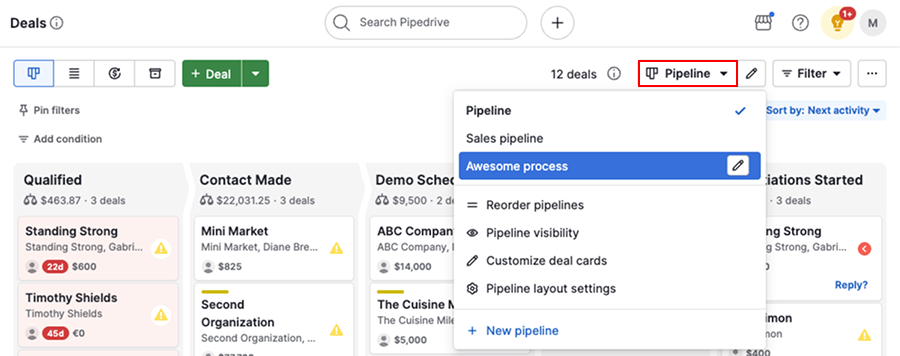
Pipedrive publishes four main tiers as of mid-2026. Here is what they mean in practice, not what the marketing copy says.
Essential ($14/seat/month annual): Pipeline views, basic deal management, 30 automation actions per account. No two-way email sync (you get one-way BCC only). No revenue forecasting. Fine for a solo founder who wants a visual upgrade from spreadsheets. I have never seen a 5+ person sales team stay here longer than 90 days.
Advanced ($29/seat/month annual): Full two-way email sync, email open and click tracking, meeting scheduling, and 3,000 automation actions per account. This is where the tool starts functioning like a real CRM. The jump from Essential is meaningful, not incremental. If you are on Essential and wondering why Pipedrive feels clunky, this is why.
Professional ($49/seat/month annual): Sales forecasting, revenue reporting, group email, e-signatures (via Smart Docs, which is still a separate add-on charge, confusingly), and 100 active automations. This is the tier Pipedrive really sells around. I set it as the minimum for any team running a structured outbound motion. Don’t start a trial on Essential and assume you’re seeing the real product.
Power ($64/seat/month annual): Adds project planning, phone support, and higher API limits. Mostly relevant for teams with complex pipelines or implementation partners who need SLA support.
Enterprise ($99/seat/month annual): Unlimited everything, dedicated CSM, SSO, and advanced security. The teams that need this already know it.
The true cost: real math for a 10-seat team
Let me run the numbers that almost no pricing post bothers to show. Assume a 10-person inside sales team on Professional, billed annually, with the two most common add-ons.
Base plan: 10 seats x $49 x 12 months = $5,880/year
LeadBooster add-on (chatbot, web forms, prospector, scheduler): $32.50/company/month = $390/year. Note this is per company, not per seat, which makes it look cheap. It is still $390 you did not budget for.
Smart Docs add-on (quotes, proposals, e-signatures): $32.50/company/month = $390/year. If you assumed e-signatures came with Professional because the feature is mentioned in Professional-tier marketing, you are not alone. It does not.
Projects add-on (if your team tracks implementation or onboarding work): $6.70/seat/month x 10 seats x 12 = $804/year.
Realistic annual total (without Projects): $5,880 + $390 + $390 = $6,660/year for 10 seats. Realistic annual total (with Projects): $6,660 + $804 = $7,464/year.
On a per-seat basis, Professional with both common add-ons is effectively $65.50/seat/month, not $49. That is a 33% gap from the hero price.
Now compare that to HubSpot Sales Hub Professional at $90/seat/month (minimum 5 seats, $5,400/year floor). The gap is smaller than it looks, and HubSpot includes its version of sequences, reporting, and deal automation without separate line items. According to G2’s CRM category benchmarks, Pipedrive consistently scores highest on ease of use and pipeline usability. But value-for-price scores have slipped as the add-on model has expanded. That tracks exactly with what I hear from teams I’ve worked with.
Which tier for which team
Which Pipedrive plan (or alternative) fits your team?
Choose Pipedrive Advanced if
- You have 1-5 reps doing mostly inbound with light email follow-up
- You do not need forecasting or group email sends
- You are coming from spreadsheets and just need a visual pipeline
Choose Pipedrive Professional if
- You run structured outbound with stages, forecasting, and automation
- You need revenue reporting your leadership will actually trust
- You are comfortable adding LeadBooster and Smart Docs as line items
Choose HubSpot Sales Hub if

- You want sequences, reporting, and deal automation in one monthly bill
- You are already using HubSpot Marketing or CMS and want a unified object model
- You have 5+ reps and can absorb the $90/seat floor
Choose Attio if
- Your RevOps team wants a fully customizable data model without Salesforce complexity
- You care more about relationship graph and enrichment than visual pipeline kanban
- You are a PLG or ops-led team that builds workflows on top of CRM data
Pipedrive pros and cons: the honest version
Beyond pricing, here is where Pipedrive genuinely wins and genuinely loses in 2026 evaluations. I’ve sat in enough tool selection calls to have a strong opinion on both.
Where Pipedrive is legitimately good: The pipeline UI is still the clearest visual deal management interface in its price tier. I say that having watched teams run on HubSpot, Close, and Salesforce side by side. Onboarding is fast, the mobile app is solid for field reps, and the Zapier and n8n integration surface is broad enough to plug into most modern stacks. For teams whose entire sales conversation revolves around “what stage is each deal in,” Pipedrive is genuinely optimized for that question. Don’t underestimate that.
Where Pipedrive falls short: Native reporting is weak for anything beyond basic pipeline metrics. If your VP of Sales wants cohort analysis, win-rate-by-rep-by-source, or revenue attribution, you are exporting to Google Sheets or buying a BI layer on top. The automation builder has improved but still lacks the conditional branching depth you get in HubSpot or even some lighter tools. And the add-on fragmentation, as the math above shows, means the “affordable CRM” reputation holds only at the lowest tiers. See also our RevOps stack cost-per-rep breakdown for how Pipedrive fits a full toolchain budget.
Close deserves a direct callout here. Close bundles a power dialer, SMS, and email sequences natively starting around $49/seat. For inside sales teams doing high-volume outbound calls, Close’s all-in model often beats Pipedrive plus a separate dialer plus a separate sequencer on both price and operational simplicity. The tradeoff is a less polished visual pipeline and fewer native integrations. For call-heavy teams, I’d run a Close trial before committing to Pipedrive.
Attio is the one I flag specifically for ops-heavy or technical buyers. The Attio data model is far more flexible than Pipedrive’s, which is still fundamentally contact-company-deal with limited object customization. If you have a RevOps team that wants to build custom objects, relationship graphs, or enrichment-driven scoring natively in the CRM, Attio competes on capability while starting cheaper than Salesforce. According to Attio’s own documentation, their workspace-level permissioning and custom attribute model are designed specifically for this use case.
What this means for your evaluation
If you are choosing Pipedrive in 2026, plan for Professional as your floor and add LeadBooster and Smart Docs to your budget immediately if you need chatbot lead capture or proposals. The tool earns its reputation on pipeline clarity and onboarding speed, and for many teams that is worth the real $65.50/seat number.
But if you need deep reporting, native sequences, or a dialer, run the total cost of Pipedrive plus the point solutions you would bolt on against HubSpot Sales Hub or Close before you sign. The sticker-price gap closes faster than you expect. I’ve seen it happen more times than I can count, usually right before a board meeting where someone is asking for headcount justification.
Sources
Frequently asked questions
How much does Pipedrive cost per user in 2026?
Pipedrive ranges from $14 per seat per month (Essential) to $99 per seat per month (Enterprise), billed annually. Most SMB teams land on Professional at $49 per seat.
What are Pipedrive's hidden fees?
The main gotchas are the LeadBooster add-on ($32.50 per company per month), Smart Docs ($32.50/month), and Projects add-on ($6.70 per seat per month), none of which are included in the base plans.
Is Pipedrive cheaper than HubSpot?
For a small team, Pipedrive base plans are cheaper than HubSpot Sales Hub. But once you add Pipedrive's required add-ons, the gap narrows significantly, especially at 10+ seats.
What are Pipedrive's main pros and cons?
Pros include the best visual pipeline UI in its price tier, fast onboarding, and solid mobile apps. Cons include weak native reporting, automations gated behind higher tiers, and a fragmented add-on model that inflates the real cost.
Who are the main Pipedrive alternatives?
The most common alternatives are HubSpot Sales Hub (more automation), Close (built-in dialer and sequences), and Attio (modern data model for ops-heavy teams).


