Why Pipedrive Teams Are Moving to Salesforce (Not Attio)
 By Ian Chamberland 12 min read
 TL;DR
Teams outgrowing Pipedrive are increasingly landing on Salesforce plus an n8n or Make automation wrapper rather than Attio, because the reporting depth and native integrations justify the complexity at scale.
On this page
The RevOps conversation about what comes after Pipedrive has been dominated by Attio for the past 18 months. But the teams I’m actually watching make the leap, the 25-to-80-rep B2B SaaS orgs with a VP of Sales who finally got budget approval, are not landing on Attio. They’re landing on Salesforce wrapped in n8n or Make. And the ROI case is cleaner than anyone in the “Salesforce is bloated” camp wants to admit.
Pipedrive is a great CRM until the moment your RevOps team needs to answer a question it was never designed to answer. Then you are in spreadsheet hell every Monday morning.
The Real Reason Teams Leave Pipedrive
It is almost never the pipeline view. Pipedrive’s kanban is genuinely good and most reps love it. The breaking point is reporting. When a VP of Sales wants weighted forecast by segment, rep, and close quarter simultaneously, Pipedrive Insights hits its ceiling fast.
I’ve watched this exact moment happen: a quarterly board prep session where the RevOps lead is copy-pasting from three different Pipedrive exports into a Google Sheet at 11pm the night before. That is the trigger.
The second trigger is enforcement. Pipedrive has required fields, but no conditional logic. You cannot say “if Stage = Proposal Sent, then POC End Date is required.” Salesforce Flows handle this natively. When a team closes $3M ARR with sloppy stage hygiene, it does not feel urgent. At $10M ARR with a board expecting forecast accuracy within 10%, it becomes a quarterly embarrassment. According to the Salesforce State of Sales report, only 28% of sales leaders say their forecast accuracy is strong, and CRM data quality is the most-cited root cause.
Why n8n or Make Changes the Salesforce Math
The classic objection to Salesforce is the admin tax. You need a certified admin, or a consultant on retainer, to do anything meaningful. That was true in 2018. It is less true now, particularly if you are willing to route your automation logic outside of Salesforce-native tools.
Here is the pattern I advocate: use Salesforce for what it does exceptionally well (data model, reporting, opportunity management, native Gong and Outreach integration) and use n8n or Make for everything operationally repetitive (lead routing, enrichment triggers, Slack alerts, sequence enrollment decisions). This is not a workaround. It is a deliberate architecture choice. Don’t bother building complex Process Builder chains inside SFDC when n8n handles the same logic in a fraction of the time with far less fragility.

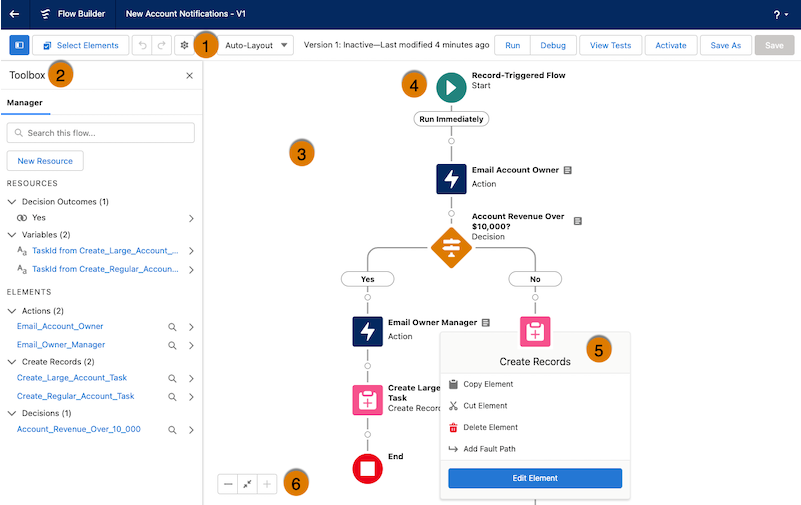
A concrete example: when a deal hits Closed Won in Salesforce, an n8n workflow fires a webhook, pulls contract value and segment from the opportunity record, posts a formatted Slack message to the #wins channel, creates a task for the CSM in Salesforce, and enrolls the contact in an onboarding sequence in Smartlead. That entire workflow took about 90 minutes to build in n8n. The equivalent Salesforce-native Flow plus Process Builder setup would take a certified admin a full day and produce something fragile.
The n8n documentation on Salesforce nodes is genuinely solid. Their SOQL query support means you can pull complex filtered record sets without writing Apex. For a RevOps operator who knows their way around a CRM data model, this is the part that makes the architecture viable.
Before You Migrate: The Prep Work That Actually Matters
Most migration guides skip straight to the import step. That is why most migrations are messy for six months afterward. Here is where I’d focus your pre-migration weeks.
Audit your Pipedrive data model first. Export every custom field, every pipeline stage name, and every automation (including Zapier workflows touching Pipedrive webhooks). Do not assume anything will transfer cleanly. Pipedrive’s deal stages are flat strings. Salesforce opportunity stages have probability percentages, forecast categories, and stage order baked in. You need a mapping document before you touch an import tool.
Pause or document every active sequence. If you are using Outreach or any sequencing tool connected to Pipedrive via Zapier, those webhooks break the moment you deprovision Pipedrive. The migration from Pipedrive post on Close covers sequence continuity in detail, and the same principles apply here. Map every active sequence touchpoint before you cut over.
Decide your Salesforce org structure before day one. Single Sales Cloud org, or Sales Cloud plus CPQ? Lead object or no lead object (yes, this is a real debate and it matters for your field mapping)? My recommendation: skip the Lead object entirely on the first build if your team has fewer than 50 reps. The added complexity rarely pays off at that scale. Get these architectural decisions documented and agreed on before you start building anything.
Export contacts, organizations, deals, activities, and notes as CSV. Run a duplicate audit (Pipedrive is notoriously lenient on duplicates). Document every custom field with its data type, because Salesforce field types are strict and mismatches cause import failures.
This is not a rename exercise. Each Salesforce stage needs a probability percentage and forecast category. Work with your VP of Sales to agree on these before the import. Wrong probability weights will corrupt your forecast from day one.
Configure your custom fields, page layouts, and required-field validation in a Salesforce sandbox first. Build at least three stage-entry Flow rules for your most commonly skipped fields. Test with dummy deals before touching production data.
Use Salesforce Data Loader or Dataloader.io for the import. Start with Accounts, then Contacts, then Opportunities, then Activities. Import in that order or your relationship lookups will fail. Do Opportunities in batches of 500 and spot-check after each batch.
Do not try to port your Zapier workflows. Rebuild them intentionally in n8n (self-hosted for cost control) or Make (managed, better for non-technical ops). Start with your three highest-volume automations: lead routing, deal stage alerts, and sequence enrollment triggers.
Keep Pipedrive read-only for two weeks after Salesforce goes live. Reps log new activity in Salesforce only. Use this window to catch anything missing from the data model or automation layer before you deprovision Pipedrive entirely.
What Breaks and How to Fix It
The Zapier-to-Pipedrive webhook problem. Every automation you built in Zapier using Pipedrive’s “New Deal” or “Deal Stage Changed” triggers dies the moment you stop using Pipedrive as your CRM. This catches teams off guard because Zapier does not warn you when a trigger becomes inactive. You discover it two weeks later when a Slack alert stops firing or a lead stops getting enrolled in a sequence. The same issue applies to any HubSpot forms integration that was writing directly to Pipedrive via Zapier.
Audit checklist before deprovisioning Pipedrive:

1. Go to Zapier > Zaps > filter by "Pipedrive" trigger
2. Export the full list (Zap name, trigger event, actions)
3. For each Zap, identify the Salesforce equivalent trigger:
   - "New Deal" -> Salesforce "New Opportunity" (Record Created)
   - "Deal Stage Changed" -> Salesforce "Opportunity Stage Updated" (Record Updated)
   - "New Activity" -> Salesforce "New Task" or "New Event"
4. Rebuild in n8n using Salesforce webhook triggers
   (Salesforce Outbound Messages or Change Data Capture)
5. Test each workflow with a live Salesforce record
   before marking the Pipedrive Zap inactive
The other thing that silently breaks: activity history. Pipedrive logs calls, emails, and notes as “Activities.” Salesforce has Tasks, Events, and a separate Email Log object. Your historical activity data will import but it will not look like it did in Pipedrive. Reps will complain. Set expectations early that activity history is available but not identical in format. It is a display issue, not a data loss issue.
Verify the Migration Worked
Before you call the migration done, run these four checks explicitly. I’ve seen teams skip this and spend weeks debugging issues that would have been caught in 20 minutes.
- Opportunity count matches: Total open deal count in Salesforce should equal Pipedrive minus any deals you intentionally excluded (spam, duplicates).
- Stage distribution looks right: If 40% of your Pipedrive deals were in “Proposal Sent,” roughly the same proportion should appear in the mapped Salesforce stage. A skewed distribution means field mapping or import errors.
- Three automations fire correctly: Trigger a new deal, advance it through two stages, and close it won. Confirm your n8n or Make workflows fire at each step and that Slack, sequencing, and task creation all behave as expected.
- Reporting baseline established: Build your first Salesforce forecast report before going live with reps. If the numbers look wrong to your VP of Sales on day one, confidence in the system evaporates fast.
Pipedrive to What, Exactly?
Choose Salesforce + n8n if

- You have 30 or more reps and need multi-dimensional forecasting
- You are running Gong, Outreach, or Salesloft and want native integration
- You have a RevOps person (even part-time) who can manage the data model
Choose Attio if

- You are a 5 to 25 person team that wants a clean UX without Salesforce complexity
- Your stack is lightweight and you do not need Gong or Outreach native integrations
- Speed of setup matters more than reporting depth right now
Choose HubSpot CRM if

- Your marketing team is already on HubSpot and you want a single platform
- You need strong contact-level engagement data baked into the CRM natively
- You want automation without learning n8n or Make first
The Bottom Line on This Migration
The Pipedrive to Salesforce path is not for every team. Under 25 reps with a lean stack? Attio or HubSpot will get you further faster with less friction. But if you are at the inflection point where forecast accuracy is a board-level conversation and stage hygiene is costing you credibility with leadership, the Salesforce plus n8n wrapper architecture is the most durable thing I’ve seen built at this scale. The migration is four to eight weeks of focused work. The reporting and enforcement capabilities on the other side are not replicable in Pipedrive at any price. The G2 Salesforce CRM category data consistently shows Salesforce leading on reporting and customization for mid-market teams, even as it lags on ease of use. That trade-off is exactly what this migration is betting on.
Sources
Frequently asked questions
How long does a Pipedrive to Salesforce migration take?
For a team of 10 to 30 reps, expect 4 to 8 weeks including data cleanup, field mapping, and retraining. Rushing the data audit phase is where most migrations break.
Is Salesforce overkill for a team under 50 people?
Not if you pair it with an automation wrapper like n8n or Make. The admin burden drops significantly when you route repetitive ops work through automation rather than Salesforce-native tools.
What does Pipedrive to Salesforce migration cost?
Budget $15,000 to $40,000 for a mid-market migration including licenses, a part-time admin or consultant, and 2 to 3 months of parallel tooling. Salesforce Sales Cloud Enterprise starts at $165 per user per month.
What breaks most often when migrating from Pipedrive to Salesforce?
Custom field naming conventions, activity log history, and any Zapier automations tied to Pipedrive webhooks. Plan to rebuild your automation layer from scratch rather than try to port it.
Why are teams picking Salesforce over Attio for post-Pipedrive growth?
Salesforce has deeper reporting, a mature ISV ecosystem, and native connections to tools like Gong and Outreach that Attio still cannot match at the enterprise tier.
Free Newsletter
Get new posts by email.
Migration guides, tool comparisons, and pricing breakdowns from real RevOps and GTM stacks, sent as they publish.
No spam. Unsubscribe anytime.
Enjoying this? Share it with your team.
Keep reading
Some links are affiliate links. Disclosure.