HubSpot Workflows vs Kit vs Make: Best Alternative 2026
 By Ian Chamberland 7 min read
 TL;DR
For most B2B teams hitting HubSpot workflow limits, Make is the escape hatch for complex logic, but Kit wins when your bottleneck is email-driven nurture, not CRM orchestration.
On this page
Most RevOps teams don’t abandon HubSpot because it stops working. They abandon it because they hit a wall: a branching condition that requires Operations Hub Pro, a multi-object sync that needs custom code, or a contact tier overage that doubles their bill for 500 extra leads. At that inflection point, the instinct is to reach for something more powerful, usually Make or a full migration. But I’ve watched teams overengineer their way into a worse problem by defaulting to Make when Kit would have shipped the workflow in two hours. This post cuts through that reflex.
What each tool is actually built for
People compare these three tools as if they occupy the same product category. They do not. HubSpot is a CRM with a workflow engine bolted on. Make is a middleware automation platform. Kit is an email-first audience platform with automation layered in. Conflating them is why I see teams either overpaying for HubSpot or building fragile Make scenarios that collapse when an API schema changes.
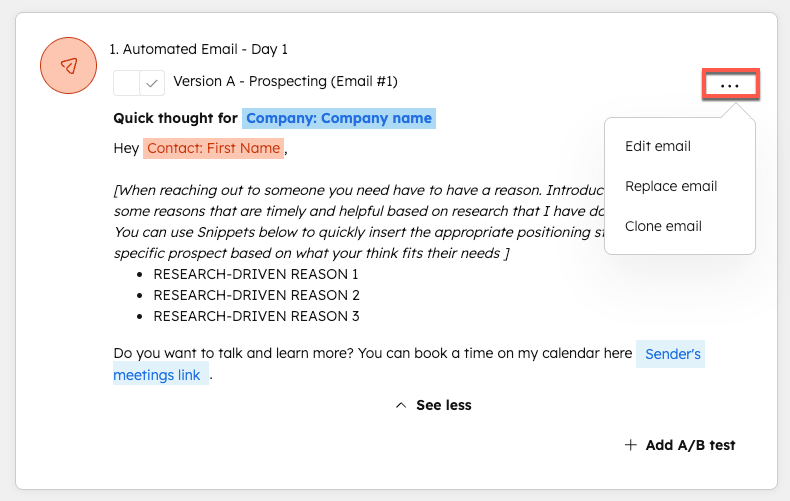
The workflow engine inside HubSpot is genuinely good for what it was designed to do: trigger on CRM events (deal stage changed, form submitted, property updated) and write back to CRM objects. That feedback loop, where automation reads from the CRM and writes to the same CRM, is where HubSpot has a durable advantage. As HubSpot’s own docs explain, workflows can enroll contacts based on any combination of contact, company, deal, or custom object properties without a third-party connector.
The problems start when you need to route data between HubSpot and four other tools in the same workflow, apply conditional logic deeper than three branches, or keep costs flat as your contact count scales. That is where Make or Kit enter legitimately.
Don’t bother trying to force HubSpot’s native workflow branching past three levels of nesting. Past that depth, the visual builder becomes unreadable, errors become hard to trace, and you’re one accidental enrollment away from spamming your entire database. Use Make for that logic instead.
Which tool fits your situation?
Choose HubSpot Workflows if

- Your automation lives inside the CRM: deal stages, contact properties, pipeline triggers
- You need native reporting on workflow performance without extra tooling
- Your team is non-technical and needs a no-code builder that sales ops can own
Choose Make if

- You need to orchestrate 4+ tools in a single automation (HubSpot, Slack, Clay, Sheets, Smartlead, etc.)
- You have a RevOps or technical ops person who can own scenario maintenance
- You are hitting per-contact pricing pain and want to pay per operation instead
Choose Kit if

- Your automation is primarily email sequences, tagging, and subscriber segmentation
- You run a content-led GTM motion (newsletter, community, product-led) not a pure sales-led CRM motion
- You want simplicity your whole team can touch without a dedicated ops owner
How to choose when you are actually at the limit
If you are hitting HubSpot workflow limits, the first diagnostic question is not “which tool should I switch to?” It is “which specific limit am I hitting?” I have seen this play out differently enough that it changes the answer completely.
If the limit is contact tier pricing (you are at 50k contacts and the next tier is a significant jump), Make does not solve that. Make is not your contact database. Kit might, if you can shift some nurture flows out of HubSpot entirely and manage a segment of your audience there. If the limit is branching complexity or custom code (you need to write JavaScript inside a workflow step), Make is the right escape hatch. Its scenario builder handles arbitrarily complex conditional logic and connects to over 1,800 native apps. If the limit is deliverability and engagement on marketing emails, that is a Kit conversation, not an ops conversation.
The pattern I run most often is Make alongside HubSpot. HubSpot stays the system of record for CRM data, Make handles the cross-system orchestration, and content-led nurture sequences run in Kit when the audience is subscriber-based rather than pure sales pipeline. As I noted in a related post on HubSpot automations costing you deals, the failure mode is usually not the tool but misaligned trigger logic. Running Make as an orchestration layer surfaces those misalignments faster because you can add logging and error handling that HubSpot’s native workflows simply don’t expose.
The contrarian case for Kit is real and I want to make it clearly. If your GTM motion is content-led (newsletter, PLG, community-driven), Kit’s automation model is fundamentally better suited than either HubSpot or Make. Kit’s sequences are built for subscriber lifecycle, not CRM pipeline. You can compare Kit against Beehiiv and Loops for revenue teams to see how the email platforms stack up when the primary channel is owned audience rather than outbound.
The decision that matters more than the tool
Choosing between HubSpot workflows, Make, and Kit is ultimately a question about where your automation complexity lives and who owns maintaining it. HubSpot wins when you want automation embedded in the CRM with native reporting and low maintenance overhead, and you can afford the tier. Make wins when your stack has grown beyond what a single platform can orchestrate and you have someone technical to own scenario hygiene. Kit wins when email is your primary GTM channel and simplicity is a feature, not a compromise.
None of these are permanent decisions. I have run all three in the same stack at the same time without it being a mess, because each was doing the job it was built for. The teams that struggle are the ones trying to make one tool do all three jobs.
Sources
Frequently asked questions
What are the main limits of HubSpot workflows?
HubSpot caps workflow actions, restricts branching depth on lower tiers, and charges significantly more per additional contact tier. Complex multi-object logic also requires Operations Hub Pro at $800/month or more.
Is Make a good HubSpot workflows alternative?
Yes, Make handles complex branching, multi-app orchestration, and data transformation that HubSpot workflows cannot do natively, at a fraction of the cost for operation-heavy automations.
When should I use Kit instead of HubSpot for automation?
Kit makes sense when your automation is primarily email-driven nurture sequences and tagging, your team lacks technical ops capacity, and you do not need deep CRM object writes.
Can Make replace HubSpot workflows entirely?
Rarely. Make is best as a layer on top of or beside HubSpot, not a full replacement. It does not store contact records or manage deals natively.
What does HubSpot Operations Hub Pro cost in 2026?
Operations Hub Pro runs $800 per month, which is the tier most teams need to unlock custom coded actions and advanced workflow branching in HubSpot.
Free Newsletter
Get new posts by email.
Migration guides, tool comparisons, and pricing breakdowns from real RevOps and GTM stacks, sent as they publish.
No spam. Unsubscribe anytime.
Enjoying this? Share it with your team.
Keep reading

Some links are affiliate links. Disclosure.