GuidesEnrichment
Does Surfe Use Waterfall Enrichment? How It Actually Works
Surfe does use waterfall enrichment across multiple data providers. Here is how its multi-provider coverage compares to FullEnrich, BetterContact, and LeadMagic.

The tools compared
Entry prices from the pricing index, read Aug 12, 2026
Some links on this page are affiliate links. If you buy through them we may earn a commission at no cost to you; it never changes a verdict. How we make money
The short answer
Yes, Surfe uses waterfall enrichment by querying multiple data providers in sequence until it finds a verified email or phone number, similar to dedicated tools like FullEnrich and BetterContact.
The question comes up constantly in RevOps Slack channels: does Surfe actually run waterfall enrichment, or is it pulling from one data source behind a polished LinkedIn overlay? The answer matters. Single-source enrichment tools routinely miss 40-60% of contacts, and if you are building outbound infrastructure you need to know whether Surfe closes that gap or just makes the miss look cleaner.
What waterfall enrichment actually means (and how Surfe implements it)
Waterfall enrichment is not a feature, it is an architectural decision. Tools that do it well silently query provider two when provider one comes back empty, cascading until a verified result appears or the list is exhausted.
Surfe started as a LinkedIn-to-CRM sync tool and layered enrichment on top. Per Surfe’s documentation on contact enrichment, the platform queries multiple underlying data sources when you hit “enrich” on a LinkedIn profile. You do not pick the providers. You do not see the cascade. You get a result (or you do not), and Surfe handles the orchestration behind the interface.
That is genuinely a waterfall pattern. What it is not is a configurable waterfall. If provider A has stale data that still passes a format check, there is no way to tell Surfe to prefer provider B for European contacts or to deprioritize a source known for role-based addresses. Transparency is the trade-off you make for the simplicity of a browser extension. I’d argue most SDR teams never notice this gap until they try to debug a high bounce rate, at which point the opacity becomes a real problem.
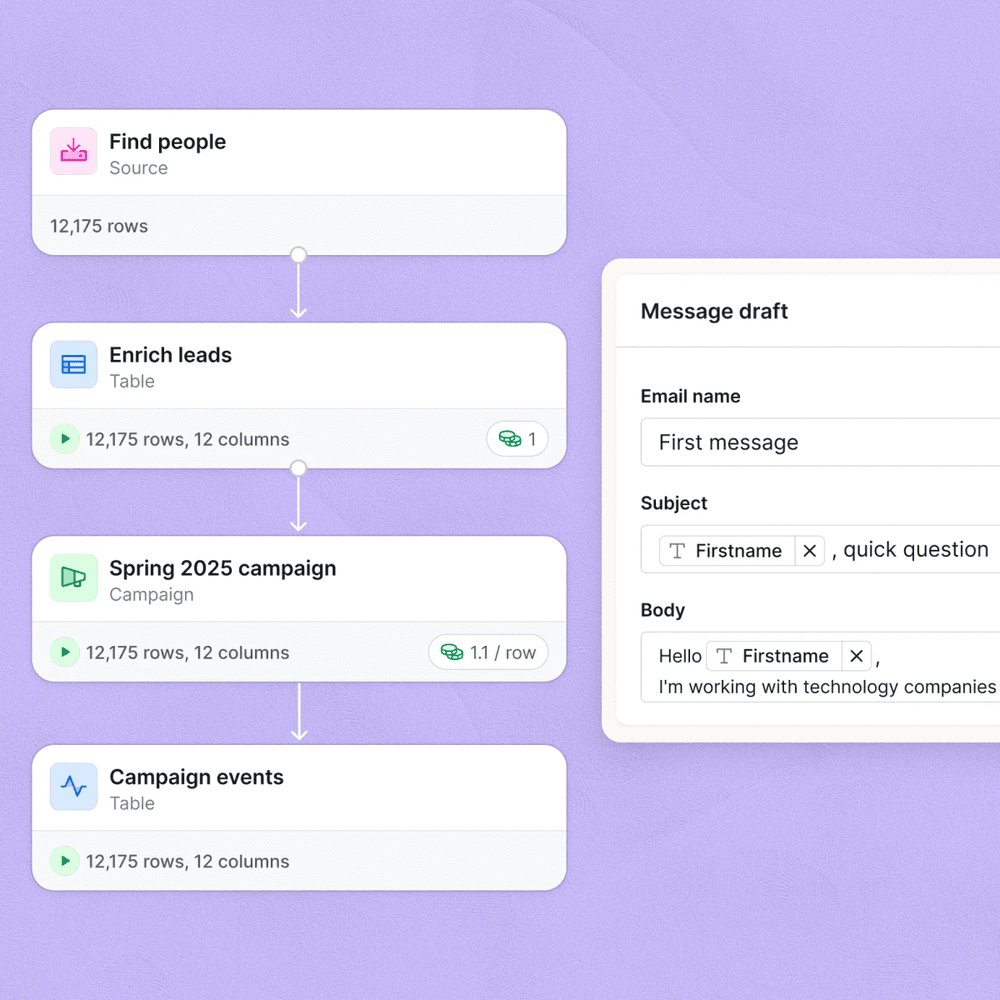
The Clay enrichment table screenshot below shows what a transparent waterfall looks like when you can see each provider column and which one fired a result. Surfe achieves a similar outcome but hides the plumbing.
How the major waterfall enrichment tools actually compare
My read is that the market has split into three archetypes: embedded enrichment (Surfe), dedicated waterfall (FullEnrich, BetterContact), and lightweight single-source (LeadMagic). Each fits a different operator maturity level. Don’t bother trying to force a dedicated waterfall tool on an SDR team that lives in LinkedIn, and don’t expect Surfe to substitute for a proper bulk enrichment pipeline before a sequence load.
Waterfall Enrichment Tool Breakdown

Surfe Top pick
Surfe's strength is the workflow: you are already on a LinkedIn profile, you click enrich, and the contact lands in your CRM with a verified email attached. The waterfall runs in the background across multiple providers, which lifts match rates meaningfully above single-source tools. The limitation is opacity. You cannot audit which provider fired, cannot weight providers by geography or persona, and cannot replay the cascade with different settings. For SDR teams who want enrichment to disappear into the workflow, that opacity is a feature. For RevOps operators who need to debug why 30% of a list came back empty, it is a real gap.
Highlights
- Multi-provider waterfall abstracted inside a LinkedIn Chrome extension
- Direct CRM sync to HubSpot, Salesforce, Pipedrive, and others
- Strong for individual contact enrichment; less suited for bulk list enrichment
- No provider-level transparency or configurability

FullEnrich
FullEnrich is purpose-built for the waterfall pattern. You can see exactly which providers are in the cascade, set fallback order, and review which source returned each result. It integrates via API and CSV, making it the right choice for bulk enrichment of lists before they hit sequences. The trade-off is that it is a standalone tool, not embedded in LinkedIn, so it adds a step to the SDR workflow rather than removing one.
Highlights
- Full visibility into which provider returned each result
- API-first for bulk enrichment pipelines
- Supports email and mobile phone waterfall separately
- Pairs well with Clay for orchestrated enrichment workflows

BetterContact
BetterContact positions on mobile phone enrichment depth, which is the hardest data type to source. It runs a waterfall specifically optimized for phone numbers, layering providers that most tools do not include. For teams running cold calling sequences, the coverage delta on mobiles is significant. Email coverage is solid but not materially different from FullEnrich. The UX is simpler than Clay-based workflows but more operator-facing than Surfe.
Highlights
- Mobile phone waterfall is the core differentiator
- Deeper phone provider coverage than most email-first tools
- CSV and API integrations for bulk workflows
- Less LinkedIn-native than Surfe

LeadMagic
LeadMagic is not a true waterfall tool. It queries its own data network and returns a result or does not. The advantage is pricing: pay-per-enrichment with no seat fees makes it accessible for low-volume workflows or one-off list enrichment. Match rates are lower than a cascading multi-provider setup, but for teams that do not need scale, the cost profile is hard to argue with. I'd not build a high-volume outbound program on LeadMagic alone. Use it as one node inside a Clay waterfall and it earns its spot.
Highlights
- Pay-per-use pricing with no monthly seat minimum
- Single-source enrichment, not a true waterfall
- Good for ad-hoc list enrichment or low-volume teams
- Integrates with Clay as one node in a broader waterfall
Which tool belongs in your stack
The honest answer is that for most outbound-focused RevOps teams, Surfe and a dedicated waterfall tool are not either/or. They solve adjacent problems.
Which enrichment approach fits your workflow?
Choose Surfe if
- Your SDRs source contacts directly from LinkedIn and want enrichment in the same motion
- You want CRM sync to happen at point-of-contact, not in a separate enrichment step
- You are comfortable trusting the provider waterfall without auditing which source fired
Choose FullEnrich if
- You are enriching bulk lists of 1,000 or more contacts before loading them into sequences
- You need to audit which provider returned each result for data quality reporting
- You are building an automated enrichment pipeline via API or Clay
Choose BetterContact if
- Mobile phone numbers are the primary data type you are trying to source
- Your team runs cold calling sequences and email-first tools are leaving coverage gaps
- You want a dedicated phone waterfall without building a custom Clay workflow
Choose LeadMagic if
- You enrich low volumes of contacts and cannot justify a monthly seat fee
- You want to use it as one node inside a Clay waterfall, not as a standalone system
- Match rate matters less than cost per enrichment for your current scale
The stack pattern worth recommending
The usual failure here is treating enrichment as a single-tool decision. Teams that consistently hit low bounce rates and high connect rates tend to run a two-stage pattern: Surfe handles LinkedIn-native enrichment for contacts sourced by reps in real time, and a bulk waterfall tool (FullEnrich or Clay) handles list enrichment before contacts enter sequences in tools like Smartlead or Outreach.
This matters because the findymail review we published makes the same point from the email-finder angle: no single-source tool covers the full market. The G2 category data for email enrichment consistently shows that match rates vary significantly by industry vertical and geography, which is exactly why the waterfall architecture exists in the first place.
For operators building on Pipedrive or HubSpot, Surfe is worth evaluating as the CRM sync layer because it eliminates manual contact creation. The enrichment waterfall is a bonus, not the primary use case. If you are specifically trying to maximize email and phone match rates on bulk lists, route those lists through FullEnrich or BetterContact before they touch your sequences. The two workflows complement each other rather than compete.
Per Surfe’s own help documentation, the enrichment feature is designed primarily to complete contact records as reps browse LinkedIn. That means it is optimized for coverage-per-click, not throughput. That framing tells you exactly where it fits.
The bottom line on Surfe’s enrichment architecture
Surfe does use waterfall enrichment and the multi-provider coverage is real. But it is a consumer-grade waterfall, not an operator-grade one. For teams whose primary workflow is LinkedIn prospecting with CRM sync, that is exactly the right trade-off. For teams building enrichment pipelines that need auditability, configurability, and bulk throughput, Surfe is the front-end of the stack, not the whole thing.
Sources
Frequently asked questions
Does Surfe use waterfall enrichment across multiple data providers?
Yes. Surfe runs enrichment requests across a cascade of data providers in sequence, stopping when it finds a verified result. This is the same waterfall pattern used by dedicated enrichment tools.
How many data providers does Surfe use for enrichment?
Surfe aggregates data from multiple third-party providers, though the exact vendor list is not fully disclosed. The practical effect is higher email and phone coverage than any single-source provider.
How does Surfe waterfall enrichment compare to FullEnrich?
FullEnrich is a dedicated waterfall enrichment tool that lets you see and configure which providers run in which order. Surfe abstracts that away inside its LinkedIn sidebar, which is simpler but less transparent.
What is waterfall enrichment and why does it matter for outbound?
Waterfall enrichment queries multiple data providers in sequence until one returns a verified result, increasing overall match rates compared to relying on a single source.
Can I use Surfe and a dedicated waterfall enrichment tool together?
Yes. A common pattern is using Surfe for point-of-contact LinkedIn enrichment and routing contacts to Clay or FullEnrich for deeper waterfall enrichment before they enter a sequence.