GuidesCold Email
Instantly to Pipedrive via n8n: Auto-Create Deals from Replies
Build an n8n workflow that watches Instantly for positive replies and auto-creates Pipedrive deals. Step-by-step recipe for RevOps operators.

The tools compared
Entry prices from the pricing index, read Aug 12, 2026
Some links on this page are affiliate links. If you buy through them we may earn a commission at no cost to you; it never changes a verdict. How we make money
The short answer
Use an n8n webhook workflow to poll Instantly for positive replies and automatically create or update deals in Pipedrive, eliminating the manual step between cold email and CRM.
Every RevOps team I work with hits the same dead zone. A rep gets a positive reply in Instantly, manually pastes the prospect into Pipedrive, and burns 20 to 40 minutes a day on data entry that a machine should handle in seconds. Worse, deals get created two days late or skipped entirely when that rep is on the road. This post is a concrete n8n workflow recipe that closes that gap, built specifically for teams running Instantly as their cold email engine and Pipedrive as their pipeline CRM.
Why This Gap Exists (and Why It Costs You Real Pipeline)
Instantly is purpose-built for cold outreach at volume. Pipedrive is purpose-built for pipeline management. Neither has a strong incentive to build a deep native integration with the other, so the handoff lands on your team. Most operators paper over it with a manual process, or worse, a one-size-fits-all Zapier zap that fires on every reply and floods Pipedrive with out-of-office messages and unsubscribes.
The smarter path is a filtered n8n workflow. n8n’s self-hosted architecture means your API keys stay on your infrastructure, the workflow logic is yours to version-control, and you are not paying per-task fees the moment volume picks up.
Setting Up the Workflow
Before you touch n8n, get two things ready: your Instantly API key (Settings > Integrations > API inside your Instantly workspace) and a Pipedrive API token (Settings > Personal Preferences > API). Store both in n8n’s built-in Credentials vault. Do not hardcode them in node parameters.
The workflow has four nodes. A Schedule Trigger, an HTTP Request node calling Instantly, an IF node filtering for positive replies, and a Pipedrive node creating the deal. That’s it. Four nodes, zero custom code required for the base version. Don’t let anyone talk you into starting with a more elaborate build.
Set the interval to every 10 minutes. In the trigger options, enable 'Activate Immediately on Save' so you do not wait for the first cron tick during testing. This becomes your polling heartbeat for the Instantly API.
Method: GET. URL: https://api.instantly.ai/api/v1/emails/list. Pass your API key as a query parameter named 'api_key'. Set the 'reply_category' filter to 'interested' (Instantly's label for positive replies). Add a 'since_timestamp' parameter dynamically using n8n's built-in date functions to fetch only new replies since the last poll.
Even with the 'interested' filter, check that the reply body does not contain strings like 'unsubscribe', 'wrong person', or 'not interested'. Instantly's AI categorization is good but not perfect. Route clean replies to the right branch, and send everything else to a Slack notification node for human triage.
Use the Pipedrive 'Search Persons' node to look up the prospect's email. If a contact already exists, grab their person_id and skip creation. This deduplication step is the one most tutorials skip, and it is why teams end up with 3x duplicate contacts in Pipedrive by week two.
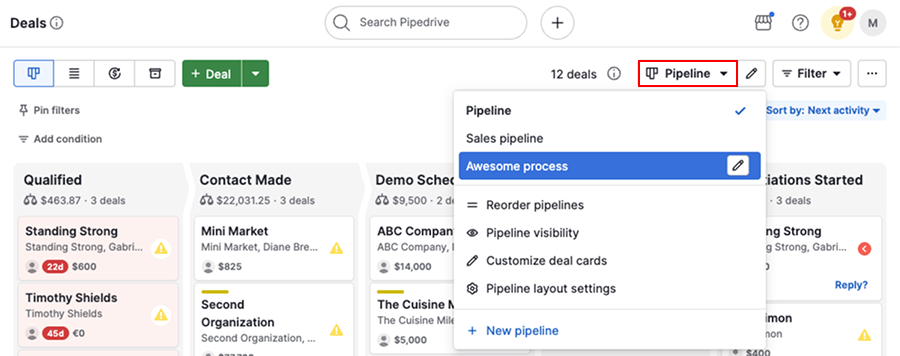
If no existing contact was found, first create a Person node using the email, first name, and company pulled from the Instantly reply payload. Then create a Deal node, linking the person_id, setting the pipeline and stage to your 'New Inbound Reply' stage, and mapping the Instantly campaign name to a custom Pipedrive field so reps know the outreach context.

The Timestamp Problem (and How to Solve It)
The trickiest part of the whole workflow is the since_timestamp parameter. Miscalculate it and you either miss replies or flood Pipedrive with duplicates from re-fetched history. This exact issue can take down an otherwise solid build, even for a team that has been running sequences happily for months.
The trap: n8n’s Schedule Trigger does not natively persist “last run time” between executions. If you use {{ $now }} directly as your timestamp, every poll fetches from the current moment with zero lookback and you miss every reply. Set a static lookback like “last 24 hours” instead, and you will re-process the same replies on every poll cycle, creating duplicate deals faster than your deduplication node can catch them.
// In an n8n Code node before the HTTP Request:
// Store last-run time in a static data variable
const workflowStaticData = $getWorkflowStaticData('global');

const lastRun = workflowStaticData.lastRunTimestamp
  || new Date(Date.now() - 10 * 60 * 1000).toISOString();

// Update for next execution
workflowStaticData.lastRunTimestamp = new Date().toISOString();

return [{ json: { since: lastRun } }];
This pattern uses n8n’s $getWorkflowStaticData('global') to persist the last successful run timestamp across executions. It is the correct solution, and it is buried in n8n’s static data docs rather than anywhere obvious in the UI. I’ve spent more time explaining this single concept to teams than any other part of the build combined.
Mapping the Instantly Payload to Pipedrive Fields
The Instantly reply payload gives you from_email, from_name, timestamp, campaign_name, reply_body, and lead_email. Here is exactly how I map those to Pipedrive:
lead_emailmaps to Pipedrive Person emailfrom_nameparsed as first/last maps to Person name (split on the first space)campaign_namemaps to a custom Pipedrive Deal field called “Source Campaign”reply_body(first 500 characters) maps to the Deal description or a linked Note- A static value “Cold Reply” maps to a custom Deal label for pipeline filtering
The campaign name mapping is the one most people skip, and it’s the most operationally valuable. Reps can see exactly which sequence generated the reply. You can build Pipedrive reports that show pipeline contribution by Instantly campaign. That data starts justifying or killing campaigns within 60 days.
Which Teams Should Use This Stack
Who this Instantly + Pipedrive + n8n stack fits
Choose Instantly + Pipedrive + n8n if

- You send 500+ cold emails per month and reps are missing replies in their inbox
- Your CRM is Pipedrive and you do not want to migrate to HubSpot just to get automation
- You want self-hosted control over API keys and workflow logic without per-task fees
Choose Instantly + HubSpot + n8n if

- You are already on HubSpot and want to pull cold replies into existing contact records
- You need marketing attribution and lifecycle stage updates alongside deal creation
- Your team uses HubSpot sequences for warm follow-up after the cold reply converts
Choose Instantly + Zapier (no-code) if

- Your cold email volume is under 200 replies per month and per-task pricing is acceptable
- You need the workflow live in 30 minutes without touching code or hosting
- You are comfortable with Zapier's Instantly trigger (basic reply detection, no sentiment filter)
One Integration Recipe, Compounding Returns
This workflow is a foundation, not a ceiling. Once deals are flowing into Pipedrive automatically, you can layer in enrichment (pull company data via Clay before deal creation), routing logic (assign deals to different owners by campaign or territory), or a Slack notification so reps get a ping the moment a warm reply lands. The cold email to CRM handoff also connects directly to how deliverability affects reply rates, because a workflow that fires on 50 replies a day will fire on 12 if your domain health deteriorates.
Build the four-node version first. Verify it runs cleanly for a full week before extending it. Every team I’ve set this up for asks the same question around day ten: “Why didn’t we do this six months ago?”
Sources
Frequently asked questions
Does Instantly have a native Pipedrive integration?
No. As of mid-2026, Instantly does not offer a direct Pipedrive integration. You need a middleware layer like n8n, Zapier, or Make to bridge the two.
What triggers the n8n workflow for Instantly replies?
You set up a scheduled polling node in n8n that calls the Instantly API to fetch new reply events, then filters by reply sentiment or category before writing to Pipedrive.
Can n8n deduplicate leads before creating Pipedrive deals?
Yes. Add a Search Contacts node in n8n before the Create Deal step. If a Pipedrive contact already exists, update the deal instead of creating a duplicate.
How often should I poll the Instantly API in n8n?
Every 5 to 15 minutes is a reasonable cadence for most cold email volumes. Polling more frequently than every 2 minutes risks hitting Instantly API rate limits.
Is this workflow safe to run across multiple Instantly workspaces?
Yes, but you will need separate n8n workflow instances or a workspace-routing branch for each Instantly workspace, since API keys are scoped per workspace.