GuidesCold Email
Lemlist Integrations Guide: Every Connection Worth Setting Up
The complete guide to Lemlist integrations: native connectors, Clay enrichment flows, HubSpot sync, and n8n automation builds worth your time in 2026.

The tools compared
Entry prices from the pricing index, read Aug 12, 2026
Some links on this page are affiliate links. If you buy through them we may earn a commission at no cost to you; it never changes a verdict. How we make money
The short answer
Lemlist integrates natively with HubSpot, Salesforce, and Pipedrive, and connects to Clay, n8n, and Zapier for enrichment and sequencing workflows that cover most outbound stacks.
Most outbound teams use Lemlist as a sequencing layer, not a standalone tool. The question is never “does Lemlist integrate with X?” (it usually does) but “which integration is actually worth the setup time, and what breaks when you scale?” This guide maps every integration tier worth your attention: native CRM connectors, enrichment pipelines with Clay, automation via n8n and Zapier, and the less-obvious triggers and webhooks that make Lemlist composable inside a real GTM stack.
What You Are Actually Wiring Together
Lemlist sits at the execution layer of an outbound stack. It sends the emails, tracks the opens and clicks, handles the personalization variables, and surfaces the replies. Every integration it needs is either feeding it leads (enrichment tools, CRMs, data providers) or consuming its output (CRM activity logging, Slack alerts, pipeline triggers, reporting).
Before you wire anything, map which direction the data flows. The usual pattern: a data source (Apollo, Clay, a CRM list) exports leads into Lemlist. Lemlist runs the sequence. On a reply or a click trigger, Lemlist pushes an event back to your CRM or a Slack channel, and a rep takes over. Most teams get the “in” side right and completely neglect the “out” side.
The Native CRM Integrations
These are the integrations I’d set up before anything else. Supported, documented, and no middleware required.
HubSpot is Lemlist’s tightest CRM connection. The native integration supports two-way contact sync, campaign enrollment from HubSpot workflows, and activity logging (emails sent, opens, clicks, replies) back to the HubSpot contact timeline. You can trigger a Lemlist campaign from a HubSpot workflow enrollment, which means lifecycle stage changes can kick off outbound sequences without a human clicking anything. For RevOps teams already invested in HubSpot, this is the connection that makes Lemlist feel native rather than bolted on. Per the Lemlist HubSpot integration docs, you authenticate via OAuth and map contact properties on first setup.
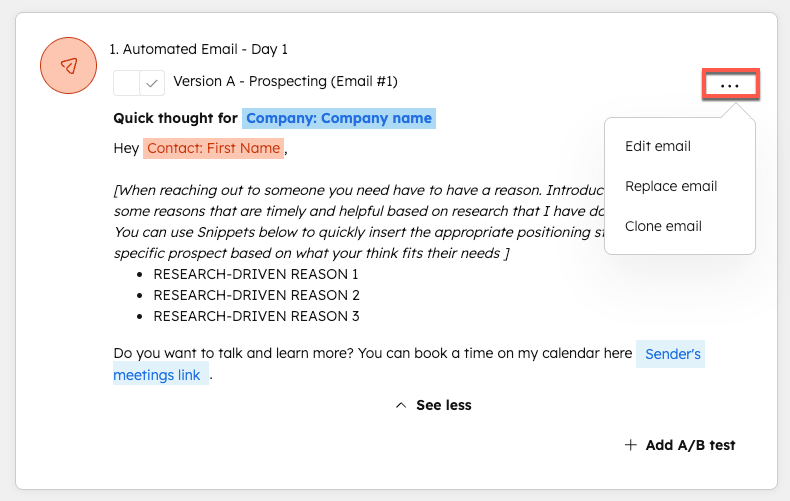
Salesforce covers enterprise accounts. Lemlist’s Salesforce connector syncs leads and contacts, logs campaign activity to the activity timeline, and supports field mapping for custom objects. The typical failure here is field mapping drift: Salesforce admins change custom fields and the Lemlist sync silently drops data. The first thing I’d check after any Salesforce schema change is whether the field mappings in Lemlist still resolve correctly. Don’t wait for a rep to notice empty fields in their activity log.
Pipedrive is the lightest of the three. Pipedrive native sync covers contact import and basic activity logging. If your team needs more sophisticated two-way sync (deal stage updates triggering Lemlist campaigns, for example), you will need an n8n or Zapier layer on top of the native connector. The native Pipedrive integration alone won’t get you there.
The Clay-to-Lemlist Pipeline
I’d prioritize this one if you are doing any ICP-targeted outbound at any real volume. Clay handles waterfall enrichment, pulling from Clearbit, Apollo, LinkedIn, and a dozen other sources, and personalizes rows at scale using AI columns. Lemlist is where those enriched, personalized rows become sequences.
The handoff works two ways:
-
CSV export from Clay to Lemlist: Clay exports a CSV with all your enrichment columns. Lemlist imports it directly and maps columns to campaign variables. Simple, no middleware needed, but manual per batch.
-
Clay HTTP action to Lemlist API: Clay’s HTTP request action can POST directly to the Lemlist API endpoint to add a lead to a campaign in real time. This makes the workflow fully automated: a new row passes through Clay’s enrichment waterfall, gets personalized, passes an ICP filter, and lands in Lemlist without a human touching it.
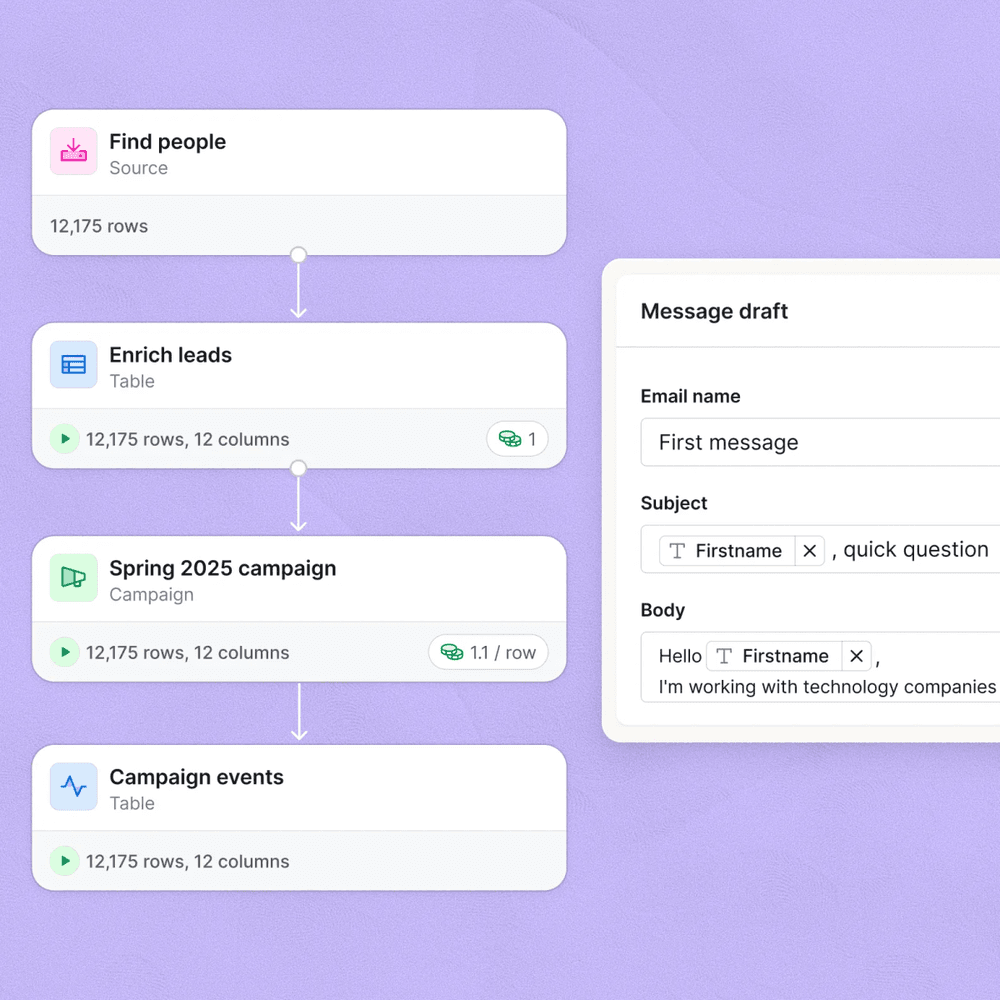
The gotcha: Lemlist variable names are case-sensitive and must match the column header exactly as exported from Clay. A column named firstName in Clay paired with a variable called first_name in Lemlist silently fails, and your emails go out with empty personalization fields. Always do a test import with 5 rows before running a full batch. Every time.
Clay column name   → Lemlist variable
─────────────────────────────────────
firstName          → {{firstName}}
companyName        → {{companyName}}
icebreaker         → {{icebreaker}}
linkedinUrl        → {{linkedinUrl}}

POST /api/v1/campaigns/{campaignId}/leads
Body: {
  "email": "{{email}}",
  "firstName": "{{firstName}}",
  "companyName": "{{companyName}}"
}
Automation Layer: n8n vs. Zapier
For anything beyond the native connectors, you need a middleware layer. The two main options are n8n and Zapier. My read: Zapier is fine for low-volume, non-technical teams who need something running this afternoon. For anyone sending serious volume, n8n wins on economics alone.
Which automation layer for Lemlist?
Choose n8n if

- You send more than 2,000 emails a month and Zapier task costs are adding up
- You want a native Lemlist node with no per-task pricing on self-hosted
- You need multi-step logic (enrichment, ICP branch, CRM write, Slack alert) in a single workflow
Choose Zapier if

- Your team is non-technical and needs a no-code interface with a short setup time
- You need to connect Lemlist to a tool n8n does not have a native node for
- Volume is low enough that per-task costs do not matter (under 500 tasks/month)
The n8n Lemlist node exposes campaign triggers, lead management actions, and webhook-based reply routing. You can build a workflow that listens for a Lemlist “reply” event, looks up the contact in HubSpot, creates a deal, and posts to a #hot-replies Slack channel, all without writing a line of custom code.
One pattern worth understanding: as detailed in our n8n integration guide, the most reliable automation builds use webhooks as the trigger rather than polling. Lemlist supports outbound webhooks for all six key events. Register your n8n webhook URL in Lemlist’s integration settings and your workflows fire in real time, not on a polling delay that costs you response speed.

The Integrations Most Teams Skip
The enrichment and CRM connections get all the attention. The high-value gaps are almost always on the output side. This is where I’d focus if you’re inheriting a Lemlist setup that’s already been running for a while.
Unsubscribe sync: When a lead unsubscribes in Lemlist, that status needs to propagate back to your CRM and to any other sequencing tools immediately. Teams that skip this re-enroll unsubscribers inside HubSpot workflows because HubSpot doesn’t know Lemlist flagged them. The fix is a Lemlist “unsubscribe” webhook that writes a suppression property to the HubSpot contact record. Takes an hour to build. Saves weeks of list cleanup.
Reply routing by sentiment: Lemlist’s native reply detection classifies replies as positive, negative, and neutral (per the Lemlist AI features documentation). You can route those signals differently: positive replies create a deal in your CRM, negative replies suppress the contact from future campaigns, neutral replies go to a human review queue. Most teams treat all replies identically, which means reps wade through out-of-office responses and miss the actual interested ones.
Lead verification before import: Running cold lists into Lemlist without bounce verification is the fastest way to damage your sending domain. Tools like Bouncer or ZeroBounce should sit in the pipeline between Clay (or any list source) and Lemlist import. The Lemlist sending best practices doc recommends keeping bounce rate under 3%. Skipping verification makes that target nearly impossible on cold lists.
Apollo as a lead source: If your team uses Apollo for prospecting, Apollo has a native Lemlist push in its sequence settings. You can push contacts from an Apollo search directly into a Lemlist campaign, cutting out the CSV export step entirely. Most Apollo users don’t know this exists.
Building a Full Outbound Stack Around Lemlist
If you are wiring Lemlist into a full GTM stack from scratch, here is the integration order I’d follow:
Set up the native HubSpot, Salesforce, or Pipedrive integration before anything else. Map your fields, verify the activity log is populating correctly, and confirm that suppression lists (unsubscribes, do-not-contact) sync both ways. Everything else depends on this being solid.
Connect your enrichment layer to Lemlist. For Clay, test the HTTP action to the Lemlist API with a 5-row sample before automating. For Apollo, use the native push to campaign feature. Confirm merge variables populate correctly in a test send before touching real volume.
In Lemlist's integration settings, add your n8n webhook URL for the 'replied' event at minimum. Build the n8n workflow that handles reply routing: CRM deal creation, Slack alert to the rep, suppression tag for negative replies.
Wire up the 'unsubscribe' and 'bounced' webhooks to write suppression properties back to your CRM. This prevents re-enrollment loops and protects your sender reputation. It's unglamorous plumbing, but skipping it causes real problems within the first month.
Run a 50-lead pilot campaign end to end before scaling. Check that HubSpot contact timelines show Lemlist activity, that replied contacts trigger your n8n workflow, and that unsubscribes appear in your CRM suppression list within minutes of firing.
The best cold email stacks, as I outlined in the best cold email stack under $300 guide, treat Lemlist as one composable node rather than the center of gravity. When your enrichment, verification, CRM sync, and reply routing are all wired correctly, Lemlist becomes a reliable execution layer instead of a manual campaign manager.
The Integration Stack That Actually Ships Revenue
Lemlist’s integration surface is broad enough to cover almost any outbound stack. The native CRM connectors handle the foundational sync. Clay covers the enrichment and personalization pipeline. n8n handles event routing at scale without ballooning your Zapier bill. The gaps most teams leave open are on the reply and suppression side, and those gaps are where deals slip and sender reputation erodes.
My recommendation: wire the HubSpot (or Salesforce) native connector first, add a Clay-to-Lemlist API push for your enrichment layer, and register n8n webhooks for reply and unsubscribe events before you run your first campaign at real volume. The setup takes a day. The alternative is cleaning up data hygiene debt for months.
Sources
Frequently asked questions
Does Lemlist have a native HubSpot integration?
Yes. Lemlist offers a native HubSpot integration that syncs contacts, campaign activity, and reply data bidirectionally. You can trigger sequences from HubSpot workflows and push engagement back as contact properties.
Can you connect Lemlist to Clay?
Yes. Clay exports enriched leads as CSVs or pushes them to Lemlist via the Lemlist API. Many teams use Clay to waterfall-enrich leads and then pipe the verified, personalized rows directly into a Lemlist campaign.
Does Lemlist have a Zapier integration?
Yes. Lemlist has a Zapier integration that exposes triggers like lead replied and lead unsubscribed, plus actions like adding a lead to a campaign. It covers basic handoffs but has rate limits at volume.
Can n8n automate Lemlist workflows?
Yes. n8n has a native Lemlist node that lets you trigger on campaign events, add leads, and route replies to Slack or your CRM, all without Zapier middleman costs.
What CRMs does Lemlist integrate with natively?
Lemlist integrates natively with HubSpot, Salesforce, and Pipedrive. All three support two-way contact sync and activity logging.