GuidesClay
Connect Clay to n8n for a Fully Automated Enrichment Pipeline
Step-by-step guide to building a Clay and n8n enrichment pipeline that routes enriched leads to Smartlead and HubSpot automatically. No manual exports.

The tools compared
Entry prices from the pricing index, read Aug 12, 2026
Some links on this page are affiliate links. If you buy through them we may earn a commission at no cost to you; it never changes a verdict. How we make money
The short answer
Use n8n webhooks to trigger Clay table runs, then route enriched lead data into Smartlead sequences and HubSpot contacts without touching a CSV.
Most enrichment pipelines I see at B2B SaaS companies share the same failure mode: someone pulls a CSV out of Clay, massages it in a spreadsheet, manually imports it into Smartlead, and then remembers to update HubSpot three days later (if at all). The data is already stale. The sequence timing is off. The CRM is out of sync. Connecting Clay to n8n eliminates every one of those manual steps and gives you a real-time enrichment loop you can actually trust.
What This Pipeline Does and Why It Matters
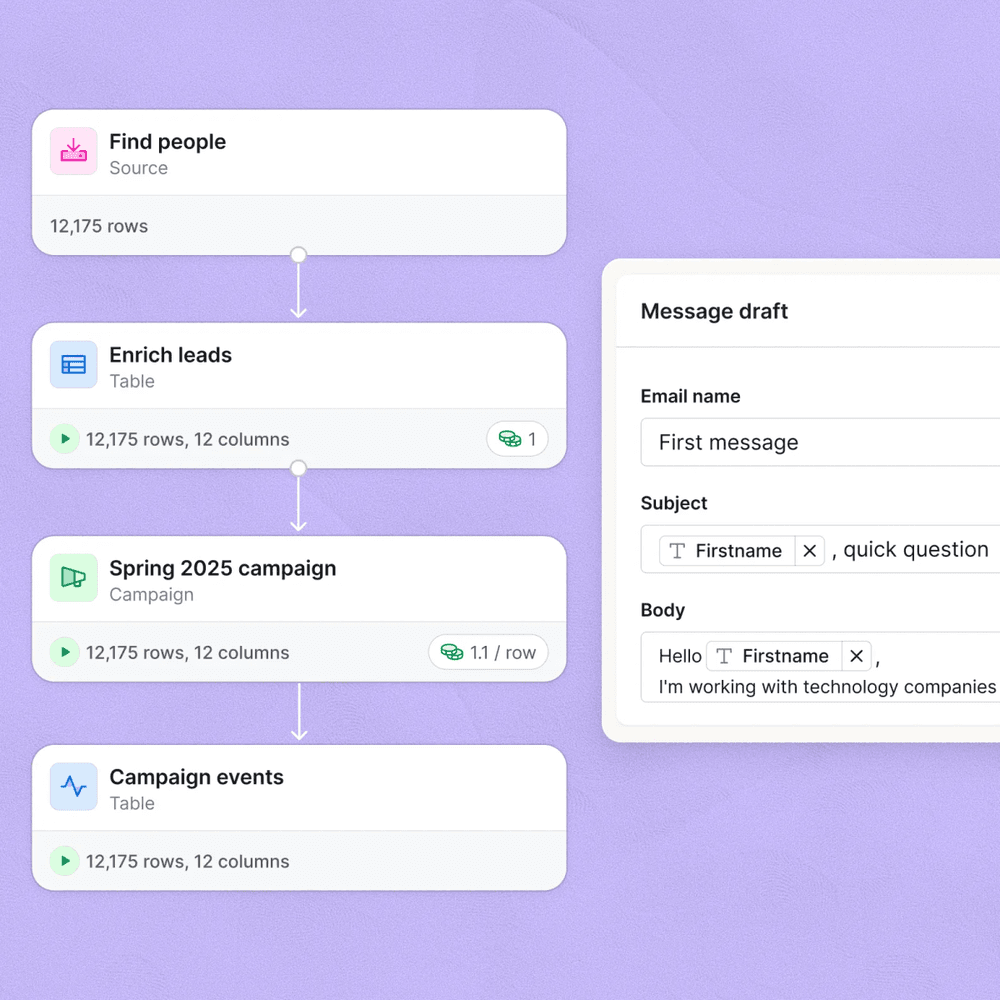
The workflow I’m walking you through is designed for teams running outbound at scale: 500 to 5,000 new leads per week. The core idea is simple. A new lead lands in Clay (sourced from LinkedIn, a form submission, a ZoomInfo export, whatever your top-of-funnel looks like). Clay runs its waterfall enrichment: job title verification, email finding, company firmographics, maybe an AI persona column. When that row is complete, Clay fires a webhook to n8n. n8n evaluates the lead against your ICP criteria, branches accordingly, pushes qualified leads into Smartlead sequences, and creates or updates the contact in HubSpot.
No CSV exports. No manual imports. No three-day lag.
The reason n8n wins as the glue layer here (instead of Make, which I covered in a separate post) is the HTTP Request node flexibility and the self-hosted option. When you’re pushing 10,000 rows a week through enrichment and you want full control over execution logs, retry logic, and data residency, n8n’s self-hosted tier is the only serious answer. n8n’s webhook documentation shows just how much control you get over payload parsing.
The Step-by-Step Build
In n8n, create a new workflow and add a Webhook node as the trigger. Set the HTTP method to POST and copy the webhook URL (it will look like your-n8n-domain/webhook/clay-enrichment). In the options, enable 'Respond immediately' so Clay doesn't timeout waiting for a sync response. Save the webhook URL. You'll need it in the next step.
In your Clay table, add a new column and choose Action as the column type. Select 'Webhook' from the action list. Paste the n8n webhook URL. Under payload, map every field you want downstream: email, first_name, last_name, company, title, linkedin_url, the ICP score column, and any AI-generated persona field. Set the trigger to fire when the row status is 'Enriched' so you're only pushing complete rows, not partial ones.
After the Webhook trigger, add an IF node. Set your condition on the ICP score or persona field Clay sent. For example: if the 'icp_tier' field equals 'A' or 'B', continue to the Smartlead branch. Everything else routes to a second branch that still creates the HubSpot contact but skips sequence enrollment. This is where most operators cut their bounce rates 20 to 30 percent before a single message leaves the sequencer.
On the qualified branch, add an HTTP Request node pointed at the Smartlead API endpoint /api/v1/client/lead/subscribe. Set method to POST, add your Smartlead API key in the Authorization header, and map the n8n fields to the Smartlead schema: email, first_name, last_name, company_name, and your campaign_id. The campaign_id can be dynamic: if you have separate campaigns per persona, store the mapping in an n8n Code node as a JavaScript object and look up the right ID based on the persona field.
Add the HubSpot node after the Smartlead call. Use the 'Create or Update Contact' (Upsert) operation keyed on email. Map all your enriched fields to HubSpot properties. Also write back a 'clay_enriched_at' timestamp and the 'smartlead_campaign_id' so your HubSpot reports can show pipeline source accurately. This is what lets RevOps close the loop from sequence reply back to deal attribution.
Wrap the Smartlead and HubSpot nodes in a Try/Catch using n8n's error branch. On failure, add a Slack node that posts to your ops channel with the lead email and the error message. In my experience, the two most common failures are Smartlead rejecting a duplicate email and HubSpot 429 rate limit errors during bulk runs. Logging both to Slack lets you fix them in minutes rather than finding out three days later when a deal slips through.

The Two Gotchas That Will Burn You
Gotcha 1: Clay fires the webhook on every row update, not just on first completion. Re-run enrichment on a row to refresh a title field and Clay fires the webhook again. Smartlead gets a duplicate subscription attempt. HubSpot logs a redundant update. I’ve seen contacts accidentally re-enrolled into active sequences because of exactly this.
Gotcha 2: n8n’s free cloud tier throttles webhook executions. Push high volume and the execution queue backs up, Clay’s webhook times out, and that row never makes it downstream. No error surfaces. You get silent data loss, which is the worst kind.
// n8n Code node: deduplicate on email
// Place this immediately after the Webhook trigger
// before any downstream API calls

const email = $input.first().json.email?.toLowerCase().trim();

if (!email) {
  throw new Error('No email in payload, skipping row');
}

// Store processed emails in n8n static data
const processed = $getWorkflowStaticData('global');
if (!processed.emails) processed.emails = {};

if (processed.emails[email]) {
  // Already processed in last 24h, stop execution
  return [];
}

// Mark as processed with timestamp
processed.emails[email] = Date.now();

return $input.all();
For gotcha 2, the fix is straightforward: self-host n8n on a $12/month DigitalOcean droplet or deploy it on Railway. The n8n self-hosting docs walk you through a Docker setup in under 30 minutes. Every high-volume team I’ve worked with has moved to self-hosted within a month of going live. Don’t wait until you hit the throttle wall to make the switch.
What to Do With the HubSpot Data
Once contacts are flowing into HubSpot with clean Clay-enriched fields, the downstream automation opens up considerably. I like to trigger a HubSpot workflow from the smartlead_campaign_id property being set. That workflow stamps the lead source, assigns the contact owner based on territory, and creates an associated deal in the pipeline. You can read more about routing form submissions and contact creation in HubSpot in our Fillout to HubSpot routing post, which covers similar contact-routing logic.
For teams also running demo scheduling automation, pair this pipeline with the Cal.com, HubSpot, and n8n scheduling workflow we documented separately. When a sequence reply triggers a meeting, the enrichment data from this pipeline already lives on the contact record and pre-populates the rep’s briefing doc automatically.
Which Stack Configuration Is Right for You
Clay plus n8n: Choose your configuration
Choose n8n Cloud (Starter) if

- You're running fewer than 2,000 enriched leads per month
- You want managed infrastructure without spinning up a server
- You're evaluating the pipeline before committing to self-hosted
Choose n8n Self-Hosted if
- You're pushing 5,000 or more leads per week through enrichment
- You need full execution logs, custom retry logic, or data residency
- Your team has basic DevOps capacity (Docker or Railway deploy)
Choose Clay plus Smartlead native integration if

- You only need Clay to Smartlead, with no HubSpot sync required
- You want zero infrastructure to maintain
- Your sequences don't require dynamic campaign routing by persona
This Pipeline Is Table Stakes for Outbound in 2026
Manual CSV exports from Clay are over for any team running outbound at real volume. This pipeline takes about three hours to build the first time, runs in near real-time, and gives your RevOps team a single audit trail inside n8n’s execution logs. Clay’s API documentation and Smartlead’s lead subscription endpoint are both stable and well-documented. Build it once, tune the ICP filter logic as your positioning shifts, and stop touching CSVs.
Sources
Frequently asked questions
Can Clay send data directly to n8n?
Yes. Clay supports webhook actions that POST row data to any URL, including an n8n webhook trigger node. You configure the webhook URL inside a Clay action column.
Does this workflow require a Clay paid plan?
You need at least a Clay Starter plan to use webhook actions and run enrichment at scale. The free tier limits rows and does not expose webhook actions.
How do I avoid duplicate contacts in HubSpot from this pipeline?
Use n8n's HubSpot node with the Upsert operation keyed on email address. HubSpot deduplicates on email by default, so existing contacts get updated rather than recreated.
What is the best way to filter out low-fit leads before they hit Smartlead?
Add an IF node in n8n after the Clay webhook fires and check the ICP score or persona field Clay populated. Only route contacts that meet your threshold to the Smartlead node.
Can n8n trigger a Clay table run, or does Clay always push to n8n?
Both directions work. n8n can call the Clay API to trigger a table run via an HTTP Request node, and Clay can push completed row data to n8n via webhook action when enrichment finishes.