Apollo to HubSpot with n8n: Auto-Sync Contacts and Trigger Sequences
 By Ian Chamberland 9 min read
 TL;DR
Use n8n to poll Apollo for new contacts on a schedule, upsert them into HubSpot with deduplication, and enroll matched contacts in HubSpot sequences automatically.
On this page
Most teams treating Apollo as a source of truth and HubSpot as their system of record end up doing one of two things: manually exporting CSVs on a loop, or paying for a Zapier plan that breaks the second Apollo changes a field name. Neither is actual apollo workflow management. This post walks through the n8n workflow I use to poll Apollo for new contacts, upsert them into HubSpot with deduplication, and fire sequence enrollment, all without touching a spreadsheet.
Why the Native Integration Falls Short
Apollo’s built-in HubSpot connector syncs contacts bidirectionally, but I have tested it on three different HubSpot portals and hit the same ceiling every time. Field mapping is limited to Apollo’s default contact fields. There is no conditional logic (push only if lead_stage = "qualified"). And the deduplication behavior is genuinely opaque. Records merge inconsistently, and you get zero visibility into what changed when.
n8n fixes this because you own every node. You decide which Apollo fields map to which HubSpot properties, write the conditional branches yourself, and log every upsert result to a Slack channel or a Google Sheet for audit purposes. The setup takes about 90 minutes the first time. After that, it runs on its own.
My opinion: stop trying to make the native Apollo sync work for anything beyond basic contact mirroring. It was not built for RevOps workflows. Build this instead.

Building the Workflow Step by Step
Before you start, get three things ready: an Apollo API key (Settings > Integrations > API), a HubSpot private app token with crm.objects.contacts.write and crm.objects.contacts.read scopes, and the ID of the HubSpot sequence you want to enroll contacts into. Get those first or you will waste time debugging auth errors instead of actual logic.
Add a Schedule Trigger node. Set it to run every 5 minutes (or every 15 if you are on Apollo's free plan, to stay under rate limits). This is your cron job. Store your Apollo API key and HubSpot token in n8n's Credentials store, not hardcoded in nodes.
Add an HTTP Request node. Method: POST. URL: https://api.apollo.io/v1/people/search. In the JSON body, pass your API key and a filter like `{ "per_page": 25, "sort_by": "created_at", "sort_ascending": false }`. To avoid reprocessing old records, store the last-run timestamp in an n8n static data variable and filter by `created_after` on each poll. Apollo returns a `people` array with email, name, title, company, and phone fields.
Add a Function node (or Code node in newer n8n versions). Loop through the Apollo `people` array and map fields to HubSpot property names: `email` stays `email`, `first_name` maps to `firstname`, `organization_name` maps to `company`. Add conditional logic here. For example, skip contacts where `email` is null or where `employment_title` does not match your ICP criteria. Return a clean array of HubSpot-ready objects.
Add an HTTP Request node after the Function node. Use a SplitInBatches node upstream to process contacts one at a time (HubSpot's upsert endpoint takes single objects, not arrays, unless you use the batch endpoint). Method: POST. URL: https://api.hubapi.com/crm/v3/objects/contacts/upsert (or the batch upsert endpoint at /crm/v3/objects/contacts/batch/upsert). Set `idProperty` to `email` so HubSpot creates a new contact if the email is not found, and updates if it is. That is the entire deduplication logic.
After a successful upsert, HubSpot returns the contact's `id`. Pass that into a second HTTP Request node. Method: POST. URL: https://api.hubapi.com/automation/v4/sequences/enrollments. Body: `{ "sequenceId": "YOUR_SEQUENCE_ID", "contactId": "CONTACT_ID_FROM_PREVIOUS_NODE", "senderEmail": "yoursdr@yourcompany.com" }`. The sender email must belong to a HubSpot user with a connected inbox. Set error handling on this node so a failed enrollment does not crash the whole workflow run.
The rate limit trap: Apollo’s free plan caps at 50 requests per hour. If your cron runs every 5 minutes and returns 25 contacts per call, you hit 300 contacts per hour. Fine on paid Apollo plans. A wall of 429s on free. Also watch HubSpot’s batch upsert limit: 100 records per call, 10 calls per second.
I have watched workflows silently swallow 429 errors and stop enrolling contacts entirely because error handling was set to “continue” instead of “retry with backoff.” You will not notice until your SDR asks why nobody got sequenced this week.
The fix: add a Wait node between batches and set HubSpot HTTP nodes to retry on 429 with a 5-second delay. Always log the HubSpot response body to a Set node so you can inspect it in the execution log.
// HubSpot batch upsert body (up to 100 records)
{
  "inputs": [
    {
      "idProperty": "email",
      "id": "prospect@company.com",
      "properties": {
        "firstname": "Alex",
        "lastname": "Rivera",
        "email": "prospect@company.com",
        "company": "Acme Corp",
        "jobtitle": "VP of Sales",
        "phone": "+15551234567",
        "hs_lead_source": "Apollo"
      }
    }
  ]
}

// Sequence enrollment body
{
  "sequenceId": "12345678",
  "contactId": "67890",
  "senderEmail": "sdr@yourcompany.com"
}
Adding Clay as an Enrichment Layer
If you are pulling raw Apollo exports or your Apollo data is thin on mobile numbers and LinkedIn URLs, slot Clay between the Apollo poll and the HubSpot upsert. The pattern is straightforward: Apollo identifies the contact, Clay runs the enrichment waterfall (Clearbit, Prospeo, Datagma, whatever you have wired), and then Clay webhooks the enriched record to n8n’s Webhook Trigger node instead of n8n polling Apollo directly.
In my testing, this pattern cuts the number of HubSpot contacts with blank phone and linkedin_url properties by more than half. That matters when sequence steps include LinkedIn tasks and your SDRs are working from HubSpot.
You can see what Clay’s enrichment table looks like before data hits the wire in our coverage of HubSpot proposal automation, which uses a similar pre-send enrichment model.
The Clay webhook fires once per enriched row. Cleaner than batching. n8n receives the payload, maps it to HubSpot properties, and runs the same upsert plus enrollment logic. The only change is your trigger node: swap Schedule Trigger for Webhook and point Clay’s webhook URL at n8n’s production webhook endpoint.
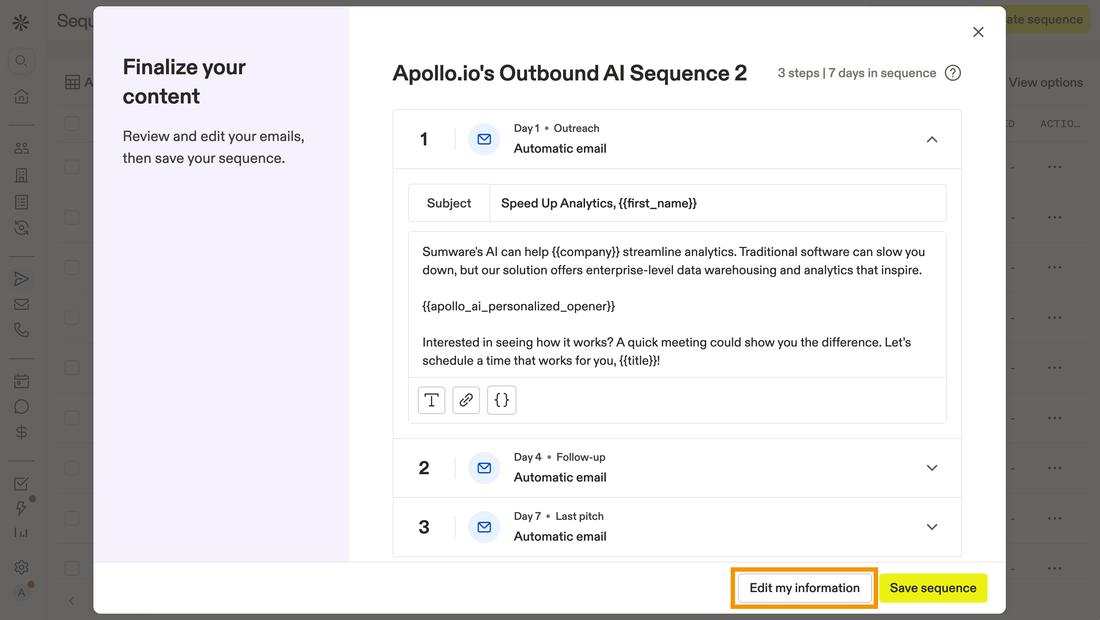
Choosing Your Path
Not every team should build this exact stack.
Which Apollo-to-HubSpot sync setup fits your team?
Choose n8n (self-hosted or cloud) if

- You want full control over field mapping and conditional enrollment logic
- Your team has one person comfortable reading API docs and writing basic JSON
- You need an audit log of every sync operation for RevOps reporting
Choose Clay + n8n if

- Apollo data is incomplete and you need waterfall enrichment before contacts hit HubSpot
- You are already paying for Clay and want to centralize enrichment logic there
- Your ICP scoring happens during enrichment, not after contact creation
Choose Apollo Native HubSpot Sync if

- You only need basic bidirectional contact sync with no conditional logic
- Your HubSpot portal is clean and deduplication is not a concern
- You do not need sequence enrollment triggered by the sync
If your HubSpot automations are already misfiring before you add this layer, read our piece on HubSpot automations costing you deals first. A broken enrollment workflow on top of a broken HubSpot setup compounds fast.
Also worth checking: if sequence leakage is your underlying problem, the sales sequence software leaking leads fix covers the structural gaps that no sync workflow can paper over.
The HubSpot Sequences API docs and Apollo REST API reference are your primary references here. Both are well-maintained and the enrollment endpoint behavior is documented accurately as of mid-2026.
What You End Up With
The finished workflow runs on a schedule, pulls new Apollo contacts, deduplicates against HubSpot on email, creates or updates the record, and fires sequence enrollment in a single automated chain. No CSV. No manual Zapier trigger. No mystery about which contacts got enrolled.
Every execution is logged in n8n. Every HubSpot upsert is auditable. Adding a new ICP filter or a second sequence is a single new branch node. That is apollo workflow management built to last, not just to ship.
Sources
Frequently asked questions
Can Apollo sync contacts to HubSpot automatically?
Not natively at the field level. Apollo has a built-in HubSpot integration but it is shallow. For full apollo workflow management control, n8n gives you conditional field mapping and deduplication logic the native sync lacks.
Does n8n have an Apollo node?
n8n has an HTTP Request node you use to hit Apollo's REST API directly. There is no dedicated Apollo node, so you call the /people/search or /people/match endpoints with your API key.
How do I avoid duplicate contacts when syncing Apollo to HubSpot?
Use HubSpot's upsert endpoint keyed on email address. If the contact exists, it updates. If not, it creates. This is the only safe pattern for apollo workflow management at any volume.
What triggers the HubSpot sequence enrollment from n8n?
After the upsert, n8n checks the HubSpot response for the contact ID, then calls the HubSpot Sequences API to enroll that contact ID in a specified sequence.
Can I use Clay in this workflow instead of pulling directly from Apollo?
Yes. Route Apollo exports through Clay for enrichment waterfall before pushing to HubSpot. n8n can receive a Clay webhook as its trigger instead of polling Apollo directly.
Free Newsletter
Get new posts by email.
Migration guides, tool comparisons, and pricing breakdowns from real RevOps and GTM stacks, sent as they publish.
No spam. Unsubscribe anytime.
Enjoying this? Share it with your team.
Keep reading

Some links are affiliate links. Disclosure.