GuidesDeliverability
Cold Email Deliverability Monitoring Workflow (Smartlead + ZeroBounce)
Build a cold email deliverability guardrail using Smartlead and ZeroBounce. Step-by-step workflow to cut bounce rates and protect sender reputation in 2026.

The tools compared
Entry prices from the pricing index, read Aug 12, 2026
Some links on this page are affiliate links. If you buy through them we may earn a commission at no cost to you; it never changes a verdict. How we make money
The short answer
Connect ZeroBounce verification to every new Smartlead list upload using a lightweight automation layer, and you will cut hard bounces below 2 percent while keeping domain reputation intact.
Deliverability used to be the thing you thought about after a campaign tanked. In 2026, after Google and Yahoo hardened bulk-sender thresholds and spam-trap networks got smarter, it is the thing you engineer before you send the first email. A common failure is blowing through pristine domains within weeks because list verification was skipped on a vendor-supplied lead file. The fix is not complicated. But it has to be systematic: a pre-send verification gate wired directly into your Smartlead campaign creation flow, not a quarterly list-scrub you remember when reply rates crater.
Why this workflow exists, and what it actually prevents
List quality degrades fast and silently. ZeroBounce’s research on email decay puts B2B address rot at roughly 2 to 3 percent per month. A 5,000-contact list from a Clay waterfall pull six months ago could be carrying 600 to 900 bad addresses before you send a single sequence. Hard bounces over 2 percent erode sender reputation. Above 3 percent, you are in Google’s danger zone, and domain recovery takes 30 to 60 days of cold-turkey silence. That is real pipeline cost, not a theoretical risk.
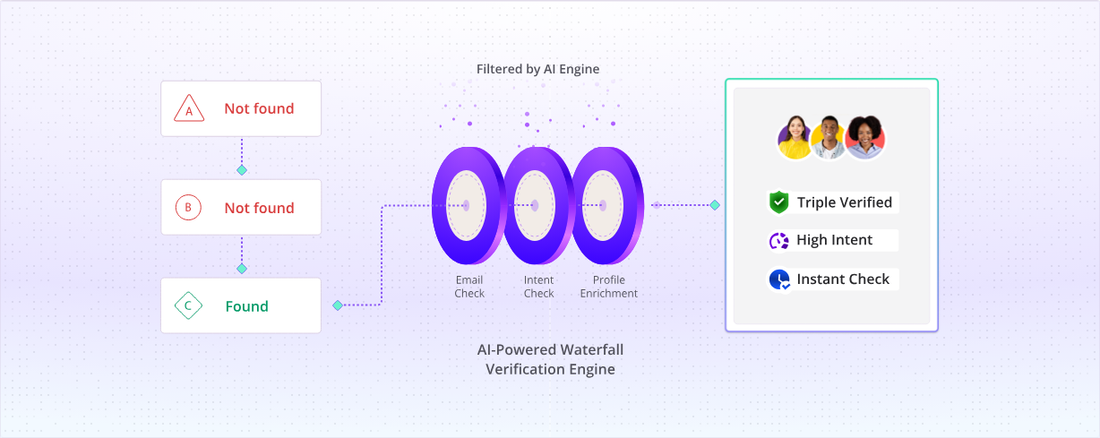
This workflow puts a verification checkpoint between your lead source and your Smartlead campaign inbox. It uses ZeroBounce for SMTP-level verification and catch-all scoring, routes results through n8n or Zapier, and only passes “valid” and “catch-all-low-risk” addresses into Smartlead. Catch-alls get quarantined to a separate low-volume campaign on a different sending domain. Everything else gets suppressed and logged.
Before any verification runs, every lead source (Clay enrichment exports, Apollo CSV pulls, manual prospecting, purchased lists) needs to land in one Google Sheet or Airtable base that acts as your staging area. Set a column schema with at minimum: email, first name, company, source tag, and a verification status column defaulting to 'pending'. One staging layer is what lets your automation catch everything. I have seen teams run verification on their Apollo lists but forget about the CSV their SDR uploaded from a conference badge scan. That is how a single unverified batch burns a warmed domain.
In n8n (or Zapier if you prefer no-code), set a trigger on new rows where verification status equals 'pending'. The ZeroBounce bulk verify endpoint accepts a list ID or a direct email for single-record validation. For batches under 100 contacts, use the single-validate endpoint in a loop to get synchronous results. For larger batches, submit to the bulk API, poll for completion, then parse the results CSV. ZeroBounce returns a status of 'valid', 'invalid', 'catch-all', 'spamtrap', 'abuse', 'do-not-mail', or 'unknown'. Write that status and the sub-status back to your staging sheet immediately.
This is the gate. In your automation layer, filter verified rows into three buckets: (1) 'valid' contacts go to your primary Smartlead campaign via the API or CSV upload; (2) 'catch-all' contacts with a confidence score above 70 get routed to a separate low-volume Smartlead campaign capped at 30 to 40 sends per mailbox per day on a warmed secondary domain; (3) everything else (invalid, spamtrap, abuse, do-not-mail, unknown) gets marked suppressed and never uploaded. Log suppression counts by source tag so you can see which lead sources are consistently delivering garbage.
Inside Smartlead, create two campaign templates: a primary campaign running 50 to 80 emails per mailbox per day on your main sending domains, and a catch-all campaign running 20 to 40 per mailbox per day on a separate subdomain (outreach2.yourdomain.com or a purpose-bought lookalike domain). Set Smartlead's built-in bounce protection to pause a mailbox automatically if it hits 1.5 percent bounce rate on any single day. That is your circuit breaker if bad addresses slip through.
Smartlead's analytics tab shows per-mailbox open rates, bounce rates, and spam complaints. Export this weekly into your staging sheet or a simple Looker Studio dashboard. If any sending domain's weekly bounce rate climbs above 1.8 percent, pause it immediately and run a fresh ZeroBounce pass on contacts still queued for that campaign. Add a Slack notification in your n8n workflow that fires whenever a batch's invalid rate exceeds 5 percent. That is a signal the lead source itself is broken and needs to be cut, not just cleaned.
The gotcha that bites every team the first time
The most common failure mode is treating “unknown” addresses as safe to send. ZeroBounce marks an address “unknown” when it cannot complete SMTP handshake verification, often because the mail server blocks probes. Teams see “unknown” and interpret it as “not confirmed bad,” which is not the same thing as “safe to send.” In practice, unknown addresses from cold B2B lists bounce at rates close to invalid addresses. Suppress them. Do not negotiate with yourself on this one.
The trap: Routing “unknown” status contacts into your primary campaign because they did not come back as “invalid.” A list with 15 percent unknowns will likely produce a 4 to 6 percent bounce rate, enough to crater a fresh domain inside two campaigns. This exact mistake can take out a domain and weeks of warm-up work. The cost savings from sending to unknowns are illusory.
// n8n Function node: routing logic
const status = $input.item.json.status;
const subStatus = $input.item.json.sub_status;

const SAFE = ["valid"];
const CATCHALL = ["catch-all"];
const SUPPRESS = [
  "invalid",
  "spamtrap",
  "abuse",
  "do-not-mail",
  "unknown" // treat unknown as suppress
];

if (SAFE.includes(status)) {
  return { route: "primary_campaign" };
} else if (CATCHALL.includes(status)) {
  return { route: "catchall_campaign" };
} else {
  return { route: "suppressed" };
}
Which verification tool fits your operation
ZeroBounce is my default recommendation for this workflow. Its catch-all confidence scoring is granular, and its bulk API is stable enough to automate against reliably. That said, it is not the only option, and the right pick depends on your volume and compliance posture.
Pick your verification layer
Choose ZeroBounce if

- You need catch-all confidence scoring, not just a binary catch-all flag
- You are processing large batches via API in an automated workflow
- You want the AI scoring layer that estimates deliverability probability on ambiguous addresses
Choose Bouncer if

- Your team is EU-based and GDPR data residency matters for your compliance posture
- You want a flat monthly subscription instead of per-credit pricing at moderate volumes
- You already use their Zapier integration and do not want to build a custom API flow
Choose Smartlead (native verify) if

- You are sending under 2,000 contacts per month and want zero additional tooling
- You accept a lighter verification pass in exchange for simplicity
- You are just starting warm-up and have not yet built an automation layer
If you are running higher volumes (50,000-plus contacts per month), stack both ZeroBounce and Smartlead’s native check. The marginal cost per credit is trivial compared to the cost of a burned domain. Do not let the credit line item be the reason you skip a layer.
This workflow pairs naturally with the Smartlead to HubSpot via n8n sync pattern I covered earlier: once a contact clears verification and enters a Smartlead campaign, the reply sync automation picks them up and routes engaged contacts into HubSpot without manual intervention.
Build it once, run it on every list
This workflow takes about three hours to wire up in n8n the first time, less if you have built API integrations before. The logic is not complicated. Every contact that touches your outbound stack passes through a verification gate before it can reach a sending mailbox. Valid addresses go to primary campaigns. Catch-alls go to a quarantine campaign on a secondary domain. Everything else is suppressed and logged by source so you know which vendors to stop paying.
The n8n self-host vs cloud decision affects where you host this workflow, but the automation logic is identical either way. If you are on Instantly rather than Smartlead, the same verification gate applies with the same API routing. Instantly’s campaign API accepts contact uploads in the same shape.
The teams I see with clean deliverability numbers in 2026 are not doing anything exotic. They built this gate, left it running, and stopped thinking about bounce rates. The system handles it. Per Google’s bulk sender requirements, keeping hard bounces under 2 percent is a baseline expectation now, not a best practice. Build for that floor and you stop firefighting.
Sources
Frequently asked questions
What is a safe bounce rate for cold email in 2026?
Most deliverability practitioners target under 2 percent hard bounces per campaign. Google and Yahoo's 2024 bulk sender requirements effectively made anything above 3 percent a domain reputation risk.
Does Smartlead have built-in email verification?
Smartlead has a native verification layer that flags risky emails, but it is not a substitute for a dedicated tool like ZeroBounce or Bouncer. Running both in sequence gives you the strongest pre-send hygiene.
How often should I clean my cold email list?
Clean any list older than 90 days before sending, and verify every net-new contact batch regardless of source. Data decays at roughly 2 to 3 percent per month for B2B lists.
Can ZeroBounce integrate directly with Smartlead?
There is no native direct integration, so most teams wire ZeroBounce via a Zapier or n8n automation that runs verification on upload and filters results before passing contacts to a Smartlead campaign.
What should I do with catch-all email addresses in cold outreach?
Suppress catch-alls from high-volume sends. Route them to a separate low-volume inbox with strong warm-up history, and keep weekly send volume on that sequence below 50 contacts per mailbox.