How to Build a $300/mo Outbound Stack in 2026
 By Ian Chamberland 11 min read
 TL;DR
You can run a fully automated outbound motion including enrichment, email sequences, CRM logging, and follow-up automation for around $300 per month by combining Apollo, Smartlead, Pipedrive, and n8n.
On this page
Most “budget outbound stack” guides are written by people who have never had to justify a $300/mo tool budget to a skeptical founder. They recommend Clay plus Apollo plus HubSpot plus Outreach and then put “cheapest” in the title. That is not cheap. That is a misunderstanding of the word.
I run RevOps consulting through Homegrown Growth Co. When a team asks me for a lean outbound system that actually works, this is the stack I build.
You do not need six tools and a Salesforce admin to run effective outbound. You need four tools, one automation layer, and thirty minutes of upfront wiring.
The Stack and Why These Four Tools
Before I walk through the build, here is the logic behind each choice. Every tool earns its seat by doing one job well and exposing a clean API so n8n can stitch everything together without you paying for native integrations.
The monthly math: Apollo Basic at $49/mo gives you 10,000 export credits, contact search, and basic sequencing you will not actually use (Smartlead is the better sender, full stop). Smartlead Starter at $39/mo gives you unlimited email accounts, inbox rotation, and warmup built in. Pipedrive Essential at $14/seat/mo handles your deal pipeline and contact records. n8n Cloud at $20/mo covers the glue layer. Add a domain purchase for sending infrastructure and you land at roughly $292/mo.
The workflow covers four phases: pull and enrich leads from Apollo, push them into Smartlead sequences, log replies and meetings back to Pipedrive, and trigger follow-up tasks automatically when a deal goes cold.

Use Apollo's search filters (title, headcount, industry, tech stack) to build a saved search of your ICP. Export to CSV or use Apollo's API to pull contacts directly. The Basic plan gives you 10,000 export credits per month, which is enough for any normal outbound volume. Key fields to pull: first name, last name, company, work email, LinkedIn URL, company domain, and employee count. You will use company domain later to route contacts into the right Smartlead campaign. Do not over-filter here. A 500-contact list that is 80% ICP beats a 50-contact list you spent three hours perfecting.
Set up an n8n workflow with either a Schedule trigger (runs the Apollo API call nightly) or a Webhook trigger (fires when a new row hits a Google Sheet you dump exports into). Use n8n's HTTP Request node to hit the Apollo people/search endpoint with your saved search ID. Map the response fields to a normalized contact object. Add an IF node that checks employee count and job title against your ICP definition. Contacts that pass go to the Smartlead branch. Contacts that fail get logged to a Pipedrive filter list for manual review later. This branching step is where most people skip out, and then wonder why their reply rates are low.
Use n8n's HTTP Request node to call the Smartlead API and add each passing contact to the correct campaign. Smartlead organizes outbound into Campaigns, and you should have at least two: one for cold first touch, one for warm follow-up after a reply or click. Pass the contact's first name and company name as merge variables in your API payload (reference them as `{{firstName}}` and `{{company}}` in your Smartlead template body). Smartlead handles inbox rotation and sending windows automatically. The one thing to configure manually: set a daily sending cap of 30 to 40 emails per mailbox and make sure warmup is active on every inbox before your first send. I have watched teams skip warmup and burn three domains in a single week.
Smartlead fires webhooks on key events: email replied, link clicked, meeting booked (if you connect Calendly or Cal.com). In n8n, create a Webhook node to receive these events. When a reply comes in, use Pipedrive's People and Deals API to either create a new deal or update the existing one. Set the deal stage based on reply sentiment (Smartlead classifies replies as interested, not interested, or out of office). Interested replies move the deal to a Qualified stage. Not interested replies trigger a tag on the Pipedrive contact for suppression. This keeps your CRM accurate without anyone manually touching it.
In n8n, set a daily Schedule trigger that calls the Pipedrive API and pulls all deals where stage is Qualified and last activity date is more than five days ago. For each stale deal, create a Pipedrive Activity (type: email, assigned to deal owner) with a note pre-populated with the contact's last reply snippet. Optionally, loop those contacts back into a Smartlead nurture campaign tagged as warm outbound. This closes the loop that most cheap stacks leave open: deals that got a soft yes and then fell through the cracks because no one followed up.
The biggest trap: sending before your inboxes are warm. Smartlead’s built-in warmup is real and it works, but it needs 14 days minimum before you send cold volume. I have seen teams spin up fresh domains, skip the warmup window, and hit spam rates above 8% on day one. Google’s postmaster tools will show you the damage in real time. Set a calendar reminder. Do not send before day 14.
// Smartlead: Add Lead to Campaign
// POST https://server.smartlead.ai/api/v1/campaigns/{id}/leads
{
  "lead_list": [
    {
      "email": "jane@acme.com",
      "first_name": "Jane",
      "last_name": "Smith",
      "company_name": "Acme Corp",
      "custom_fields": {
        "company_domain": "acme.com",
        "employee_count": "50"
      }
    }
  ],
  "settings": {
    "ignore_global_block_list": false,
    "ignore_unsubscribe_list": false
  }
}
Pipedrive as the Source of Truth
The reason I use Pipedrive instead of a free CRM tier is API quality and pipeline visibility. At $14/seat it is the most affordable CRM with a proper REST API, webhook support, and enough field customization to store everything n8n needs to route deals correctly. Free HubSpot locks API access behind paid plans. The free Salesforce Developer Edition is not a production CRM. Do not bother with either at this budget.
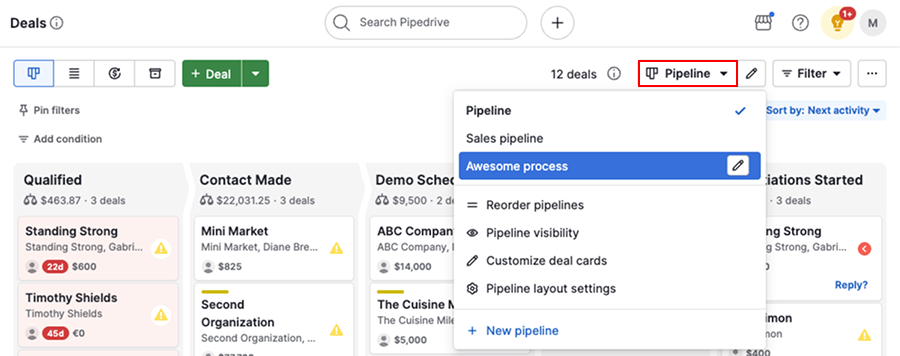
For this stack, create three custom fields on the Pipedrive Deal object: smartlead_campaign_id (text), last_reply_sentiment (single option: interested, not interested, oor), and sequence_status (single option: active, completed, suppressed). n8n writes to all three via the Deals API. This gives you one place to see every contact’s outbound status without logging into Smartlead separately. If you ever need to migrate from Pipedrive to a heavier CRM down the road, these structured fields make the transition clean.
Who This Stack Is and Is Not For
This build is designed for a single SDR or a founder running their own sales motion, targeting 300 to 800 new contacts per month. If you are pushing 5,000+ contacts per month, you will hit Apollo’s export limits and Smartlead’s Starter plan caps. At that volume, you also want Clay’s waterfall enrichment for better data quality. If your sequences are leaking leads at the handoff stage, this breakdown on sequence software gaps is worth reading before you scale up.
According to G2’s 2025 Sales Tools report, the median sales engagement platform costs $110/seat/month for mid-market teams. This stack runs roughly $60 to $70 per seat equivalent for a solo operator, without sacrificing the automation layer that makes follow-up systematic.
The Apollo plus Smartlead plus n8n combination has an upgrade path built in. When you are ready for better enrichment, drop Clay into the workflow between Apollo export and Smartlead enrollment. When you need more advanced sequencing logic, swap n8n workflows for Reply.io. The Pipedrive core stays put either way.
The $300 Stack: Tool-by-Tool

Apollo
Apollo Basic is the best value prospecting database at this budget tier. Data quality on email and LinkedIn URL is solid for North American B2B. In my testing, bounce rates average 4 to 6%, which is acceptable if you run Smartlead's verification before sending. Do not buy Apollo for its sequencing. The email sender is weak. Buy it for the database and nothing else.
Highlights
- 10,000 export credits/month
- Saved searches with ICP filters
- API access on Basic plan
- Tech stack and intent filters included

Smartlead Top pick
Smartlead is the deliverability layer. Unlimited email accounts on Starter means you can spin up five to ten sending inboxes across two or three domains, which is exactly what you need to stay out of spam at 300 to 800 contacts per month. The webhook system is reliable and the reply classification (interested, not interested, OOO) feeds cleanly into n8n. I have run this in production and the warmup infrastructure genuinely works.
Highlights
- Unlimited email accounts
- Built-in inbox warmup
- Webhook events on reply, click, bounce
- Reply sentiment classification
Pipedrive
Pipedrive Essential is the only CRM at this price point with a REST API that does not require a paid add-on to unlock. Custom fields, webhooks, and activity creation all work on the Essential plan. The pipeline UI is the best in this tier, not a close call. For a solo SDR managing 50 to 100 open deals, it covers everything you need.
Highlights
- REST API on Essential plan
- Custom fields and pipeline stages
- Activity and note creation via API
- Webhook support included

n8n
n8n Cloud Starter at $20/mo is the glue holding the stack together. Native Pipedrive node, HTTP Request node for Apollo and Smartlead APIs, and a clean webhook handler. The workflow canvas is more technical than Zapier but the execution ceiling is dramatically higher. You are not going to outgrow n8n at this scale. And if you want to eliminate the $20/mo fee entirely, self-hosting on a cheap VPS is a real option.
Highlights
- Native Pipedrive node
- Webhook trigger and handler
- Scheduled workflows for stale deal follow-up
- Self-host option to eliminate the $20/mo fee
Running This for the Long Term
The stack pays for itself if a single meeting per month converts to a deal. At 300 contacts per month with a 3% reply rate and a 30% meeting conversion from replies, you are booking two to three meetings per month. That math works for almost any B2B sale above $5,000 ACV.
The one thing I would add at month three, once you have real data: enable Smartlead’s built-in email verification waterfall before enrollment. Bounces accumulate quietly and damage your sending reputation fast. According to Mailgun’s email deliverability benchmarks, keeping your hard bounce rate below 2% is the threshold that keeps you out of Google’s spam bucket. Build the verification step in early. Retrofitting it after your domain reputation tanks is painful.
One more thing this stack does not include: a dialer, LinkedIn automation, or intent data. Those are real additions that cost real money. If your ICP lives on LinkedIn, Smartlead’s Starter plan does not cover it. Budget another $50 to $100/mo for a LinkedIn tool if you need that touchpoint.
Sources
Frequently asked questions
What is the cheapest outbound stack in 2026?
Apollo Basic plus Smartlead Starter plus Pipedrive Essential plus n8n Cloud comes in around $290 to $310 per month for a solo SDR or small team. That covers prospecting, email sending, CRM, and automation.
Can you do outbound without Salesforce or HubSpot?
Yes. Pipedrive handles pipeline and deal tracking at a fraction of the cost, and n8n replaces most workflow automation you would otherwise build inside HubSpot or Salesforce.
Does Apollo replace Clay for enrichment?
Apollo covers basic company and contact data well. Clay goes deeper with waterfall enrichment and AI personalization, but it costs significantly more. For a $300 budget, Apollo is the right call.
Is Smartlead safe for cold email in 2026?
Smartlead has strong deliverability infrastructure including inbox rotation and built-in warmup. It is one of the more reliable options for cold outbound at the budget tier.
How hard is it to connect n8n to Smartlead and Pipedrive?
Both have REST APIs and n8n has a native Pipedrive node. Smartlead uses a straightforward API key auth. A basic enrichment-to-sequence workflow takes a few hours to build if you are comfortable with no-code tools.
Free Newsletter
Get new posts by email.
Migration guides, tool comparisons, and pricing breakdowns from real RevOps and GTM stacks, sent as they publish.
No spam. Unsubscribe anytime.
Enjoying this? Share it with your team.
Keep reading


Some links are affiliate links. Disclosure.