GuidesMigration guide
Migrate from Apollo to Clay Without Losing Your Sequences or Contact Data
Step-by-step guide to migrating from Apollo.io to Clay: export contacts, rebuild sequences, and sync everything to HubSpot without data loss.

The tools compared
Entry prices from the pricing index, read Aug 12, 2026
Some links on this page are affiliate links. If you buy through them we may earn a commission at no cost to you; it never changes a verdict. How we make money
The short answer
Export your Apollo contacts and sequences first, enrich and dedupe in Clay, then reconnect your sending tool and CRM sync before you cancel Apollo.
The trigger I see most often is a renewal quote. A team has been living inside Apollo for 12 to 18 months, sequences are humming, the contact database has grown to 15,000+ records, and then the renewal lands at 2x the original price. Someone opens a Clay demo tab and 45 minutes later they are asking me how hard the switch actually is. The honest answer: it is not painful if you do it in order, and it is a disaster if you do not. This guide covers exactly that order.
Before you migrate
Do not open a Clay workspace and start importing until you have completed this checklist. Teams that skip the pre-work often spend a long time untangling duplicate contacts and missing reply data. The sequence is everything here.
- Export every contact list from Apollo. Go to People, filter by each saved list or sequence, and export as CSV. Do this for every segment, not just active sequences. Apollo’s CSV export docs walk through the field selection. Choose all fields, especially
last_activity_date,email_status, and any custom fields your team has populated. - Screenshot or document every active sequence. Record step number, wait days, subject line, and body text for every step. Apollo gives you no structured export for sequence logic, only the contact membership list.
- Sync your CRM before you leave. If you use HubSpot or Salesforce, trigger a full Apollo sync right now and verify that open, click, and reply data is flowing into contact activity timelines. This is your permanent record. Once you deprovision Apollo, the activity feed in Apollo is gone.
- Pause (do not delete) active sequences. Pausing preserves the enrollment data. Deleting it destroys the contact-to-sequence mapping you may need for suppression lists later.
- Pull your suppression list. Export unsubscribes and bounces from Apollo’s Do Not Contact list. You will re-upload this to your sending tool after the migration or you will hit those addresses again.
- Note your billing cycle end date. Apollo credits do not roll over and are non-refundable. Run them down on enrichment exports before your cycle ends.
Migration steps
Open your exported CSVs in Google Sheets or your ETL tool of choice. Dedupe on email address as the primary key, not name. Flag rows where email_status is 'invalid' or 'unverified' and move them to a separate sheet. You do not want to pay Clay credits to enrich contacts that will hard bounce. A quick COUNTIF on the email column takes five minutes and saves real money.
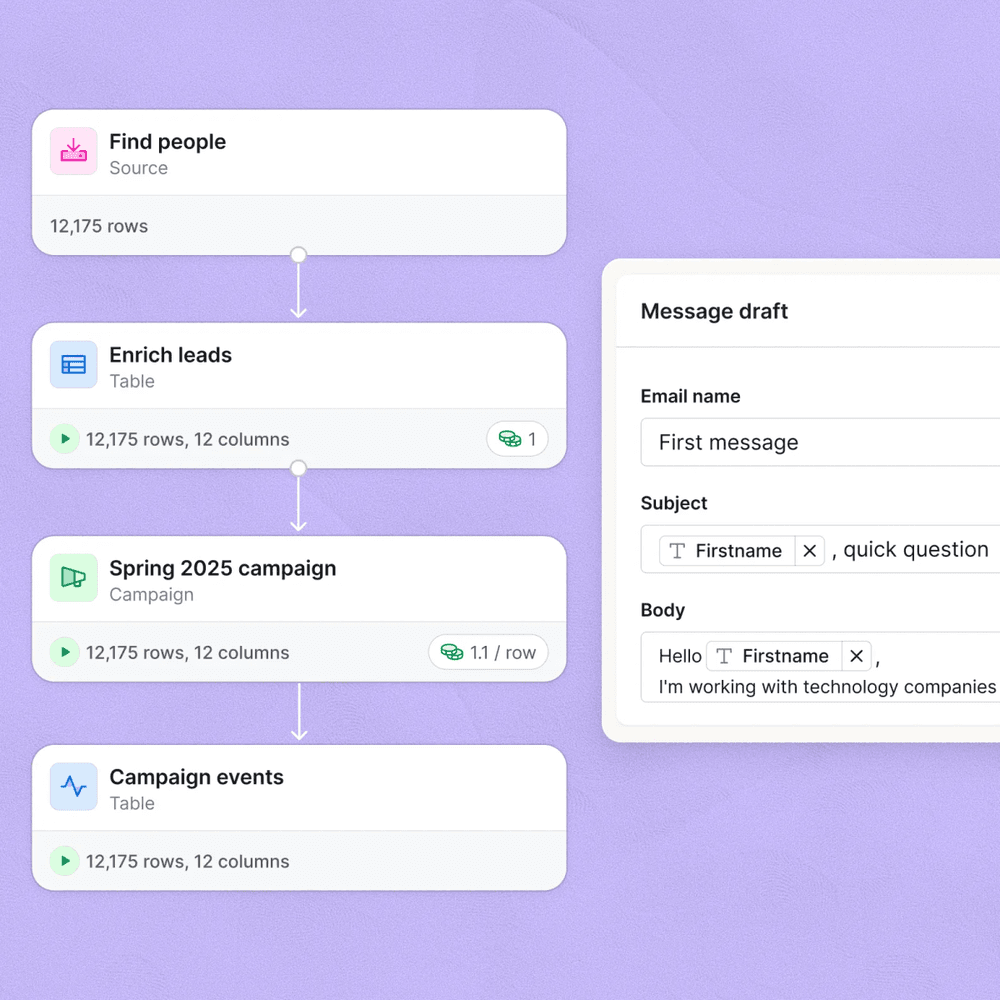
Create a new table in Clay and import your cleaned CSV. Map Apollo's column headers to Clay's native fields: first name, last name, company, title, LinkedIn URL, and email. Then set up your enrichment waterfall. I typically run Findymail or Prospeo as the first email finder, Clearbit as the company enricher, and then a LinkedIn scraper for title freshness. Clay's waterfall stops as soon as a provider returns a confident result, so you only pay for what actually runs.
This is where the manual work lives. Take your documented sequence steps and build them inside Smartlead, Instantly, or Outreach, whichever you are using alongside Clay. Map the merge fields to the column names from your Clay table (for example, your first name column maps to the first name variable your sending tool uses for personalization). If you built AI personalization lines in Apollo's sequence editor, recreate those as Clay columns first so they output a plain text string that your sender can inject.
Use Clay's native Smartlead or Instantly integration to push enriched rows directly into a campaign. For HubSpot, use Clay's HubSpot action to create or update contacts and map every custom property. If you need more complex routing logic (for example, pushing high-ICP contacts to one HubSpot pipeline and low-ICP to a nurture workflow), build that branching in n8n or Zapier between Clay's webhook output and HubSpot's API. I have covered that pattern in depth for the [LinkedIn outbound loop using Clay, Lemlist, and HubSpot](/blog/2026-08-22-linkedin-outbound-loop-clay-lemlist-hubspot/).
Import the unsubscribe and bounce CSV you exported from Apollo into your new sending tool's suppression list before you launch a single campaign. Non-negotiable for deliverability. If you are using Smartlead, go to Settings, then Blacklist, and upload the file. Instantly has the same flow under Blacklist in account settings. Do this before step three finishes or you risk re-contacting opted-out prospects on day one.
Keep Apollo active but paused. Run your first Clay-powered campaign for five to seven business days and monitor bounce rates, reply rates, and HubSpot sync fidelity. Once you have confirmed that enriched contacts are flowing correctly into HubSpot, sequences are firing, and suppression is working, cancel Apollo at the end of your billing period. Do not cancel early. You paid for the cycle.
What breaks and what does not transfer
The biggest surprise for most teams is that Clay is not trying to be Apollo. Apollo is a full-stack outbound platform: database, enrichment, sequencing, and analytics in one UI. Clay is a data infrastructure tool. That distinction matters enormously before you migrate. Understanding it on day one saves a lot of “where is this feature” frustration on day two.
What does not transfer:
- Sequence enrollment history (who was on step 3 of which cadence)
- Open, click, and reply metrics from Apollo’s native analytics
- Apollo’s contact scoring and intent signals (you rebuild these with Clay’s enrichment columns and your own scoring logic in HubSpot or Salesforce)
- Apollo’s dialer and LinkedIn Tasks (if you used these, you need a separate replacement)
What transfers cleanly:
- All contact and account data via CSV export and re-import
- Email addresses, with re-verification on the Clay side
- Company data, refreshed and often improved through Clay’s waterfall
- Suppression lists
Teams consistently underestimate how much of their Apollo setup lived in the sequencer, not the database. Do a full audit of which features you actually use before you assume Clay covers everything.
The gotcha: contacts active in an Apollo sequence have no “paused at step X” flag in the CSV export. If you had 200 contacts mid-sequence, you do not know who was on step 1 versus step 4. Enrolling them all from the top means double-touching some prospects. Enrolling none means dropping the sequence entirely.
Fix: before pausing the sequence in Apollo,
pull the Activity export filtered by that
sequence. Cross-reference the last_activity_date
column against each step's send date to infer
which step each contact was on.

Then in your new sending tool, create a
separate campaign for "mid-sequence" contacts
and start them at the inferred step number.

It takes 30 minutes per sequence and it is
the only way to avoid double-touching.
Verify it worked
Before you submit the Apollo cancellation, run these four checks. I treat these as a hard gate, not a nice-to-have.
- HubSpot contact sync fidelity. Pull 20 random contacts from your Clay table and search for them in HubSpot. Confirm that all custom properties mapped correctly and that no duplicates were created.
- Suppression list active. Send a test campaign in your sending tool to a throwaway address that is also on your suppression list. It should not receive the email.
- Bounce rate baseline. After your first Clay-enriched send of at least 200 contacts, bounce rate should be under 2%. If it is higher, your enrichment waterfall is not resolving emails cleanly and you need to add a verification step. The cold email deliverability monitoring workflow using Smartlead covers how to set that up.
- HubSpot deal pipeline untouched. Open HubSpot’s deal view and confirm that no existing deals were orphaned or had their associated contacts duplicated during the sync.
Who should switch and who should stay
Most teams frame this as a binary choice. It is not. The real question is whether your outbound motion has outgrown Apollo’s data layer.
Apollo vs Clay: which direction is right for your team
Choose Stay on Apollo if

- Your team lives inside one tool and hates context switching between a data platform and a sender
- You rely heavily on Apollo's intent data and buying signals and have not evaluated alternatives
- You have fewer than 2,000 contacts in active sequences and enrichment quality has not been a blocker
Choose Migrate to Clay if

- You are paying for Apollo enrichment credits and regularly hitting quality issues on email accuracy
- You want to plug in multiple data providers (Clearbit, Prospeo, LinkedIn, Findymail) and only pay per successful result
- Your outbound motion is getting more complex with AI personalization, waterfall logic, or signal-based triggers that Apollo's native tooling cannot support
If you are running a signal-based outbound motion, pulling job change data, funding signals, or website visitor intent into your sequences, Clay is the better infrastructure layer. I have yet to see Apollo’s native enrichment keep up with a well-tuned Clay waterfall on contact data quality. Apollo is still a solid entry-level outbound platform for smaller teams who want everything in one place and are not yet hitting the data quality ceiling.
For teams that need a sequencer alongside Clay, I currently recommend Smartlead for volume-focused cold email and Outreach for enterprise AE-driven sequences. If you are already in HubSpot deeply, their Sequences product works as the sender if you push Clay-enriched contacts there via the native integration or through n8n for more custom routing.
The migration from Apollo to Clay is worth the effort for teams doing any volume of signal-based or AI-personalized outbound. The setup cost is real but front-loaded. Once your waterfall is dialed in, you are pulling cleaner data at lower cost per verified contact than Apollo’s credit model allows. Do the pre-work, rebuild your suppression list first, and do not cancel Apollo until parallel testing gives you a green light.
Sources
Frequently asked questions
Can you export sequences from Apollo to Clay?
Apollo does not export sequence steps as a structured file, so you will need to manually document your cadence logic and rebuild it in Clay as a waterfall table or push to a sending tool like Smartlead or Instantly.
Does Clay replace Apollo completely?
Clay replaces Apollo's enrichment and list-building layers but not the email sending layer. You still need a sequencing tool like Smartlead, Instantly, or Outreach alongside Clay.
How long does an Apollo to Clay migration take?
For a team with one or two active sequences and under 10,000 contacts, the full migration including CRM reconnection typically takes three to five business days.
Will my Apollo contact history move to Clay?
Activity history like email opens and replies does not transfer to Clay. Export that data to your CRM in HubSpot or Salesforce before you migrate, because it lives there permanently.
What happens to my Apollo credits when I cancel?
Apollo credits are non-refundable and expire at the end of your billing period, so time your cancellation to run out your credit balance before churning.