GuidesKit
Gumroad ConvertKit Integration: Tag Buyers and Trigger Upsells
Connect Kit to Gumroad to auto-tag buyers and fire upsell sequences. Step-by-step with native Zapier, n8n, and Make options covered.

The tools compared
Entry prices from the pricing index, read Aug 12, 2026
Some links on this page are affiliate links. If you buy through them we may earn a commission at no cost to you; it never changes a verdict. How we make money
The short answer
Use Zapier, n8n, or Make to connect Gumroad purchase webhooks to Kit so every buyer gets tagged instantly and enters a product-specific upsell sequence automatically.
The Gumroad/Kit gap is a real revenue leak. A buyer hits your thank-you page, their email lands nowhere in Kit, and the upsell sequence you spent an afternoon writing fires for exactly zero people. The native connection does not exist, so the workflow lives in the middle layer: Zapier, n8n, or Make. This post covers all three paths, which one to pick, and the tagging schema that makes the downstream upsell logic actually work.
Why the middle layer matters here
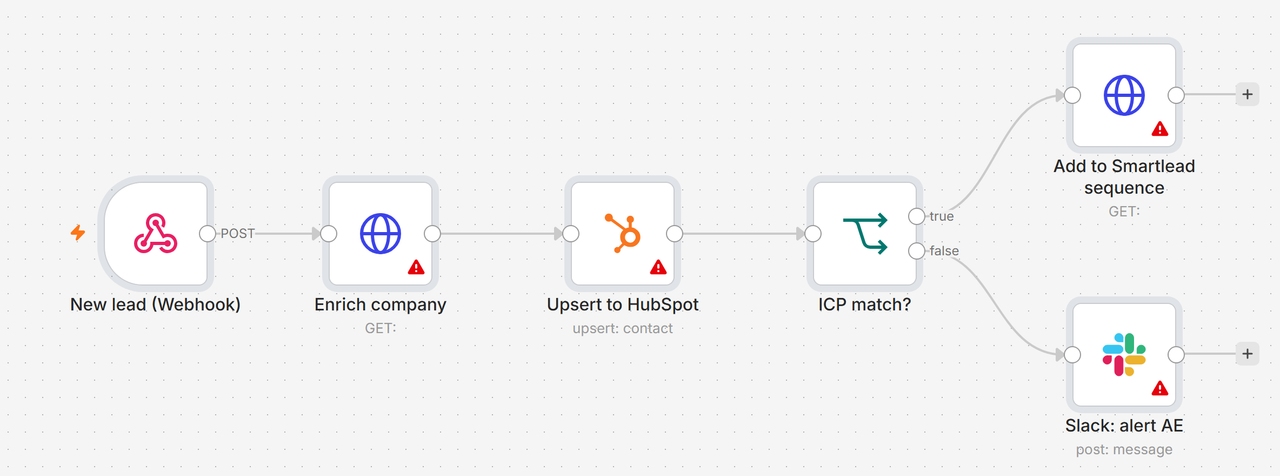
Gumroad exposes a ping/webhook on every completed sale, sending a POST payload with the buyer’s email, product name, product ID, price, and order ID. That is all you need. Kit (formerly ConvertKit) accepts subscriber creates and tag assignments via its v4 REST API. The automation layer’s only job is to catch the Gumroad ping, pull the email and product name, and call Kit’s API with the right tag.
The part most people skip is the tagging schema. Tagging someone “buyer” is almost useless. Tagging them gumroad-product-writing-course and buyer-2026-10 gives you segments you can actually filter on, suppress from cold outreach, and fork into product-specific upsell sequences. I’d argue that the tag naming decision matters more than which middleware you pick.
In Gumroad, go to Settings > Advanced > Ping. Paste your automation layer's webhook URL here. Gumroad will POST to this URL on every completed sale. For Zapier, use the 'Webhooks by Zapier' trigger URL. For n8n or Make, create a webhook node first and copy its URL. Test with Gumroad's built-in ping test button before going live.
The Gumroad ping body includes `email`, `product_name`, `product_id`, `price`, `quantity`, and `order_id` as form-encoded fields. Map `email` and `product_name` immediately. Build your tag string from product_name: strip spaces, lowercase, prefix with `gumroad-`. A product called 'Cold Email Playbook' becomes the tag `gumroad-cold-email-playbook`. Do this transformation in the automation layer with a text transform step, not in Kit.
Call Kit's POST /v4/subscribers endpoint with the buyer's email. If the subscriber already exists, Kit returns their subscriber ID. If not, it creates them. Both Zapier's Kit integration and n8n's Kit node wrap this as a 'find or create' action. Never skip the lookup step. Pass `first_name` from the Gumroad payload if available.
With the subscriber ID in hand, call Kit's POST /v4/tags/{tag_id}/subscribers endpoint, or use the 'Add Tag to Subscriber' action in Zapier or n8n. If the tag does not exist yet, create it via the API first and store its tag_id as a static value in your automation. Add a second tag for the purchase month (`buyer-2026-10`) so you can segment by cohort later.
Add a final step: Kit's POST /v4/sequences/{sequence_id}/subscribers. Pass the subscriber ID. The sequence ID is a static integer you copy from the Kit sequence URL. This fires the sequence immediately. Build a separate sequence per product, not one generic 'buyer' sequence. The product-specific angle is what actually drives upsell conversion.
The common trap: Gumroad sends the ping as application/x-www-form-urlencoded, not JSON. Automation tools default to expecting JSON, so the payload either errors out or arrives as a single unparsed string. In n8n, set the webhook node’s response format to “Form-Urlencoded”. In Make, use the “Parse query string” function on the raw body. In Zapier, the Webhooks trigger handles this automatically when you use “Catch Hook.”
// n8n: transform product_name to Kit tag slug
// in a Code node before the Kit node
const productName = $input.item.json.body.product_name;
const tagSlug = "gumroad-" + productName
  .toLowerCase()
  .replace(/[^a-z0-9]+/g, "-")
  .replace(/^-|-$/g, "");

return [{ json: { tagSlug, email: $input.item.json.body.email } }];
Which automation layer to use
Most people reach for Zapier out of habit when the workflow is simple enough that the platform choice mostly comes down to budget and how much you want to own the infrastructure. I’d skip Zapier for this specific workflow unless you’re already paying for it. The n8n path is cleaner and cheaper at anything above trivial volume.
Which middleware fits your Gumroad to Kit workflow
Choose Zapier if

- You want this running in 30 minutes with zero infrastructure decisions
- You process fewer than 500 Gumroad sales per month (stays in Starter territory)
- You already pay for Zapier for other workflows
Choose n8n if

- You want to self-host and pay nothing beyond your VPS cost
- You need to branch logic (different sequences per product, refund handling, gift purchases)
- You are already running other n8n workflows and want one canvas
Choose Make if

- You prefer a visual scenario builder over n8n's node graph
- You need Gumroad plus Kit plus a third tool (Notion, Airtable, Slack) in one scenario
- You want cloud-hosted but cheaper than Zapier at volume
Building the upsell sequence in Kit
Once the tagging layer is working, the sequence logic is straightforward. My read is that the instinct to build one long nurture sequence for all buyers is the wrong call. The better pattern is three short sequences per product:
- Delivery plus onboarding (days 0 to 3): confirm the purchase, deliver any bonus content, set expectations.
- Social proof plus use case (days 4 to 10): one or two emails showing what buyers do with the product. No pitch.
- Upsell (days 11 to 14): introduce the logical next product. Use Kit’s conditional content blocks to personalize the offer by tag so one template serves multiple products.
The sequence ID you drop into your automation’s final step corresponds to sequence 1. When a subscriber completes sequence 1, Kit’s built-in automations (Automation Rules) can move them into sequence 2 on a tag trigger. No extra middleware needed for that hand-off.
This is the same architecture worth recommending whether you’re connecting Gumroad and Kit or running a Zoom webinar tagging workflow or a Kajabi course enrollment sequence. The middle-layer pattern is identical; the payload fields change.
Get it running
The Gumroad to Kit integration is three nodes and one webhook URL. The complexity is in the tag naming convention and sequence design, not the plumbing. Pick your middleware, copy the endpoint URL into Gumroad’s ping field, and run a test purchase (Gumroad lets you buy your own product for $0) to verify the subscriber appears in Kit with the right tag before you open it to real traffic.
If you need more branching logic than a single Zap allows, the n8n path scales cleanly. For anything in between, Make hits a good balance of visual clarity and affordable operations pricing.
Sources
Frequently asked questions
Does Gumroad have a native ConvertKit integration?
Gumroad does not have a direct native Kit integration. You connect them via Zapier, n8n, Make, or Gumroad's webhook feature pointing at Kit's API.
How do I tag a Kit subscriber when they buy on Gumroad?
Send a Gumroad sale webhook to your automation layer (Zapier, n8n, or Make), look up or create the subscriber in Kit by email, then apply a tag matching the product purchased.
Can I trigger a Kit sequence from a Gumroad purchase?
Yes. After tagging the subscriber, add a second Kit action to add them to a specific sequence by sequence ID. That sequence starts sending immediately.
What is the cheapest way to connect Gumroad and Kit?
n8n self-hosted is free beyond server costs and handles this workflow cleanly with its Kit and webhook nodes. Zapier's free tier covers low-volume use but caps at 100 tasks per month.
What happens if a buyer already exists in Kit?
A well-built workflow checks for an existing subscriber first and updates their tags rather than creating a duplicate. Both the n8n Kit node and Zapier's Kit integration handle this with a find-or-create action.