GuidesCRM
How to Connect ActiveCampaign to Close CRM: Sync Contacts and Trigger Follow-ups
Step-by-step guide to building an ActiveCampaign Close CRM integration that syncs contacts bidirectionally and fires follow-up sequences automatically.

The tools compared
Entry prices from the pricing index, read Aug 12, 2026
Some links on this page are affiliate links. If you buy through them we may earn a commission at no cost to you; it never changes a verdict. How we make money
The short answer
Connect ActiveCampaign to Close CRM via n8n or Zapier to sync contacts bidirectionally and trigger follow-up automations based on CRM activity, no native integration required.
There is no native ActiveCampaign Close integration. That surprises a lot of teams running outbound through Close and nurture through ActiveCampaign. The gap matters: without a sync layer, reps are manually checking whether a lead opened a sequence email before calling, and marketing is completely blind to which leads a rep already touched. The fix is a webhook-and-API bridge built in n8n or Zapier, and it takes about two hours to get right once you know the field-mapping landmines going in.
Why this integration is worth building
The core use case is lead routing and follow-up timing. Marketing qualifies a lead through an ActiveCampaign nurture sequence. That lead needs to land in Close as an opportunity the moment they hit a score threshold or click a specific link. Going the other direction, when a rep marks a lead “No Answer x3” in Close, that signal should pause the ActiveCampaign sequence and re-queue the contact into a longer drip, not keep hammering them with emails.
I’d argue the bidirectional sync is where most teams underinvest. They build the marketing-to-CRM push and call it done, leaving reps’ activity completely invisible to ActiveCampaign. That one-way blindness is how you end up with a rep calling someone who already unsubscribed.
If you are evaluating whether ActiveCampaign is even the right tool for this stack, our ActiveCampaign alternatives breakdown covers the cases where Brevo or Customer.io make more sense.
Building the integration: step by step
Pull a CSV export from both tools and reconcile your contact fields manually first. Close uses Leads and Contacts as separate objects; ActiveCampaign has Contacts and Accounts. Decide whether a Close Lead maps to an ActiveCampaign Contact (usually yes) or an Account. Write out every custom field pair: for example, Close's 'Lead Status' maps to ActiveCampaign's custom field 'CRM Status'. Missing this step produces duplicate contacts on day one.
In Close, go to Settings > Integrations > Webhooks and add a new outbound webhook. Subscribe to the events you care about: lead.updated, activity.call.created, and opportunity.status_changed cover 90% of follow-up triggers. Set the endpoint to your n8n webhook URL (or Zapier catch hook). Close will POST a JSON payload including the lead ID, changed field, and old/new values. Per the Close API docs, you can filter by specific field changes server-side to reduce noise.
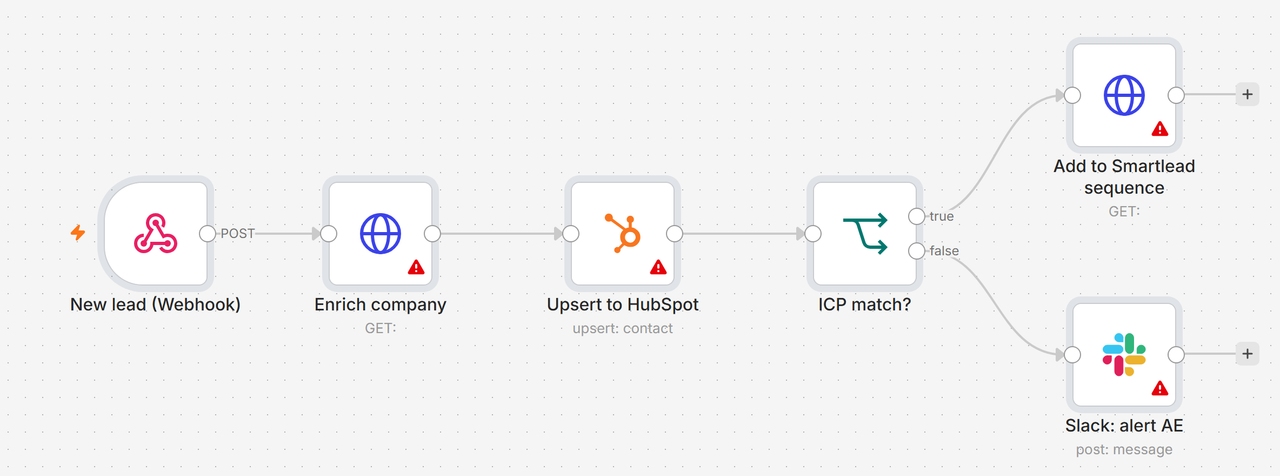
In n8n, create a Webhook trigger node. Add an IF node branching on the event type field from the Close payload. For a 'lead.status changed to Nurture' event, route to an ActiveCampaign node that calls the POST /api/3/contactTags endpoint to add a tag like 'CRM: Nurture Queue'. For a 'call: no answer' event, call the ActiveCampaign API to update the contact's custom field 'Last Call Outcome' and optionally remove them from an active automation using the DELETE /api/3/contactAutomations endpoint. Use n8n's built-in error handling to send failures to a Slack channel rather than silently dropping them.
In ActiveCampaign, use an automation that fires when a contact reaches a score threshold or completes a key action (clicked demo link, opened 3 emails in 7 days). The final action in that automation should be a Webhook action posting to your n8n endpoint. The n8n workflow then calls the Close API POST /api/v1/lead/ to create a new lead, or PATCH /api/v1/lead/{id}/ to update an existing one. Pass the ActiveCampaign contact ID as a custom field in Close so you can always look up the record in both systems.
Before creating a new record in either system, always query first. In n8n, add an HTTP Request node that calls Close's GET /api/v1/lead/?query=email:(contact email) before any POST. If a lead already exists, route to the PATCH branch. Same principle going the other direction: use ActiveCampaign's GET /api/3/contacts?email=(email) before creating. Without this, every automation run that fires twice (retry, manual trigger, webhook replay) creates a duplicate. This is the single most common failure in DIY integrations.
Webhooks fail. Networks drop. Build a scheduled n8n workflow that runs at 2am daily, queries Close for leads updated in the last 24 hours via GET /api/v1/lead/?date_updated__gte=(yesterday), and cross-references those against ActiveCampaign contact records. Any mismatch (missing tag, stale field value) gets corrected. This catch-up job is your safety net and takes about 30 minutes to build once you have the main workflow running.
The field-mapping gotcha and how to fix it
The trap: Close stores phone numbers as an array of objects with a field key and a phone key, not a flat string. ActiveCampaign expects a plain string in the phone field. If you pass the raw Close phone array directly into ActiveCampaign’s API, the write either fails silently or stores [object Object] in the phone field.
I’d also watch out for Close’s lead status being a free-text string that teams have customized differently across workspaces. A status of “Qualified” in one Close account might be “SQL” in another. Hard-code a status map in your n8n workflow, not on the ActiveCampaign side, so you have one place to update it.
// n8n Function node: normalize Close phone to AC string
const closePhones = $json.lead.phones || [];
const primaryPhone = closePhones.find(p => p.field === 'office')
  || closePhones[0];
const phoneString = primaryPhone ? primaryPhone.phone : '';

// Status map: Close label -> AC tag
const statusMap = {
  'Qualified': 'CRM: SQL',
  'SQL':       'CRM: SQL',
  'Nurture':   'CRM: Nurture Queue',
  'No Answer': 'CRM: No Answer',
  'Lost':      'CRM: Lost'
};

const acTag = statusMap[$json.lead.status_label] || 'CRM: Unknown';

return [{
  json: {
    email: $json.lead.contacts[0]?.emails[0]?.email,
    phone: phoneString,
    acTag:  acTag
  }
}];
Which middleware should you use
The decision between n8n and Zapier comes down to how much branching logic your sync needs and whether you want to self-host.
Pick your middleware
Choose n8n if

- You need branching logic (different actions per Close event type)
- You want a nightly reconciliation job alongside real-time webhooks
- Your team has one person comfortable with JSON and HTTP nodes
Choose Zapier if

- You only need one-directional pushes (AC to Close or vice versa)
- Your ops team is non-technical and needs a GUI-only build
- Volume is under 2,000 Zap runs per month
Choose Make if

- You want visual flow editing closer to n8n but with a lower learning curve
- You need HTTP modules with custom headers and are comfortable mapping arrays
- Zapier's task-based pricing is getting expensive at your volume
For anything beyond a single Zap (push new AC contact to Close on tag added), my read is that n8n is the right call. The branching, error handling, and scheduled polling nodes are all native. Zapier’s Paths feature covers some of this, but you hit task limits fast once you add the reconciliation poll. For more on where Zapier falls short for GTM workflows generally, our GTM workflow automation piece goes deeper.
Triggering follow-up sequences from CRM signals
The highest-value output of this integration is not contact sync. It is automating follow-up timing based on what reps actually do in Close. Per ActiveCampaign’s API documentation, you can enroll a contact into any automation by POSTing to /api/3/automationContacts with a contact ID and automation ID. That means:
- A Close call logged as “Left Voicemail” fires an n8n step that enrolls the contact in a “post-voicemail” AC sequence, a short 3-email drip spaced 2, 4, and 7 days out
- A Close opportunity moved to “Demo Scheduled” removes the contact from any active drip and adds a tag that suppresses them from batch sends until the opportunity closes
- A Close lead marked “Lost” after a close date starts a 90-day re-engagement automation in ActiveCampaign rather than leaving the contact orphaned
This is where the Close and ActiveCampaign combination earns its keep. Close handles the calling and deal tracking. ActiveCampaign handles the long-game nurture. The integration is the connective tissue that keeps both tools aware of what the other is doing.
ActiveCampaign’s automation branching also lets you branch on custom field values. Once you are writing Close’s lead status into ActiveCampaign, you can use that field to branch your nurture sequences by where the lead is in the sales process, not just by behavior.
Get the sync running, then optimize
The two-hour build estimate above is realistic if your field map is clean going in. The nightly reconciliation job is not optional. Skip it and you will spend that time manually debugging mismatch reports from reps. Once the core sync is stable, the next layer worth building is passing ActiveCampaign’s lead score into Close as a custom field so reps can sort their queue by marketing engagement before their morning call block. That single addition tends to change how reps prioritize, and it costs about 20 minutes to add once the base integration is live. For a deeper look at how to set up n8n for outbound workflows beyond this integration, the patterns in our GTM automation guide apply directly.
Sources
Frequently asked questions
Is there a native ActiveCampaign Close CRM integration?
No native integration exists between ActiveCampaign and Close CRM. You need a middleware layer like n8n, Zapier, or Make to connect them via their respective APIs.
Which fields sync between ActiveCampaign and Close CRM?
With a custom integration you can sync contact name, email, phone, lead status, tags, and custom fields. Deal stage and pipeline data require mapping Close opportunities to ActiveCampaign custom objects or tags.
How do I trigger an ActiveCampaign automation from a Close CRM event?
Use Close's outbound webhooks to fire on lead status changes, then route that payload through n8n or Zapier to ActiveCampaign's API to add a tag or start an automation.
Can I sync ActiveCampaign automation scores to Close CRM?
Yes. ActiveCampaign exposes contact scores via its API. A polling step in n8n or a webhook-triggered Zap can write that score to a Close CRM custom field on a schedule.
What is the best middleware for ActiveCampaign and Close CRM integration?
n8n is the strongest choice for complex bidirectional sync because it handles branching logic and error retries natively. Zapier works fine for simple one-directional triggers.