GuidesCRM
Pipedrive Implementation Guide: Set Up Your CRM for Outbound in 2026
A step-by-step Pipedrive implementation guide for outbound GTM teams: pipeline config, enrichment with Clay, automation with n8n, and sequences that actually convert.

The tools compared
Entry prices from the pricing index, read Aug 12, 2026
Some links on this page are affiliate links. If you buy through them we may earn a commission at no cost to you; it never changes a verdict. How we make money
The short answer
Stand up Pipedrive for outbound in five focused steps: define your pipeline stages, import and enrich contacts via Clay, wire automation with n8n, configure sequences, and set up activity-based reporting before your first campaign send.
Most Pipedrive implementations fail before the first deal is created. Teams import a CSV, slap on default pipeline stages, and wonder six weeks later why reps aren’t logging activity and why the data is a mess. The real issue is sequencing: you have to configure the CRM around your outbound motion, not the other way around. This guide walks through a complete Pipedrive implementation for outbound GTM teams in 2026, including Clay enrichment, n8n automation, and sequence setup.
Why most Pipedrive setups fall apart at the outbound layer
A CRM configured for inbound is actively hostile to outbound. The field model, the pipeline logic, and the activity defaults are all wrong for a team that has to go find its own pipeline.
The structural problem is that Pipedrive ships with a demo pipeline and generic stages. Inbound teams can get away with that because leads arrive pre-qualified. Outbound teams cannot. Every stage transition is a deliberate rep action, and if the CRM does not reflect that motion exactly, reps stop trusting it and stop updating it.
I’d argue the single biggest lever in any Pipedrive implementation is stage design. Get that wrong and every downstream automation, sequence, and report inherits the wrong shape.
The five-step outbound implementation
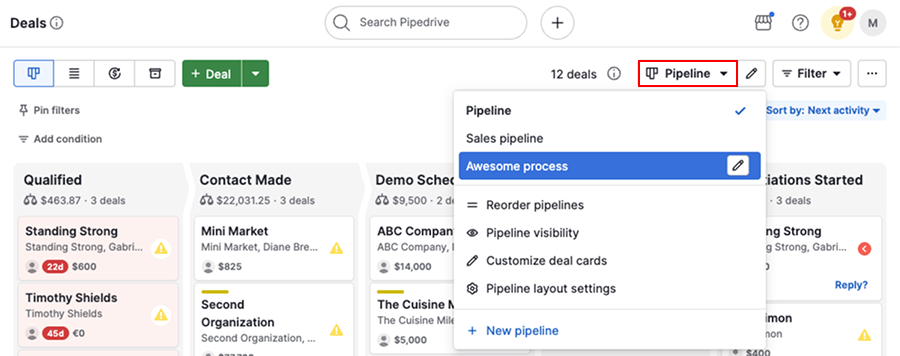
Open a spreadsheet and map every step a deal actually moves through, from first touch to closed-won or dead. For most outbound motions that looks like: Prospecting, Contacted, Replied, Meeting Booked, Qualified, Proposal Sent, Closed. Delete any stage that does not have a clear entry and exit condition a rep can state in one sentence. Then, and only then, log into Pipedrive and build the pipeline. Per the Pipedrive help docs, you can have up to 15 pipelines, so consider a separate pipeline for inbound versus outbound from day one.
Before you import anything, add the custom fields you will populate via enrichment: Job Title Seniority (dropdown), Company Headcount (number), Tech Stack (multi-select), ICP Tier (dropdown: Tier 1 / Tier 2 / Out), and Last Enriched Date (date). Map these in Pipedrive under Settings > Data Fields > Person and Organization. This is the schema Clay will write back into. Doing it after import means remapping everything twice.
Pull your target account list into Clay and build a waterfall enrichment: Apollo for email and title, then Clearbit for company data, then LinkedIn as a fallback for anything that misses. Clay's column-level cascading means you only pay for the enrichment that actually lands. Once enriched, use Clay's Pipedrive integration (or push via Zapier with field mapping to your custom fields from Step 2) to create Person and Organization records. Do not import raw CSVs. You will spend a week cleaning data that a 20-minute Clay table fixes.
Set up a Pipedrive webhook in n8n that fires on deal.updated events. Branch on the stage_id: when a deal moves to Contacted, create an activity reminder in Pipedrive for a 3-day follow-up. When a deal moves to Replied, POST to your Smartlead or Lemlist API to pause the outbound sequence so the rep takes over. When a deal moves to Meeting Booked, send a Slack notification to the AE channel with the deal name, company size, and ICP tier pulled from the custom fields. This is the automation layer that keeps reps from manually updating two systems.
In Pipedrive's Insights, build three reports on day one: Pipeline Velocity by Stage (time in stage, deals in stage, conversion rate per stage), Activity Completion Rate by Rep (calls logged, emails sent, tasks completed versus created), and Source Attribution (which lead source produces deals that reach Qualified). Export these as a dashboard and share it with the team before the first sequence goes live. If you wait until week four to build reporting, you will not have baseline data to benchmark against.
The enrichment and automation wiring in detail
The Step 3 and Step 4 connection is where most implementations break. The common failure is treating enrichment as a one-time import rather than a continuous loop. My recommendation: have Clay run a daily table refresh on any contact where Last Enriched Date is older than 30 days, pushing delta updates back to Pipedrive. That keeps your data current without manual intervention.
For the n8n workflow, the Pipedrive webhook node is straightforward to configure, but watch the payload structure. The current.stage_id field in the webhook body is what you branch on, not the stage name (names change; IDs do not). Map your stage IDs from Pipedrive’s API at GET /stages before you build the workflow, and hardcode them as variables at the top of the n8n workflow so any teammate can update them without touching the branch logic.
The trap: Teams build n8n automation that triggers on deal stage change but forget to handle re-entrancy. If a rep moves a deal from Contacted to Replied and then back to Contacted (it happens), the sequence trigger fires twice and the prospect gets re-enrolled. This is the most common complaint about sequence and CRM integrations.
Add a check node after the webhook that queries Pipedrive’s activity log via the API and confirms no active sequence enrollment exists before the POST to Smartlead or Lemlist. One extra API call saves a lot of reputation damage.
// n8n: Check for active enrollment before sequence trigger
// In an n8n Code node, after the webhook trigger:

const dealId = $input.item.json.current.id;
const stageId = $input.item.json.current.stage_id;

// Hardcode your stage IDs as workflow variables
const REPLIED_STAGE_ID = 4;
const CONTACTED_STAGE_ID = 2;

if (stageId !== REPLIED_STAGE_ID) {
  return [{ json: { skip: true } }];
}

// Fetch open activities for this deal
const activities = await $http.get({
  url: `https://api.pipedrive.com/v1/deals/${dealId}/activities`,
  qs: { api_token: $vars.PIPEDRIVE_API_KEY, done: 0 }
});

const hasActiveSequence = activities.data.data?.some(
  a => a.note?.includes('sequence:active')
);

return [{ json: { dealId, shouldEnroll: !hasActiveSequence } }];
For the Clay side, the enrichment waterfall pattern covered in the Surfe vs Clay comparison gives a good mental model: waterfall logic means if Apollo returns a valid work email, Clay does not charge a credit to try Clearbit on top of it. Design your column order accordingly.
And if you need sequences that go beyond what Pipedrive’s native email handles, the Pipedrive automated emails setup guide covers the full sequence configuration without needing a developer.
Which tool fills which gap
Pipedrive is the record of truth and pipeline manager. It is not a sequence engine, an enrichment layer, or a serious automation platform. Here is how I’d split the stack:
Which tool handles which job in your outbound stack
Choose Pipedrive if
- You need a clean, visual pipeline for reps to manage deal stages and log activity
- Your team is under 50 seats and wants a lighter CRM than Salesforce or HubSpot
- You want workflow automations and email sync without a full marketing automation platform
Choose Clay if

- You need multi-source enrichment that does not lock you into one data vendor
- Your ICP tier scoring requires enriching 5+ fields per contact before outreach
- You want to build dynamic prospect lists that update automatically on a schedule
Choose n8n if

- You want self-hosted automation without per-task pricing that compounds at volume
- Your team has light technical ability and can configure JSON workflows without a full dev
- You need complex branching logic: CRM webhooks to sequence tools to Slack and back again
Choose Smartlead if

- You are sending cold email at volume and need inbox rotation and deliverability management
- Your outbound sequences need A/B testing and reply detection that Pipedrive cannot handle natively
- You want a sequence tool that accepts API enrollments from n8n or Zapier webhooks
For HubSpot users evaluating whether to switch: HubSpot’s CRM is genuinely stronger on the marketing automation and contact lifecycle side, but the pipeline UI is cluttered compared to Pipedrive’s visual board. If your team is primarily outbound SDRs working deals, Pipedrive wins on UX. If marketing and sales share the same contact database heavily, HubSpot is worth the premium. The segmentation guide for Pipedrive covers how to approximate HubSpot-style list segmentation inside Pipedrive if you stay on the lighter stack.
Getting your implementation to stick
Configuration is the easy part. Adoption is where Pipedrive implementations live or die. The usual trap is building a well-designed pipeline and then leaving reps to self-discover it. I’d argue the first two weeks of any CRM rollout should have a mandatory activity logging ritual baked in: every call gets logged before the rep closes their laptop. No exceptions.
Pair that with a weekly 15-minute pipeline review where the manager pulls the Insights dashboard live with the team. That surfaces stage stagnation and missing activities in a way that no Slack reminder ever will. Pipedrive’s help documentation on activity management is worth assigning to new reps as onboarding reading.
The Clay enrichment loop and n8n automation mean reps spend less time on data entry, which removes the biggest excuse for not using the CRM. When the system pre-populates ICP tier, headcount, and company tech stack before the rep ever touches the record, logging a call outcome takes 20 seconds rather than two minutes. That is the real ROI of a well-wired implementation: not the automation itself, but the adoption it enables.
Sources
Frequently asked questions
How long does a Pipedrive implementation take?
A focused team can complete a baseline outbound-ready Pipedrive implementation in one to two weeks. Complex enrichment integrations with Clay or n8n workflows add another week.
Can Pipedrive handle outbound sequences natively?
Yes, Pipedrive's Campaigns and built-in email sync support basic sequences, but most outbound teams connect a dedicated tool like Smartlead or Lemlist for higher-volume cadences.
What is the best way to enrich contacts in Pipedrive?
The most reliable pattern is a Clay waterfall that writes enriched fields back to Pipedrive via API or Zapier, giving you multi-source coverage without buying a single-vendor data license.
Does Pipedrive integrate with n8n for automation?
Yes. Pipedrive exposes a full REST API and webhooks, and n8n has a native Pipedrive node, making it straightforward to trigger workflows on deal stage changes or new contact creation.
How do I set up pipeline stages in Pipedrive for outbound?
Map your actual sales motion first: typically Prospecting, Contacted, Replied, Meeting Booked, Qualified, Proposal, and Closed. Remove any stage your reps skip in practice.