GuidesCRM
Pipedrive for Marketing Teams: What Works and What Doesn't
Pipedrive can handle basic marketing workflows, but has real limits. Here's an honest breakdown of what it does well and where you need to augment it.

The tools compared
Some links on this page are affiliate links. If you buy through them we may earn a commission at no cost to you; it never changes a verdict. How we make money
The short answer
Pipedrive works for marketing as a deal-stage trigger and contact database, but it lacks native lead scoring, multi-step nurture, and campaign analytics that dedicated marketing tools provide.
Pipedrive gets evaluated for marketing more often than you’d expect. The pitch makes sense on paper: one tool for contacts, deals, and outreach, without the HubSpot tax. The reality is more nuanced. Pipedrive is a well-designed sales CRM with some marketing surface area bolted on, and knowing exactly where the seams are will save you from building a workflow that falls apart six months in. Here’s my honest read on where it earns its place and where you’ll be patching gaps with other tools.
Pipedrive is a sales tool that marketing teams can use. That word order matters: the product decisions reflect it.
What Pipedrive Actually Gives Marketing Teams
More than most RevOps practitioners give it credit for. Within a specific scope.
The core contact database is solid. Pipedrive stores people and organizations with custom fields, labels, and filters that work well for basic segmentation. If you’re a B2B team with a sales-led motion where marketing’s job is to fill the top of a pipeline and hand off to an AE, you can manage that workflow entirely in Pipedrive. Deal stages become your funnel stages. Automations fire when a deal moves from “Lead In” to “Demo Scheduled” and can trigger tasks, emails, or webhook calls to other systems.
The Pipedrive implementation guide covers how to configure custom stages and fields for outbound, and those same patterns apply to inbound marketing feeds. The segmentation capabilities (filters on deal fields, person fields, custom labels) give you enough surface area to build simple campaign lists, which the Campaigns add-on can then target.
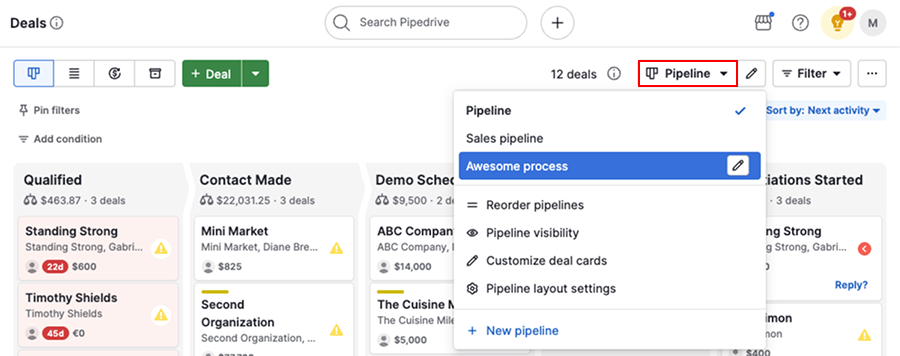
Workflow automation in Pipedrive fires on triggers like deal stage change, deal created, or contact field updated. You can send a one-off email, assign a task, update a field, or call a webhook. That webhook is actually the most powerful marketing lever Pipedrive has: you can fire into n8n, Zapier, or Make and kick off a full nurture sequence in a separate tool. I’d argue that’s the correct architecture for most teams, rather than trying to make Pipedrive do the nurture itself. Don’t bother building multi-step nurture inside Pipedrive’s automation builder. Use Pipedrive to trigger, then hand off to a tool designed for it.
The Pipedrive automated emails guide goes deeper on what’s possible without code. Short version: one-to-one triggered emails yes, multi-step drip sequences no.
Where Pipedrive Falls Short for Marketing
This is where most evaluations get soft. I’ll be direct about the gaps.
No lead scoring. There is no native lead scoring engine in Pipedrive. You can approximate it with custom numeric fields that automations update when certain conditions are met (form filled, email opened, deal stage advanced), but it’s fragile and requires you to design the scoring logic yourself in automations. A common failure mode: scoring fields drift out of sync when deals are moved manually. HubSpot and ActiveCampaign both handle this natively, which matters when your MQL definition relies on score thresholds.
Campaigns is a bolt-on, not a marketing suite. The Campaigns add-on gives you bulk email sending with template editors, open and click tracking, and basic unsubscribe management. Per Pipedrive’s own documentation, it does not support behavioral triggers (send email when contact opens previous email), A/B testing, or time-delay drip sequences. It is closer to a list-blast tool than a marketing automation platform. For teams comparing this to Mailchimp or Brevo, Campaigns loses on features at similar or higher per-contact cost. That’s not a knock on Pipedrive, it’s just what the product is.
Reporting is deal-centric, not campaign-centric. Built-in reports show pipeline velocity, conversion rates by stage, and activity metrics. There is no campaign attribution report that connects an email campaign to pipeline created. You can work around it with UTM tracking in custom fields and manual analysis, but that requires real effort. Teams that need to show “which campaigns drove which pipeline” will find Pipedrive frustrating compared to HubSpot’s revenue attribution or even a lightweight tool like Factors AI.
Form and landing page capture is thin. Pipedrive’s web forms exist but they are basic. No native landing page builder. If lead capture is a core marketing motion, you’re looking at Leadpages or a similar tool, then syncing submissions to Pipedrive via Zapier or a native integration. That adds cost and another failure point.
The trap: Teams assume Pipedrive’s workflow automations map to marketing automation. They set up a “deal created” trigger that sends a welcome email and call it nurture. Three months later they realize contacts who didn’t convert in week one have received zero follow-up, because there’s no time-delay sequence logic to re-engage them.
The fix: Use Pipedrive as the system of record and deal tracker. Route all nurture logic through a dedicated tool. A webhook from Pipedrive on “deal stage = Lead In” can enroll a contact in a Lemlist or Smartlead sequence, or trigger an n8n workflow that branches on contact properties. The segmentation guide at /blog/2026-10-20-pipedrive-segmentation-guide-filter-tag-and-trigger-sequence/ has the filter patterns to make this clean.
Pipedrive vs. HubSpot for Marketing: The Actual Decision
Most teams asking “Pipedrive for marketing?” are really asking “Should we use Pipedrive instead of HubSpot?” That’s a different question and worth addressing directly.
Pipedrive vs. HubSpot: Which fits your marketing motion?
Choose Pipedrive if

- Your marketing team's primary job is filling a sales pipeline and handing off to AEs, not running nurture campaigns
- You already use or plan to use a dedicated email tool like Lemlist, Smartlead, or ActiveCampaign and just need a CRM backbone
- Budget is a real constraint and you can live without native lead scoring or multi-touch attribution
Choose HubSpot if

- You need native lead scoring, smart lists, and behavioral triggers without stitching together a third-party stack
- Marketing and sales share the same platform and need unified reporting on pipeline influenced by campaigns
- You are running content-led, product-led, or inbound motions where nurture sequences and attribution are core to the program
The pricing gap is real but overstated once you account for the tools you’ll need to supplement Pipedrive. A Pipedrive Professional seat ($59/month) plus Campaigns plus a Lemlist or Smartlead license for sequences can approach or exceed HubSpot Starter territory, especially once your contact list grows. If you’re evaluating the marketing automation layer specifically, the ActiveCampaign alternatives post is worth reading before you commit.
Who Should Actually Use Pipedrive for Marketing
My read is that Pipedrive works well for marketing teams in one specific configuration: B2B companies with a sales-led motion, a small marketing headcount (one to three people), and a workflow where marketing owns lead generation and initial qualification, not multi-touch nurture.
In that setup, you get a clean contact database, deal-stage automation that reflects real buyer progression, and enough filtering to build targeted campaign lists. The gaps in scoring, nurture, and attribution get handled by connecting Lemlist for outreach sequencing, using a form tool like Fillout for lead capture, and piping everything through a lightweight automation layer. That’s a functional, affordable stack for a team that doesn’t want to live inside HubSpot.
Where Pipedrive collapses is when the marketing team starts owning the full funnel: MQL definition, nurture design, pipeline attribution, and campaign reporting. Those workflows all assume a marketing automation platform. Pipedrive is not that. Teams that push past the limit usually end up with a custom-field mess, broken scoring logic, and frustrated salespeople whose pipeline data is polluted by marketing experiments. The GTM workflow automation guide covers why that gap matters in a broader automation context.
The Verdict
Pipedrive earns its place as a marketing tool for lean, sales-led B2B teams that need a clean CRM backbone without HubSpot’s complexity or price tag. It does not earn its place as a standalone marketing automation platform. Know which problem you’re solving before you buy.
Sources
Frequently asked questions
Can Pipedrive be used for email marketing?
Yes, Pipedrive has a Campaigns add-on for bulk email, but it lacks advanced segmentation and behavioral triggers. Most teams pair it with a dedicated email tool instead.
Does Pipedrive have marketing automation?
Pipedrive has basic workflow automation for deal and contact updates, but it does not offer multi-step nurture sequences or lead scoring natively. You need an integration or add-on for that.
How does Pipedrive compare to HubSpot for marketing?
HubSpot has a far deeper marketing suite including lead scoring, smart lists, and native attribution. Pipedrive is cheaper and simpler but requires third-party tools to match those capabilities.
What is the Pipedrive Campaigns add-on?
Campaigns is a paid Pipedrive add-on that adds bulk email sending, basic templates, and open/click reporting. It does not support behavioral automation or drip sequences.
Can Pipedrive replace HubSpot for a small marketing team?
For a very small team that just needs contact management and simple email blasts, Pipedrive plus Campaigns can work. Teams that need nurture workflows, lead scoring, or attribution should stick with HubSpot.