GuidesPipedrive
Pipedrive Segmentation Guide: Filter, Tag, and Trigger Sequences
How to segment Pipedrive contacts, apply labels, use filters, and trigger outreach sequences without needing a CRM admin. Practical RevOps playbook.

The tools compared
Entry prices from the pricing index, read Aug 12, 2026
Some links on this page are affiliate links. If you buy through them we may earn a commission at no cost to you; it never changes a verdict. How we make money
The short answer
You can build powerful Pipedrive segments using native filters and custom fields, then trigger sequences via n8n or Make without touching admin settings or hiring a specialist.
Most Pipedrive users treat the CRM as a pipeline visualizer and nothing else. They chase deals through stages, log calls, then export a CSV whenever they need to do real segmentation work in a spreadsheet. That is a failure of setup, not a failure of the tool. Pipedrive has a capable filter engine, a label system, custom fields, and an automation layer that, wired correctly, can slice your contact base, tag records automatically, and push the right people into a cold sequence or a nurture track without a single admin ticket. This guide walks through exactly how to set that up.
The segmentation model Pipedrive actually uses
Before building anything, it helps to understand what Pipedrive gives you natively. The platform has four segmentation surfaces, and most teams only use one of them.
Filters are the core of any Pipedrive segment. You can filter Persons, Organizations, Deals, Activities, and Leads independently. Filters support AND/OR logic, date ranges, field comparisons, and pipeline-specific conditions. Save a filter and it becomes a reusable segment you can share with your team.
Labels are colored tags you apply to Persons and Organizations. They show up in list views and can be used as filter conditions. Pipedrive gives you up to ten label colors, named whatever you want. Think “Hot Lead,” “Customer,” “Churned,” “Partner.” Coarse but fast to apply.
Custom fields are the power layer. You can create text, numeric, date, dropdown, and multi-option fields on any object. A multi-option custom field called “Segment” with values like “ICP-SMB,” “ICP-MM,” and “ICP-ENT” gives you a tag-like system with no color ceiling and full filter support. I’d start here rather than leaning on labels for anything requiring more than five distinct values.
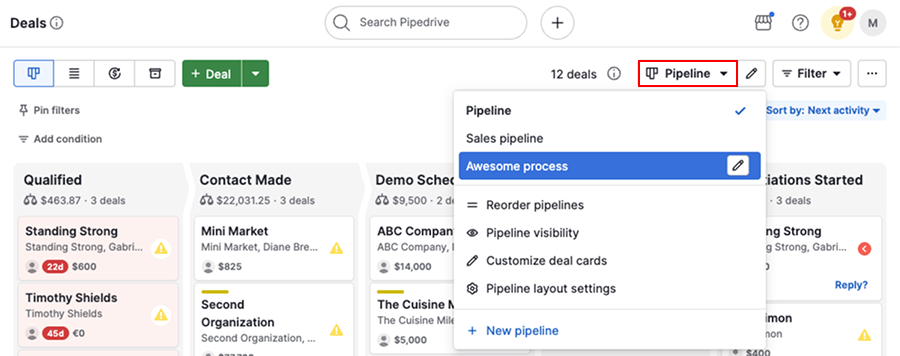
Pipeline stage is the most overlooked segmentation dimension. A contact’s associated deal stage is queryable in filters, which means “everyone in the Proposal stage with a deal value over $10k in the Enterprise pipeline” is a valid segment you can build in about 90 seconds.
How to build a Pipedrive segment step by step
Before touching the UI, write out the logic in plain English. 'All Persons where Industry = SaaS AND Deal Stage = Qualified AND Last Activity > 14 days ago.' This prevents you from building filters that look right but miss edge cases. If you cannot write the criteria in one sentence, the segment is probably two segments.
Go to Settings > Data Fields > Person (or Organization). Add a multi-option custom field called 'Segment' or 'ICP Tier' with your values. Add a single-line text field called 'Enrichment Source' if you are using Clay or a waterfall enrichment tool upstream. These fields will be your most reliable filter handles later.
In the Contacts > People list view, click the filter icon and add your conditions. Chain AND/OR groups as needed. When the count looks right (spot-check 5-10 records manually), hit Save Filter, give it a descriptive name like 'ICP-SMB / Stale 14d,' and set sharing to All Users. A saved filter is your segment. Treat it like a list in HubSpot or a smart campaign in Marketo.
Select filtered records in list view and use the bulk-edit action to apply a label. For ongoing automation, go to Automations and create a trigger: 'When a Person's custom field Segment changes' then 'Update Label to Hot.' This keeps labels in sync with your custom field values without manual work.
For native single-email outreach, Pipedrive's automation supports 'Send email' as an action. For multi-step sequences, you need to push records out. Create a Pipedrive automation that fires a webhook when a Person matches your segment conditions, then catch it in n8n or Make, transform the payload, and create a contact in Smartlead or Lemlist. The webhook trigger is available on the Professional plan and above.
The webhook-to-sequence wiring (where most setups break)
The filter-and-label work above gets you clean segments. The automation step is where teams leave value on the table. Here is the common failure mode and the fix.
The trap: Teams set up a Pipedrive automation that fires on a label change but use the built-in “Send email” action. That sends one email from the rep’s connected inbox and stops. No follow-up, no sequence enrollment, no reply detection. When the rep goes on PTO, the emails still fire but nobody handles replies. Worse, Pipedrive does not deduplicate enrollment, so if the label gets toggled twice, the contact gets two emails.
// n8n webhook node catches Pipedrive payload
// Then maps to Smartlead API call
{
  "email": "{{$json.person.email[0].value}}",
  "first_name": "{{$json.person.first_name}}",
  "last_name": "{{$json.person.last_name}}",
  "campaign_id": "42",
  "custom_fields": {
    "company": "{{$json.organization.name}}",
    "segment": "{{$json.person.segment}}"
  }
}
// Add an IF node upstream: check
// "already_enrolled" custom field = true
// to prevent duplicate enrollment
The fix is a deduplication guard. In n8n, add an IF node that checks a Pipedrive custom field called “Sequence Enrolled” before the Smartlead or Lemlist enrollment call. If the field is true, the branch exits. After successful enrollment, write back to the Pipedrive Person record via the API to flip “Sequence Enrolled” to true. One extra API call. Zero double-enrollments. You can see how this pattern scales in the n8n workflow canvas when you add a branching enrichment step.
For teams already looking at Pipedrive-to-JSON data pipelines, the same webhook pattern applies. The payload structure is identical.
When to bring HubSpot into the segmentation layer
HubSpot has a materially better segmentation UI than Pipedrive. Full stop. Active lists with behavioral triggers, lifecycle stage logic, and form submission history are genuinely more powerful than Pipedrive’s saved filters. If your GTM motion involves marketing nurture alongside sales pipeline work, my read is that the right architecture is Pipedrive as the deal-of-record system and HubSpot handling all segmentation and sequence enrollment upstream. Don’t try to force Pipedrive to do both jobs well.
The native HubSpot-Pipedrive sync is bidirectional and handles Contact-to-Person and Deal-to-Deal mapping. You can build your segment as a HubSpot Active List, enroll it in a HubSpot sequence, and have deal creation or stage updates sync back to Pipedrive automatically.
The catch: you are now paying for two CRMs. For teams under 10 reps on Pipedrive’s Professional plan, the HubSpot Sales Hub add-on cost often does not pencil. In that case, stay native in Pipedrive and use Make or n8n as the middleware layer instead.
For a deeper look at how Make connects to GTM tooling, Make integrations for GTM teams covers the pattern in more detail.
Which tool handles which part of the stack
Pick the right layer for your segmentation stack
Choose Pipedrive (native) if
- You want segments built purely on pipeline data: stage, deal value, last activity
- Your team is under 10 reps and you cannot justify a second platform
- Single-touch email actions on segment entry are enough
Choose n8n if

- You need multi-step logic between Pipedrive and a sequence tool
- You want to self-host and keep costs near zero at volume
- You are comfortable with a JSON-based workflow builder
Choose Make if

- You want a visual, no-code scenario builder with Pipedrive's native Make module
- Your team has non-technical operators who will maintain the automations
- You need built-in error handling and run history without self-hosting
Choose HubSpot (list layer) if

- Your marketing team already lives in HubSpot and needs behavioral segmentation
- You want lifecycle stage logic, form fills, or page views as segment criteria
- You are willing to pay for a two-CRM architecture and manage the sync
A note on sequence tool selection
Once your segment is clean and the trigger is wired, the sequencer choice matters. Smartlead and Lemlist both accept contact enrollment via API and support custom field variables for personalization tokens. If you are using Mailshake or Instantly instead, the API structure differs but the n8n or Make pattern is identical: HTTP request node pointing at the enrollment endpoint with your mapped fields. Don’t let tool preference change the architecture. The pattern holds regardless of which sequencer sits at the end of the chain.
For context on how Pipedrive fits into a broader outreach stack, the comparison of Mailshake vs Pipedrive covers why these tools are complementary, not competing. And if you need better enrichment on your segment records before enrollment, the Surfe vs Fullenrich waterfall coverage comparison is worth reading before you commit to an enrichment layer.
Per Pipedrive’s developer docs, the Persons API supports full CRUD on custom fields, which means any automation tool that can make an authenticated POST request can write segment data back to Pipedrive without a developer on call.
The segment is only as good as the action it triggers
A saved filter with no downstream trigger is just a fancy search. The whole point of building clean Pipedrive segments is that they become the inputs to repeatable, automatable motions: sequence enrollment, deal stage nudges, rep task creation, or Slack alerts on segment size changes. According to G2’s CRM workflow automation research, teams that automate at least one post-filter action see meaningfully higher CRM data quality over time, because the automation surface pressure-tests whether the segment logic is actually correct.
Start with one segment, one trigger, one action. Wire the Pipedrive webhook to n8n or Make, add the deduplication guard, enroll into your sequence tool of choice, and write the enrollment flag back to the Person record. When that loop runs cleanly for two weeks, you have a pattern you can replicate across every segment in your model. Simple. Repeatable. No admin overhead.
Sources
Frequently asked questions
Does Pipedrive have segmentation?
Yes. Pipedrive supports segmentation through contact and deal filters, custom fields, and labels. You can save filter views and use them as audiences for email campaigns or automation triggers.
How do I tag contacts in Pipedrive?
Pipedrive uses Labels (colored tags on persons and organizations) rather than a true tagging system. You can also create a multi-option custom field to replicate tag-style segmentation with more granularity.
Can Pipedrive trigger email sequences automatically?
Pipedrive's native automation can send single emails on deal stage changes, but for multi-step sequences you need to push to a dedicated sequencer like Smartlead or Lemlist via n8n, Make, or Zapier.
What is the best way to segment Pipedrive without a developer?
Use saved filters built on custom fields and label values, then wire those filters to an automation via Pipedrive's workflow automation or a no-code tool like n8n or Make.
Does Pipedrive integrate with HubSpot for segmentation?
Yes, via a native two-way sync or through middleware like n8n and Make. This lets you use HubSpot's list-building on top of Pipedrive pipeline data without migrating your CRM.