Pipedrive Marketplace: Integrations Worth Paying For in 2026
 By Ian Chamberland 10 min read
 TL;DR
The Pipedrive Marketplace has 400-plus integrations but only a handful are worth paying for in 2026. Focus on automation middleware, conversation intelligence, and phone integrations before adding anything else.
On this page
The Pipedrive Marketplace has crossed 400 integrations. That number is mostly noise. I’ve spent the better part of three years building RevOps stacks on top of Pipedrive for B2B SaaS teams, and the honest answer is that maybe 15 of those 400 integrations are worth a second look. Fewer still deserve a recurring line item on your tech budget. This guide cuts to the ones that actually change how deals move.
Why the Marketplace Exists (and Why You Should Ignore Most of It)
The integrations worth paying for are the ones that fix a structural gap in Pipedrive’s core product, not the ones that add a feature Pipedrive already does adequately.
Pipedrive’s core strength is pipeline visibility. It is genuinely the best drag-and-drop deal pipeline UI in its price tier, and I will die on that hill. But it was not built to be an automation powerhouse, a conversation intelligence platform, or a dialer. The Marketplace exists to paper over those gaps. Some apps do it well. Most do not.
The pattern I keep seeing: teams install five or six Marketplace apps in the first 90 days, then quietly stop using three of them by month four because the data sync is janky or the triggers are too limited. The smarter move is to pick a thin stack of integrations that each handle a distinct job, then stitch them with a middleware layer you actually control.
The Stack I’d Actually Build in 2026
Here is how I think about the Marketplace in layers. The automation layer comes first because it multiplies everything else. The phone layer comes second because call data is where deal context actually lives. The marketing hand-off layer comes third. Everything else is optional and has to earn its seat.
Pipedrive Marketplace: The Integrations That Earn Their Cost

n8n Top pick
n8n is not listed in the Pipedrive Marketplace directly, but it connects via a native Pipedrive node and the REST API. I put it first on this list because it is the integration that makes every other integration better. When Pipedrive's built-in automation triggers (which I've written about at length in my post on [Pipedrive automation limits and workarounds](/blog/2026-09-20-pipedrive-automation-in-2026-limits-triggers-and-workarounds/)) hit a wall, n8n is where you route around them. You can fan out a deal stage change into a Slack alert, a Clay enrichment call, a Smartlead sequence enrollment, and a HubSpot contact update, all in one workflow. Self-hosted on a $6/month VPS means your data never touches a third-party server.
Highlights
- Native Pipedrive node with trigger and action support
- Webhook-based triggers catch events Pipedrive's native automation misses
- Self-hostable: no per-operation pricing ceiling
- Active community workflow library for Pipedrive-specific use cases

Make
Make is the Marketplace-adjacent alternative for teams that want n8n's power without touching a terminal. The Pipedrive module in Make is mature, covering deals, contacts, organizations, notes, and activities as both triggers and actions. Where Make earns its cost over Pipedrive's native automations is in multi-step logic with conditional branching. I've used it to build lead routing flows that score inbound form fills against deal history before assigning an owner. Watch the pricing model closely though. It is operations-based, and it will sneak up on you on high-volume pipelines. If you're processing more than a few hundred deals per month, model out your operation count before committing.
Highlights
- Visual scenario builder with no-code Pipedrive module
- Supports routers, iterators, and error handlers natively
- 300+ pre-built templates including several Pipedrive-specific ones
- Better for non-technical RevOps operators than n8n

Aircall
The [Aircall](/go/aircall/) native integration is one of the better phone-to-CRM connections I've tested. Calls log automatically to the correct contact and deal in Pipedrive, recordings are attached as activity notes, and you can fire Pipedrive automations off call outcomes (connected, voicemail, no answer). Setup takes about 20 minutes if your Pipedrive deal stages are already clean. If they are not, fix those first or you will end up with call logs orphaned to the wrong stage. I've also written a deeper comparison on [connecting Aircall to HubSpot with n8n](/blog/2026-09-23-connect-aircall-to-hubspot-with-n8n-auto-log-calls-and-trigg/) if you're running a hybrid CRM setup.
Highlights
- Auto-logs inbound and outbound calls to Pipedrive contact and deal records
- Call recordings and transcripts attached as deal notes
- Trigger Pipedrive automations based on call disposition
- Click-to-call from within the Pipedrive interface

HubSpot
Teams running [HubSpot](/go/hubspot/) for marketing and Pipedrive for sales are more common than the pure-play vendors want to admit. The native Pipedrive-HubSpot integration handles basic contact sync and deals-to-contacts mapping well enough for simple setups. It falls apart when you need custom field mapping, lifecycle stage logic, or bidirectional deal updates. For anything beyond a simple contact hand-off, skip the native connector and use n8n or Make as the sync layer instead. The connector also does not handle HubSpot lists as a sync target, which is a real gap if your marketing team segments by list membership.
Highlights
- Native contact and company sync between both CRMs
- Deal creation in Pipedrive can trigger HubSpot contact property updates
- One-click install from the Pipedrive Marketplace
- Custom field mapping requires workarounds or middleware
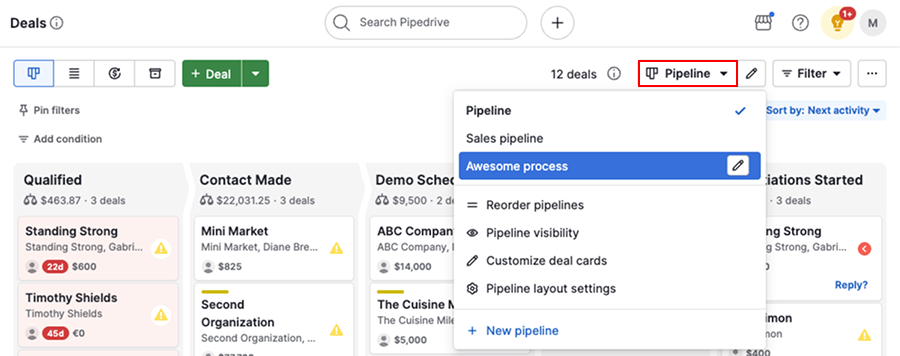
The Middleware Decision: n8n vs. Make for Pipedrive
This is the fork every Pipedrive team hits within six months of getting serious about automation. Both tools connect to Pipedrive well. The decision is really about who owns the automation and at what cost.
Where teams go wrong: They start with Make because it’s faster to set up, hit the operations cap on a high-volume pipeline month, and then get a surprise bill. Or they start with n8n self-hosted, underestimate the maintenance overhead, and end up with a broken workflow at 2am because a dependency updated. Neither is catastrophic, but both are predictable.
The other mistake I see consistently: using Pipedrive’s native automations AND a middleware layer for overlapping triggers. You end up with duplicate activities, double-logged notes, and confused reps. Pick one layer to own each trigger type and document it explicitly.
Pipedrive Deal Stage Change
       |
       v
n8n Webhook Trigger
       |
   [Branch]
  /         \
Stage 4?   Other
  |
  v
Clay Enrichment
  |
  v
Update Pipedrive
Custom Fields
  |
  v
Enroll in Smartlead
Sequence
Categories to Skip in the Marketplace
A few categories I’d actively avoid spending money on right now.
Data enrichment apps. The Marketplace has several enrichment tools that are effectively white-labeling Lusha or Clearbit data at a 40 to 60 percent markup. If you need enrichment in your Pipedrive workflow, pull the data directly from the source or use Clay as a waterfall enrichment layer via n8n. You get better match rates and lower unit costs. Don’t pay a middleman for data you can buy wholesale.
Email sequence tools inside the Marketplace. Pipedrive’s native email automation is limited but functional for simple follow-up sequences. If you’ve outgrown it, the real answer is a dedicated outbound tool like Smartlead or Lemlist connected via middleware, not a Marketplace email app that locks your sequences inside a vendor’s UI. I covered the best options in a separate breakdown if you want the full comparison.
Generic Zapier-based connectors. The Marketplace lists several integrations that are just pre-built Zapier Zaps wrapped in a one-click installer. You’re paying for convenience that evaporates the moment you need custom logic. Build it yourself in Make or n8n and own the workflow.
Audit Before You Add
Before installing anything new, run a quick audit of what you’re already paying for. The Pipedrive automations audit I published covers the specific places where native automation breaks down and integration data leaks out of deal records. Fixing those gaps before layering in new integrations is non-negotiable. Building on a broken foundation just means you’ll debug two problems instead of one.
The Pipedrive Marketplace app directory itself is worth browsing by category rather than by popularity. Top-rated apps skew toward the largest user bases, not the highest RevOps utility. Those are very different rankings.
One More Cut: Who Should Use Which Middleware
n8n vs. Make for Your Pipedrive Stack
Choose n8n if
- Your team has at least one person comfortable with JSON and basic API concepts
- You process high volumes of deals or contacts and want predictable flat-rate pricing
- Data sovereignty matters, or you prefer self-hosted infrastructure
Choose Make if
- Your RevOps operator is non-technical and needs a visual drag-and-drop builder
- You're running under 10,000 operations per month and the per-operation pricing won't bite
- Speed of setup matters more than long-term cost optimization
The Pipedrive Marketplace is most useful as a starting point for discovery. It is not your final answer. The integrations worth paying for in 2026 solve a structural gap: middleware for automation logic, a proper phone integration for call data, and a clean hand-off to your marketing CRM. Everything else has to prove it reduces manual work or improves data quality before it earns the budget.
Sources
Frequently asked questions
What is the Pipedrive Marketplace?
The Pipedrive Marketplace is an app directory where users can browse and install native integrations, third-party connections, and automation tools that extend Pipedrive's CRM functionality. It currently lists over 400 apps.
Does Pipedrive integrate with HubSpot?
Yes, there are several bi-directional HubSpot integrations available in the Pipedrive Marketplace, though most teams use middleware like n8n or Make to build custom sync logic rather than the native connector.
Is n8n available in the Pipedrive Marketplace?
n8n is not listed directly in the Pipedrive Marketplace, but it connects to Pipedrive via a native node and REST API, making it the most flexible automation layer for Pipedrive-heavy stacks.
What does Aircall's Pipedrive integration do?
The Aircall integration for Pipedrive auto-logs calls, syncs call recordings and transcripts to contact and deal records, and can trigger Pipedrive automations based on call outcomes.
How many integrations are in the Pipedrive Marketplace?
As of 2026, the Pipedrive Marketplace lists over 400 integrations across categories including marketing, communication, automation, and data enrichment.
Free Newsletter
Get new posts by email.
Migration guides, tool comparisons, and pricing breakdowns from real RevOps and GTM stacks, sent as they publish.
No spam. Unsubscribe anytime.
Enjoying this? Share it with your team.
Keep reading

Some links are affiliate links. Disclosure.