Pipedrive Automation in 2026: Limits, Triggers, and Workarounds
 By Ian Chamberland 11 min read
 TL;DR
Pipedrive automation covers basic deal-stage triggers and email sequences natively, but you will need Make, n8n, or Zapier to handle multi-step logic, cross-object branching, or anything touching enrichment and outbound sequencing.
On this page
Pipedrive automation is one of the most searched terms in the SMB RevOps space, and also one of the most misunderstood. Teams buy Pipedrive expecting HubSpot-level workflow logic, then spend three months duct-taping it together with Zapier before giving up or committing to a proper orchestration layer. I have been through that arc, and this post is the map I wish existed on day one. What Pipedrive automation actually does in 2026, where the hard walls are, and which middleware tools close the gap without turning your stack into a maintenance nightmare.
What Pipedrive automation actually does
Pipedrive’s built-in workflow builder has matured since 2023, but it is still fundamentally a linear trigger-action engine. You pick a trigger object (deal, person, organization, activity, or lead), choose a triggering condition, then stack a sequence of actions. Actions include: update a field, create an activity, send an email, add a follower, move a stage, or create a note.
That is largely it.
What you cannot do natively: branch based on a condition mid-flow (“if deal value is over $20k, do X, else do Y”), enroll the same record in multiple simultaneous automations that check each other’s state, fire on an inbound webhook from an external system, or trigger on email reply detection. The workflow builder also has no concept of wait-for-condition steps. You can add a time delay, but you cannot say “wait until the activity is marked complete, then proceed.”
These are not edge cases. They are the core of any real sales automation stack.
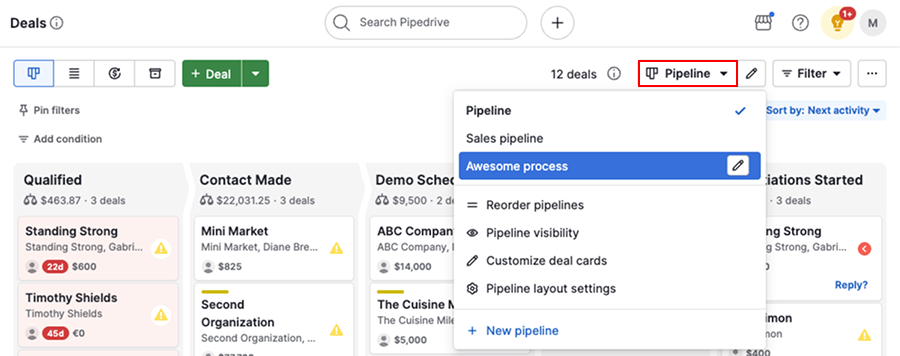
According to Pipedrive’s own automation documentation, the workflow builder supports conditions on trigger filters but not mid-flow branching logic. That distinction is easy to miss in a sales demo and very painful to discover post-onboarding.
The four automation walls you will hit
Most teams run into the same four limits in roughly the same order. Understanding them upfront lets you architect around them instead of retrofitting six months later.
Wall 1: No branching. Every workflow is a straight line. If you need conditional logic, you need middleware. No exceptions.
Wall 2: No external event triggers. If your product signals a PQL event via webhook, or your data warehouse pushes a score change, Pipedrive has no listener for it. You need Make or n8n to catch the event and write back to Pipedrive via API.
Wall 3: No reply-aware sequencing. Pipedrive can send an email step in a workflow, but it cannot detect a reply and halt the sequence. For true outbound sequences with reply detection, you need Smartlead, Instantly, or Lemlist running in parallel, connected back to Pipedrive via deal and activity updates. This is covered in more depth in your sales sequence software is leaking leads.
Wall 4: Cross-object logic gaps. You can trigger on a deal and update a person field, but you cannot trigger on a person field change and then evaluate deal-level conditions in the same flow. The object graph is shallow, and you feel it fast in any account-based motion.
The trap: Teams try to work around the branching limit by creating duplicate automations with opposite trigger filters (one for “deal value greater than 20000” and one for “deal value less than or equal to 20000”). This works until you have five conditions. At that point you have 32 automations burning through your plan cap and becoming impossible to debug when a field rename breaks two of them silently.
// Make scenario: branch logic Pipedrive can't do
{
  "trigger": "Pipedrive: Watch Deals (stage change)",
  "router": {
    "branch_a": {
      "condition": "deal.value > 20000",
      "actions": ["Assign AE", "Create Slack alert"]
    },
    "branch_b": {
      "condition": "deal.value <= 20000",
      "actions": ["Enroll in Lemlist sequence"]
    }
  }
}
The middleware layer: Make, n8n, Zapier, and HubSpot
This is where most Pipedrive teams actually live once they hit wall one or two. The four real options are Make, n8n, Zapier, and treating HubSpot as both CRM and automation engine (then syncing to Pipedrive or replacing it outright).
My honest take: Zapier is the wrong default for anything beyond two steps. It gets recommended constantly because it has brand recognition, but the per-task pricing punishes volume and the branching support is genuinely worse than Make’s router. Use Zapier only if your team already owns it org-wide and the flows are trivially simple.
Which middleware fills the Pipedrive automation gap?
Choose Make if

- You want the deepest Pipedrive-native module with no custom API coding
- You need visual canvas debugging and multi-branch router logic
- Your team is non-technical but the flows are complex
Choose n8n if

- You want self-hosted deployment for data residency or cost control at volume
- Your team has a developer who can maintain node configurations
- You are running high-volume webhook processing where per-operation pricing stings
Choose Zapier if

- Your flows are genuinely simple: one trigger, one or two actions
- Non-technical stakeholders need to own and edit automations independently
- You are already paying for Zapier across the org and want to avoid another tool
Choose HubSpot if

- You are already reconsidering Pipedrive as your CRM
- You need contact-based enrollment logic, A/B testing in sequences, and reporting in one tool
- Your team is growing past 10 reps and the RevOps overhead of middleware is becoming its own problem
I default to Make for most Pipedrive automation gaps. The native Pipedrive module covers deal watchers, person creates, activity updates, and API calls with built-in field mapping. The router module handles the branching Pipedrive cannot do. And the visual canvas makes it auditable when something breaks at 2am before a board demo.
For teams weighing a broader HubSpot move, I have seen that transition play out in ways that this post on why Pipedrive teams are moving to Salesforce (not Attio) captures well, even though the destination differs. If you want to compare Make against HubSpot Workflows as an automation layer more broadly, this breakdown of HubSpot Workflows vs. Kit vs. Make covers the tradeoffs in detail.
Building a real Pipedrive automation stack
Here is how I actually wire this up for a B2B SaaS team running Pipedrive as their CRM with both outbound and inbound motions in play.
List every automation you want, then sort them into two buckets: 'Pipedrive can own this' (field update on stage change, activity reminder, internal assign) and 'needs middleware' (external webhook, reply detection, conditional branching). Most teams are surprised how short the first bucket is.
Create a Make organization connected to Pipedrive via the native module. Use Pipedrive's webhook integration (Settings > Webhooks) to push deal and person events into Make in real time rather than polling. Polling introduces 5-15 minute delays that kill time-sensitive workflows.
Each router branch gets its own condition set. Route high-ACV deals to Slack with a deal summary. Route SMB deals into a Lemlist or Smartlead sequence via their API. Route inbound leads from your website form into Pipedrive person creation plus immediate sequence enrollment, all in one scenario.
When a prospect replies, your sequencing tool should write an activity back to Pipedrive: 'Email replied on [date]' plus a stage move if warranted. Make handles this in the same scenario or a separate one triggered by the sequencer's webhook. This closes the loop that Pipedrive's native email steps cannot.
Before Make writes enrichment data from Clay or Apollo back to Pipedrive fields, run a filter step that checks whether the field is already populated. Overwriting human-entered data with enrichment data is one of the fastest ways to destroy rep trust in your CRM. A 30-second filter step prevents it.
The n8n canvas below shows a version of this architecture with a webhook trigger, ICP branch, and parallel Smartlead plus Slack outputs. The pattern is identical in Make, just with a different visual skin.

What this stack cannot fix
Middleware closes the logic gap. It does not fix Pipedrive’s reporting limitations.
If you need revenue attribution across touchpoints, sequence engagement correlated with deal velocity, or anything resembling a multi-touch attribution model, you are going to feel the ceiling. That is a CRM-level problem, not an automation problem. The tooling you add around Pipedrive can execute the right actions at the right time, but the data model that would let you report on whether those actions worked is constrained by Pipedrive’s object structure.
Pipedrive’s API documentation is genuinely solid, which is why the middleware approach works at all. But if your RevOps reporting needs are outpacing your CRM’s data model, that is a signal worth taking seriously rather than papering over with more Make scenarios.
For teams considering a full migration away from Pipedrive, this guide on migrating from Pipedrive to Close without losing your sequences is the most practical reference I have found for the actual mechanics.
The honest picture
Pipedrive automation in 2026 is best understood as a capable trigger-action system for deal-centric events, paired with a middleware layer for everything that requires logic, external data, or sequence awareness. The native builder handles the 20% of use cases that are truly linear. Make or n8n handles the 80% that are not.
Calling that a limitation is fair. Calling it a dealbreaker depends entirely on whether you are willing to build the middleware layer once and maintain it, or whether you need everything in one tool with a unified data model and reporting layer. If it is the latter, the honest answer is that you may have outgrown Pipedrive, not just its automation.
Sources
Frequently asked questions
What can Pipedrive automation actually do natively?
Pipedrive's native automation handles deal-stage triggers, activity creation, email sends, and field updates. It does not support branching logic, webhooks out of the box, or cross-object automation between contacts and deals simultaneously.
Does Pipedrive have workflow automation like HubSpot?
Pipedrive has a basic workflow builder available on Professional and above plans, but it lacks HubSpot's branching, enrollment re-triggers, and deep contact-based logic. For anything beyond linear triggers, you need a middleware layer like Make or n8n.
What is the best integration tool for Pipedrive automation?
Make is the most practical choice for most RevOps teams because it has a dedicated Pipedrive module, visual canvas debugging, and handles complex multi-step flows without custom code. n8n is better if you want self-hosted control or cost predictability at volume.
Can Pipedrive send automated email sequences?
Yes, but only through its Campaigns add-on or the basic email automation step in workflows. For true sales sequences with reply detection and step branching, you need a dedicated tool like Smartlead, Instantly, or Lemlist connected via Make or Zapier.
What triggers are available in Pipedrive automation?
Pipedrive supports triggers on deal stage changes, deal creation, activity completion, person and organization field changes, and inbound email receipt. There is no native trigger for webhook payloads or external event data without a middleware tool.
Free Newsletter
Get new posts by email.
Migration guides, tool comparisons, and pricing breakdowns from real RevOps and GTM stacks, sent as they publish.
No spam. Unsubscribe anytime.
Enjoying this? Share it with your team.
Keep reading

Some links are affiliate links. Disclosure.