GuidesTool vs tool
Mailshake vs Pipedrive: Why They Get Confused and What to Use
Mailshake and Pipedrive solve different problems. This guide clears up the confusion and shows which sequencer or CRM fits your GTM stack.

The tools compared
Entry prices from the pricing index, read Aug 12, 2026
Some links on this page are affiliate links. If you buy through them we may earn a commission at no cost to you; it never changes a verdict. How we make money
The short answer
Mailshake is a cold outreach sequencer and Pipedrive is a CRM pipeline tool. They are not alternatives to each other, and most teams need one of each or a better modern replacement for both.
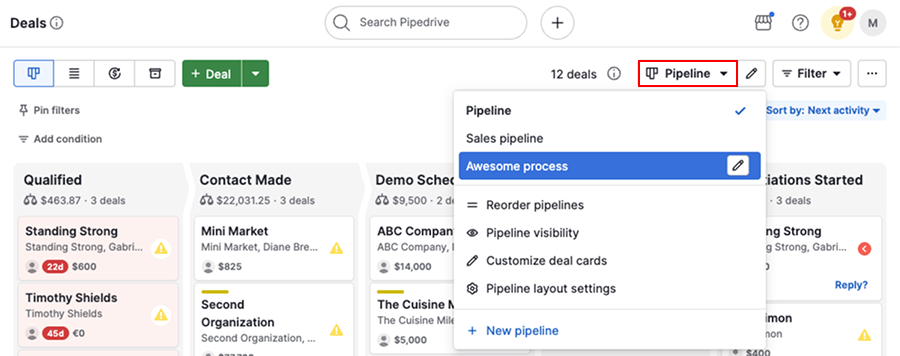
If you are searching “Mailshake vs Pipedrive,” I want to save you the tab-switching: these two tools are not competitors. They sit in completely different layers of a GTM stack, and the fact that people compare them reveals a real gap in how outbound teams think about their tooling. Mailshake sequences cold emails. Pipedrive tracks deals in a visual pipeline. The confusion happens because both store contacts, both touch “email,” and both get used by sales reps, so from the outside they look like they overlap.
They do not.
What you actually need to figure out is which sequencer fits your outbound motion, and separately, whether Pipedrive is the right CRM for your team. Those are two different decisions and I’d argue conflating them costs early-stage teams more time than almost any other tooling mistake.
Why the Confusion Happens
The buyer searching “Mailshake vs Pipedrive” is usually an early-stage SDR or a founder who just realized they need to get more systematic about outbound. They know they need software. They have heard both names. And because both tools sit in the “sales software” bucket, the comparison feels natural.
Here is the actual job split. A sequencer like Mailshake handles the top of funnel: automating touch sequences, managing send volume, rotating inboxes, and tracking open and reply rates across cold contacts. A CRM like Pipedrive handles what happens after someone responds, tracking deal stages, managing follow-up tasks, forecasting pipeline, and giving managers visibility into the funnel. They hand off to each other. A reply in Mailshake should trigger the creation of a deal in Pipedrive, either via a native integration or a Zapier/Make bridge.
The moment teams skip one or the other, they hit a wall. Running outbound from a CRM alone means manually managing send cadences and losing track of who got which email. Running purely from a sequencer means no structured place to manage active deals once a prospect converts to a conversation. Both are painful. I’d put “running pipeline out of a sequencer” at the top of the list of avoidable early-stage GTM mistakes.
Mailshake in 2026: Still Useful, but Losing Ground
Mailshake built its reputation on being the accessible entry point to cold email automation. The UX is clean, onboarding is fast, and the Dialer add-on gives it a multichannel angle. The deliverability landscape shifted hard in 2023 and 2024, though, with Google and Yahoo tightening bulk sender rules. Mailshake’s multi-inbox and warmup tooling has not kept pace with what Smartlead and Instantly now offer by default.
My read is that Mailshake makes sense for teams under 500 monthly cold emails who want a simple, low-friction UI and are not running aggressive volume plays. Above that threshold, the limited inbox rotation and per-seat pricing model start to create real friction. Don’t stay on Mailshake out of familiarity if you are adding SDRs or domains every quarter. The infrastructure just was not built for that.
The Modern Sequencer Field
If the real question is “which sequencer should I use,” here is where the main options actually land:
Cold Email Sequencers Compared

Mailshake
Mailshake is the easiest cold email tool to set up and works well for low-to-mid volume outbound. The Dialer add-on adds phone, and the LinkedIn step feature adds multichannel reach. The gap shows at scale: inbox rotation is limited compared to Smartlead or Instantly, and the pricing model charges per seat rather than per mailbox, which penalizes growing SDR teams.
Highlights
- Fast onboarding with minimal technical setup
- Built-in dialer for multichannel cadences
- Clean sequence builder with A/B testing
- Limited multi-inbox warmup compared to competitors

Smartlead Top pick
Smartlead is built around the premise that deliverability is an infrastructure problem, not a content problem. Unlimited mailboxes per account, built-in warmup, and an AI-driven sending scheduler make it the go-to for teams sending at real volume. The reporting layer takes longer to learn, but the deliverability controls are significantly more mature than Mailshake's. I'd point most growth-stage SDR teams here first.
Highlights
- Unlimited mailboxes on all paid plans
- Automated inbox warmup included
- AI-optimized sending windows
- Steeper learning curve than Mailshake

Instantly
Instantly competes almost directly with Smartlead: unlimited sending accounts, built-in warmup via their network, and a clean campaign builder. The Instantly Leads marketplace blurs the line into prospecting data, which is useful for teams without a separate data vendor. The community and onboarding resources are strong, which helps smaller teams get up to speed faster.
Highlights
- Unlimited sending accounts on all plans
- Large warmup network (Instantly network)
- Built-in lead sourcing via Instantly Leads
- Less mature CRM-side features than Mailshake

Reply.io
Reply.io sits between a pure sequencer and a lightweight CRM, with its built-in contact database, task management, and inbox. For teams that want fewer tools and less integration overhead, it is a reasonable consolidation play. That said, I would not call it a CRM replacement for any team managing a real pipeline with multiple deal stages and forecasting needs.
Highlights
- Sequences plus built-in contact database
- AI email writing assistant (Jason AI)
- LinkedIn automation included on higher plans
- Not a full CRM for pipeline management
How to Choose
The first question is not “which sequencer” but “what phase of growth are you in.” Sending fewer than 500 cold emails a month and want to move fast without technical overhead? Mailshake is still defensible. Scaling an SDR team, adding more inboxes every quarter, and worried about landing in spam? Smartlead or Instantly will serve you better, with meaningfully stronger deliverability infrastructure per the Smartlead docs on inbox rotation.
On the CRM side, Pipedrive is a genuine contender for growth-stage B2B teams that want a pipeline-first UI without the complexity overhead of Salesforce or HubSpot. It integrates with both Mailshake (via Zapier) and Smartlead (via Make or n8n), so the sequencer choice does not lock you in. If you are already running HubSpot for marketing, the HubSpot CRM is the obvious path for unified reporting, as covered in our Make integrations guide for GTM teams.
Which tool fits your situation?
Choose Mailshake if
- You are sending under 500 cold emails per month
- You want the fastest possible onboarding with minimal configuration
- You need a built-in dialer alongside email sequences
Choose Smartlead if
- You are scaling to multiple SDRs or multiple domains
- Deliverability and inbox rotation are your top concern
- You want unlimited mailboxes without per-seat pricing pain
Choose Instantly if
- You want warmup infrastructure included out of the box
- You need built-in lead sourcing to reduce data vendor costs
- You prefer a strong community and onboarding resources
Choose Pipedrive if
- You need a dedicated CRM to manage pipeline after sequences run
- You want a visual deal board without Salesforce complexity
- Your team tracks multiple deal stages and needs forecast reporting
The Stack That Actually Works
Stop looking for a single tool to own both sequencing and pipeline. The modern outbound stack at most B2B SaaS companies under 100 employees looks like this: a sequencer (Smartlead or Instantly at volume, Mailshake for simplicity) feeding replies into a CRM (Pipedrive for pipeline-first teams, HubSpot if you want unified marketing attribution), connected via a lightweight automation layer. Per G2’s cold email category data, the top-rated tools in the sequencer category are uniformly different products from the top-rated CRMs, because the jobs are genuinely different. Treat them that way. Pick the best tool for each job, integrate rather than consolidate, and move on to problems that actually require your attention.
Sources
Frequently asked questions
Is Mailshake a CRM?
No. Mailshake is a cold email sequencer with basic contact management. It does not replace a CRM like Pipedrive for pipeline tracking and deal management.
Can Pipedrive send cold email sequences?
Pipedrive has a basic email automation feature, but it is not built for high-volume cold outreach with inbox rotation and deliverability controls the way Mailshake or Smartlead are.
What is a better alternative to Mailshake in 2026?
Smartlead and Instantly are the two most common Mailshake replacements for high-volume cold outreach, offering multi-inbox rotation and stronger deliverability controls.
Do I need both a sequencer and a CRM?
Yes, in almost every B2B GTM stack. A sequencer drives outbound prospecting and a CRM manages open deals and pipeline. They serve different jobs and integrate rather than replace each other.
Does Reply.io combine sequencing and CRM in one tool?
Reply.io offers sequencing with a built-in contact database but is not a full CRM. It suits smaller teams that want fewer tools, though serious pipeline management still benefits from a dedicated CRM.