GuidesMigration guide
Migrate from Pipedrive to Attio Without Losing Deal History
Step-by-step Pipedrive data migration guide to Attio. Covers exports, field mapping, n8n automation, and the gotchas that kill deal history.

The tools compared
Entry prices from the pricing index, read Aug 12, 2026
Some links on this page are affiliate links. If you buy through them we may earn a commission at no cost to you; it never changes a verdict. How we make money
The short answer
Export Pipedrive deals and contacts as CSV, map custom fields before importing to Attio, and use n8n to backfill activity history that the native importer drops.
The moment that triggers most Pipedrive exits I’ve seen is the same: a VP of Sales looks at the activity timeline on a deal and realizes the CRM has no memory. Notes live in a salesperson’s head, email threads are scattered across inboxes, and the “deal history” is a list of stage-change timestamps. That pain, not Attio’s marketing, is what starts the migration conversation. The good news is that the actual data move is tractable. The bad news is that Attio’s native CSV importer will quietly drop about 40% of what matters unless you know where the gaps are before you start.
Before you migrate
Do not touch the importer until you have done this prep work. I have watched teams start the import on a Friday afternoon and spend the weekend untangling duplicate records because they skipped the audit step. The sequence matters more than the speed.
What to pull from Pipedrive before you touch anything else:
- Navigate to your Pipedrive account settings and run a full data export (Settings > Data management > Export data). Download all seven CSVs: Contacts, Organizations, Deals, Activities, Notes, Products, and Lead Sources.
- Export your custom fields list from Settings > Data fields. You need the internal field keys, not just the display names, because Attio’s importer maps by column header.
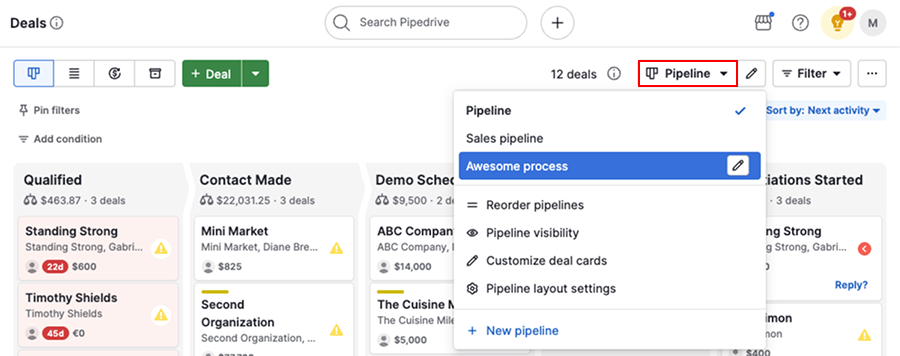
- Take a screenshot or export of your pipeline stage configuration. Attio calls these “statuses” inside a Collection, and you will recreate them manually before importing deals.
- Note which users own which records. Attio assigns ownership by workspace member email. If your team has changed emails since they joined Pipedrive, you will get orphaned records. This is one of the most common problems I’ve seen.
- Pause or complete any active sequences in connected tools (Lemlist, Smartlead, Instantly). A mid-migration contact record that gets enriched or emailed while you are moving it creates duplicates across both systems.
- If you use Pipedrive’s email sync, export the last 90 days of email activity via your email provider directly. This data does not come through the CSV export.
If you are migrating to Attio from a particularly large or messy Pipedrive instance, run your contact CSV through a deduplication pass before import. Attio will create a new record for every row, so duplicates in Pipedrive become duplicates in Attio. Except now they are harder to merge because you have lost the original ID linkage. Tools like Clay can handle that deduplication pass cleanly before you touch the importer.
The migration steps
Before importing a single record, build the Collections and Attributes in Attio that mirror your Pipedrive setup. In Attio, go to Settings > Objects and create a Deals object if it does not already exist. Add every custom attribute you noted from the Pipedrive field export. Set the right attribute types (number, select, date, text) now. Changing types after import requires re-importing. Do not skip this step to save 30 minutes, it will cost you hours.
Attio resolves company-to-contact relationships on import, but only if the parent record already exists. Import your Organizations CSV first, mapping the Pipedrive 'Organization Name' column to Attio's Company Name attribute. Then import Contacts, mapping the 'Organization Name' column to create the association. Import Deals last, linking to both Contact and Company by email and domain match. Reversing this order creates orphaned records you will spend hours cleaning up.
The CSV importer handles structured records. It does not handle Pipedrive activities (calls, meetings, tasks) or freeform notes. For those, build an n8n workflow: use the Pipedrive HTTP node to GET /activities and /notes, paginate through all pages, then POST each item to Attio's API as a Note on the matched record. Match on email address for contacts or deal title for deal records. I typically run this as a one-time workflow with a manual trigger and a small delay node between requests to avoid hitting Attio's rate limit of 200 requests per minute. Do not use Zapier here. Its 100-record polling cap makes bulk historical pulls genuinely impractical.
Pipedrive's deal export includes a 'Stage' column showing current stage, not the full stage-change history. To get the history, call the Pipedrive API endpoint GET /deals/{id}/flow, which returns every stage change as a timestamped event. Pull these via n8n, format them as note entries (date + old stage + new stage), and POST them to the deal record in Attio. It is not a perfect recreation, but it preserves the decision trail your AEs will ask for in six months.
Once records are in Attio, reconnect your toolchain. Attio has native integrations for Slack, Gmail, and Google Calendar. For everything else, use the Attio API or an n8n trigger on the 'Record created' webhook. Reconnect your enrichment source (Clay, Apollo, or whatever you use) by pointing it at Attio instead of Pipedrive. Update any workflows that were reading from or writing to Pipedrive to use Attio's API endpoints instead.
Keep your Pipedrive subscription active for 30 days post-migration. Your team will find edge cases: a deal that did not import, a note that is missing, a custom field that mapped wrong. Having Pipedrive accessible as a reference prevents a support ticket from becoming a data recovery crisis. After 30 days, downgrade to the lowest paid plan (you need API access to keep pulling historical data if something surfaces) and fully cancel at 60 days.
The gotchas: what breaks and what does not transfer
The biggest surprise for teams I have worked with is not the data that fails to import. It is the data that imports incorrectly and looks fine until someone queries it. That is the category that hurts.
What does not transfer at all: Email thread bodies (only subjects and dates come through metadata), Pipedrive’s native calling logs if you used the built-in dialer, recurring activity templates, and any data in deprecated or hidden custom fields that were not in the active export.
What transfers incorrectly without intervention: Currency fields where Pipedrive stored values without ISO codes (Attio expects explicit currency), multi-select fields where Pipedrive concatenated values with a pipe character (Attio expects separate values), and phone numbers without country codes (Attio’s formatter will reject or mangle them).
The gotcha: Pipedrive exports multi-select fields as a single string with pipe separators, like "Enterprise|SMB|Mid-Market". When Attio’s importer sees this in a Select attribute column, it creates a new option called literally "Enterprise|SMB|Mid-Market" instead of three separate values. You will not notice until a filter query returns zero results. I have seen this waste an entire afternoon of troubleshooting.
# Pre-import cleanup: split Pipedrive
# pipe-delimited multi-selects into
# separate columns or JSON arrays
import pandas as pd

df = pd.read_csv("pipedrive_deals.csv")

# Split the multi-select column
df["segment_split"] = (
    df["Segment"]
    .str.split("|")
    .apply(lambda x: [v.strip() for v in x] if isinstance(x, list) else [])
)

# Attio CSV import expects one value
# per row for multi-select attributes.
# Explode to separate rows if needed,
# or use the API to POST arrays directly.
df_exploded = df.explode("segment_split")
df_exploded.to_csv("attio_ready_deals.csv", index=False)
The Attio docs on CSV import are actually solid on field type requirements. Read that page before building your column mapping. The Pipedrive API reference for the /deals/flow endpoint is worth bookmarking before you build the n8n backfill. Between those two pages, you will catch most of the type mismatches before they become a problem.
If you have already done a similar export-clean-import cycle, the patterns will feel familiar. See our Pipedrive to HubSpot migration guide for how the same pre-import cleanup applies across destinations. The Pipedrive vs Attio comparison covers what you gain on the Attio side once you are through the migration.

Verify it worked
Do not declare the migration done until you have checked all four of these. Skip any one and you will hear about it from a rep two months later.
- Record count match: Pull the total count from Pipedrive’s export CSVs and compare to the record count in each Attio Collection. A variance above 1% means something dropped.
- Spot-check 10 random deals: Open 10 deals in Attio and verify the owner, associated contact, company, stage, deal value, and close date all match Pipedrive. Do this before your team starts touching records.
- Filter test on custom fields: Run a filter in Attio on your two most-used custom attributes. If the results look wrong (too few or too many records), the field type mapping is likely incorrect.
- Activity backfill audit: Pick 3 high-activity deals and count the number of notes and activities in Pipedrive vs Attio. The numbers will not match perfectly (email threads excluded), but should be within 80-90% for a clean backfill.
According to G2’s CRM migration user research, data integrity issues during migrations are the top complaint from CRM switchers, cited by 67% of respondents who rated their migration negatively. That number tracks with what I see. The verification step is not optional.
Who should make this switch
Choose Switch to Attio now if

- Your team is under 50 seats and your Pipedrive custom fields have gotten out of control
- You need workspace-level flexibility (custom objects, attribute types, filtering) that Pipedrive's schema cannot give you
- You are building a PLG or product-led motion and need to pipe product data into your CRM records natively
Choose Stay on Pipedrive if

- Your team runs a high-volume outbound motion and lives in the pipeline view all day
- You rely heavily on Pipedrive's native dialer, LeadBooster, or smart contact data features
- Your deal history is shallow enough that losing activity logs is not a business risk
Choose Consider folk instead if

- You want a lighter, more relationship-focused CRM without Attio's engineering-heavy setup
- Your team is small (under 10 seats) and does not need complex pipeline automation
- You spend more time managing warm intros and network deals than high-volume pipeline
The migration is the easy part
Getting records into Attio is tractable if you follow the sequence. What most teams underinvest in is post-migration workspace design: building the right Collections, automations, and views so the new CRM does not just become a more expensive version of the Pipedrive chaos they left. That is where the real work lives.
The n8n backfill workflow is reusable, too. Once built for this migration, it doubles as your ongoing sync layer if you ever need to push data between systems. And if you are evaluating folk as a lighter alternative before committing to Attio, the CSV export you built for this migration works identically for that import.
Sources
Frequently asked questions
Can you migrate deal history from Pipedrive to Attio?
Attio's native CSV importer handles contacts, companies, and deals but drops activity notes and email threads. You need n8n or a script hitting the Pipedrive API to migrate those separately.
How long does a Pipedrive to Attio migration take?
A clean migration for a team with under 10,000 records typically takes one focused day. Larger datasets or messy custom fields can stretch it to a week of iteration.
Does Attio have a Pipedrive importer?
Attio supports CSV import and has a Pipedrive-specific field guide in their docs, but there is no one-click native connector. You map fields manually during the import wizard.
What data does Pipedrive export include?
Pipedrive's full data export includes contacts, organizations, deals, activities, notes, and products as separate CSV files. Email threads require the API or a Gmail/Outlook sync export.
Should I use n8n or Zapier to migrate Pipedrive data?
Use n8n for migrations above a few thousand records. Zapier's task limits and 100-record polling caps make it impractical for bulk historical data pulls.