GuidesMigration guide
Migrate HubSpot to Attio Without Losing Deal History
Step-by-step guide to migrating from HubSpot to Attio: export deal history, rebuild workflows, and avoid the data gaps that kill most CRM migrations.

The tools compared
Entry prices from the pricing index, read Aug 12, 2026
Some links on this page are affiliate links. If you buy through them we may earn a commission at no cost to you; it never changes a verdict. How we make money
The short answer
You can migrate from HubSpot to Attio in roughly one to two weeks by exporting contacts, companies, and deals as CSVs, importing them into Attio's structured data model, and rebuilding automations natively or via n8n.
The moment teams decide to leave HubSpot is almost always the same. Someone opens the billing page, sees the renewal quote for Sales Hub Professional, and realizes they’re paying $500 or $900 per month for a contact database and a handful of automations they could replace with a purpose-built relational CRM for a fraction of the cost. That’s when the migration planning starts. The thing that trips most teams up is not the export step. It’s the assumption that “deal history” means the same thing in both systems. It does not.
Before you migrate
The biggest data loss I see happens before the migration even starts. Teams export too late and miss records that were modified during the cleanup window. Lock your HubSpot instance into read-only mode for reps the day you start exporting. This is not official functionality; just pull admin access from non-owners so nobody is creating deals or updating contacts while you are pulling data.
Run these exports in HubSpot before touching Attio:
- Contacts (all properties, not just defaults): Settings > Data Management > Import/Export > Export contacts. Include lifecycle stage, owner, create date, and last activity date.
- Companies: Same path, export with associated contact count and industry/size fields.
- Deals: Export deal name, pipeline, stage, close date, amount, associated company, associated contact, and create date. HubSpot’s deal export does not include stage change history by default. You need to go to Reports > Analytics > Deal Stage Funnel and export that separately as a report.
- Notes and activities: Export from Contacts > Activity, filtered by type. These come out ugly and need manual cleanup.
- Workflows: There is no export. Screenshot or document every active workflow before you touch anything. I use Loom to record a walkthrough of each one.
- Sequences: Same situation, no export. Log every sequence name, step count, delay, and email body in a Google Sheet.
Also check your HubSpot integrations panel. If you have live syncs running to tools like Salesforce, Outreach, or Gong, pause those syncs before exporting. Mid-write records produce dirty data that is genuinely painful to clean later.
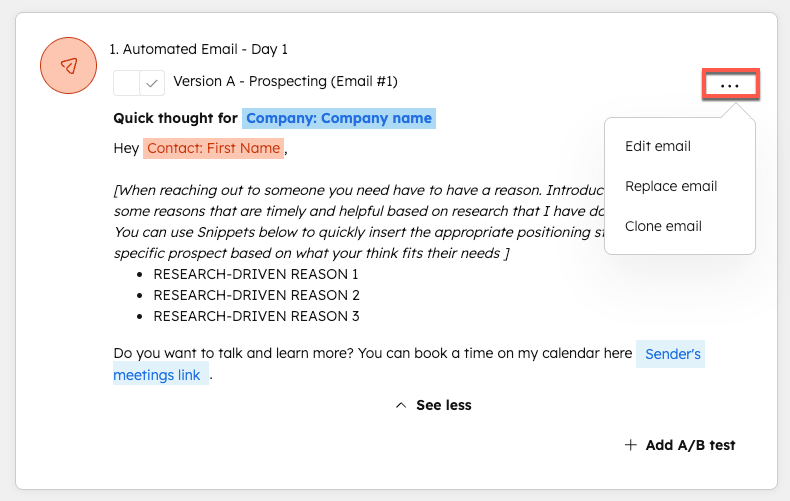
Open your contact and deal exports in Google Sheets. Deduplicate on email domain for contacts and deal name plus company for deals. HubSpot creates a lot of duplicate company records when contacts are imported from multiple sources. Attio's data model is relational by design, so a duplicate company means orphaned records downstream. I run a COUNTIF on the domain column and manually review anything with more than three matches.
Attio uses a different object structure than HubSpot. HubSpot has Contacts, Companies, Deals, and Tickets as top-level objects. Attio has People, Companies, and Deals, but Deals are relational records that sit between People and Companies, not standalone. Before you import, create a field mapping doc: HubSpot property name on the left, Attio attribute name on the right. Pay special attention to custom properties. Any HubSpot custom field that does not have a matching Attio attribute needs to be created in Attio's data model editor first, or that column gets dropped on import.
Attio's importer resolves relationships by matching on email for People and domain for Companies. If you import Deals before Companies exist in the system, the company association will fail silently and you will have floating deal records with no company attached. Go to Attio > Settings > Import, upload your companies CSV first, let it resolve, then import contacts, then deals. Each import gives you a mapping UI where you match CSV columns to Attio attributes.
Attio has a native automation builder that handles triggers like stage changes, attribute updates, and record creation. For simple workflows (assign owner on deal create, notify Slack on stage change), rebuild directly in Attio. For anything that touches external tools, routing through n8n gives you more control. I typically rebuild lead routing and deal-created notifications natively, and move anything involving Clay, Apollo, or multi-step sequences to n8n. See our guide on connecting Apollo to n8n for a starting point on that pattern.
Attio's Gmail and Google Calendar integration handles activity capture going forward, but it does not backfill historical email threads from HubSpot. Connect via Attio > Settings > Integrations > Email. Once connected, new emails to and from contacts in Attio will auto-log. For the historical gap, I add a note on each active deal record that says 'Migrated from HubSpot on [date], prior email history in HubSpot archive' so reps know where to look.
After import, pull a count of deals by stage in Attio and compare it to the same count in HubSpot before you shut anything down. Go to Attio > Deals, group by stage, and screenshot the counts. Do this comparison for total deal value per stage as well. A mismatch here usually means some deals lost their stage association during import, which happens when the stage name in your CSV does not exactly match the pipeline stage name you created in Attio.
What breaks and what does not transfer
This is the section most migration guides skip. It’s also where I spend the most time. Don’t skim it.
What transfers cleanly: Contact names, emails, phone numbers, company names and domains, deal names, deal amounts, close dates, pipeline stages (if names match exactly), and custom properties that you pre-created in Attio’s data model.
What does not transfer at all: HubSpot email send history from Sequences, meeting booking logs from HubSpot Meetings, any data captured by HubSpot’s tracking pixel or form submissions that only lived in the activity feed, workflow enrollment history, and A/B test results from email campaigns.
What transfers badly: Notes. HubSpot exports notes as a flat text dump with timestamps jammed into a single column. You can import these into Attio as a note attribute on contact records, but you lose threading and the association to specific deals. My standard call here is to import the last 90 days of notes and archive the rest in a shared Google Doc linked from the deal record.
The gotcha: HubSpot deal stage change timestamps are not in the default deal export. If you need to show pipeline velocity or historical conversion rates in Attio, you need to pull the deal stage funnel report from HubSpot’s Analytics section before migrating. Once you cancel or deprovision HubSpot, that data is gone unless you exported it first.
In HubSpot:
Reports > Analytics Tools
> Deal Stage Funnel Report
> Export as CSV

Columns to keep:
- Deal ID
- Stage name
- Date entered stage
- Date exited stage
- Days in stage

Import these as a custom
"Stage History" note object
in Attio or store in a
Google Sheet linked to
each deal record.
According to HubSpot’s own export documentation, activity data exports are limited to a rolling window and do not include all associated object data in a single file. That is exactly why the multi-pass export approach above is necessary, not optional.
Verify it worked
Before you cancel HubSpot, run these four checks:
- Deal count parity: Total deals in Attio matches total deals exported from HubSpot (filter to “all time” in both).
- Owner assignment: Pick 10 random deals in Attio and confirm the assigned owner matches what HubSpot showed. Owner import fails silently if the email address in your CSV does not match an Attio workspace member.
- Pipeline stage distribution: Deal count per stage in Attio matches your HubSpot funnel report snapshot.
- Email capture going forward: Send a test email to a contact in Attio from your connected Gmail account and confirm it appears in the contact’s activity feed within 5 minutes.
Keep HubSpot running in read-only mode for 30 days after go-live. Do not cancel the subscription until you have closed at least one deal entirely within Attio and confirmed that the activity log looks correct. Thirty days feels conservative until you actually need it.
HubSpot or Attio: who should switch
Choose Attio if
- Your team is under 25 seats and tired of paying HubSpot's per-feature tax on things like custom reports and sequences
- You want a relational data model where people, companies, and deals connect without manual association hacks
- You are routing enrichment and outreach through Clay or n8n and need a CRM with a clean API, not a marketing suite
Choose HubSpot if

- You rely on HubSpot Marketing Hub for email campaigns, landing pages, and ad attribution and cannot separate CRM from marketing
- Your team uses HubSpot's built-in sequences and meeting booking heavily and does not want to re-platform those workflows
- You have more than 50 seats and the migration cost in rep downtime outweighs the subscription savings
If you are also evaluating Pipedrive as an alternative landing spot, our breakdown of what Pipedrive actually costs in 2026 is worth reading before you commit. And if your HubSpot workflows include lead scoring automation, the Trigify + HubSpot lead scoring guide covers what you would be giving up and what you can replicate elsewhere.
For rebuilding outbound sequences post-migration, I’ve had good results routing Smartlead through n8n to push replies back into Attio as deal activities. The pattern is nearly identical to the Smartlead-to-HubSpot sync guide but with Attio’s API endpoint swapped in.
One week before go-live
The migration itself is not the risk. The transition period is. I always run a parallel two-week sprint where reps log deals in both systems, then compare at the end. It sounds tedious, and reps will complain loudly, but it catches field mapping errors that a static record count never surfaces. By the end of week two, every active deal should have matching data in both systems. Then you cut over, put HubSpot in read-only mode, and do not look back.
The Attio API documentation is genuinely good for custom field creation and bulk record writes via REST if you want to automate parts of the import rather than grind through the CSV UI. If your deal count is above 5,000, read it before you start. The CSV approach works fine at lower volumes; above 5,000 records you will want the API for the import itself and for any post-import patching on association errors.
Sources
Frequently asked questions
Can HubSpot deal history be migrated to Attio?
Yes, but only as flat CSV data. HubSpot's deal timeline events, email activity logs, and note threads do not export natively and must be reconstructed manually or via API.
Does Attio have a native HubSpot importer?
Attio supports CSV import and has a HubSpot integration for live sync, but there is no one-click historical migration tool. You will need to export and map fields manually.
How long does a HubSpot to Attio migration take?
For a team with under 10,000 contacts and fewer than 20 active workflows, expect one to two weeks including data cleanup, import, and workflow rebuild.
What does not transfer from HubSpot to Attio?
Email send history, sequence enrollment records, meeting logs from HubSpot Meetings, and automation enrollment history do not transfer. Deal stage change timestamps transfer only if you export them explicitly before migrating.
Is Attio cheaper than HubSpot for small B2B teams?
Generally yes. Attio's Plus plan starts around $34 per seat per month versus HubSpot Sales Hub Starter at $20 per seat but with significant feature restrictions and steep upgrade costs.