GuidesAi Sdr
AiSDR + HubSpot Workflow: Full Setup Guide for 2026
Step-by-step tutorial for building an AI SDR workflow with AiSDR and HubSpot in 2026, including Clay enrichment and n8n automation.

The tools compared
Entry prices from the pricing index, read Aug 12, 2026
Some links on this page are affiliate links. If you buy through them we may earn a commission at no cost to you; it never changes a verdict. How we make money
The short answer
Connect AiSDR to HubSpot by syncing your CRM contacts as the prospect source, letting AiSDR run personalized outreach sequences, then routing replies and booked meetings back to HubSpot via native sync or an n8n webhook.
Most AI SDR tools I evaluate fall into one of two failure modes: standalone email blasters that know nothing about your CRM state, or tools that promise deep HubSpot sync but quietly drop half the contact properties on the way in. AiSDR sits in a different spot. It reads your HubSpot contacts, uses those properties to personalize outreach at the message level, and writes activity back to the timeline without a Zapier chain holding the whole thing together. I’ve been building this stack for B2B SaaS teams at Homegrown Growth Co. all year, and what follows is the exact workflow I’d hand an operator setting it up in 2026.
What This Workflow Actually Does
Before jumping into steps, here is what the finished system looks like end-to-end. HubSpot is the system of record. AiSDR is the outbound engine. Clay optionally enriches new prospects before they hit AiSDR. n8n handles conditional routing for hot replies and meeting bookings. Nothing duplicates. Nothing runs blind.
The core loop is simple. A new contact enters a HubSpot list. AiSDR picks them up on a sync interval you define (15 minutes is the default), runs a multi-step email sequence personalized from HubSpot properties, and logs every sent email, open, click, and reply back to the contact timeline. Booked meetings fire a webhook that n8n catches and stamps the deal stage in HubSpot. No manual handoff required.
In AiSDR, go to Settings > Integrations > HubSpot and click Connect. Authorize with a HubSpot super-admin account so AiSDR can read and write contact and company properties. After auth, AiSDR surfaces a property mapping screen. Map at minimum: First Name, Last Name, Email, Company Name, Job Title, and Lifecycle Stage. Map any custom properties you plan to use in personalization (for example, 'Pain Point' or 'ICP Tier'). Toggle bidirectional sync on so email activity writes back to HubSpot timelines.
Create an active list in HubSpot filtered to exactly the contacts AiSDR should work. A typical filter stack: Lifecycle Stage is 'Lead' AND Contact Owner is known AND 'Enrolled in Sequence' is false AND 'Unsubscribed from all email' is false. Excluding active sequence enrollees prevents double-touching the same prospect. I also add a custom property filter like 'AiSDR Eligible = true' so sales reps can gate contacts manually when needed.
If your HubSpot contacts come in thin (name, email, company only), run them through Clay before AiSDR touches them. In Clay, build a waterfall: LinkedIn enrichment first, then Clearbit or People Data Labs as a fallback. Push enriched values back to HubSpot as contact properties. AiSDR then reads the enriched properties on its next sync. The personalization quality jump is significant. I covered this pattern in detail in the post on [connecting Clay to n8n for automated enrichment](/blog/2026-07-31-connect-clay-to-n8n-for-a-fully-automated-enrichment-pipelin/).
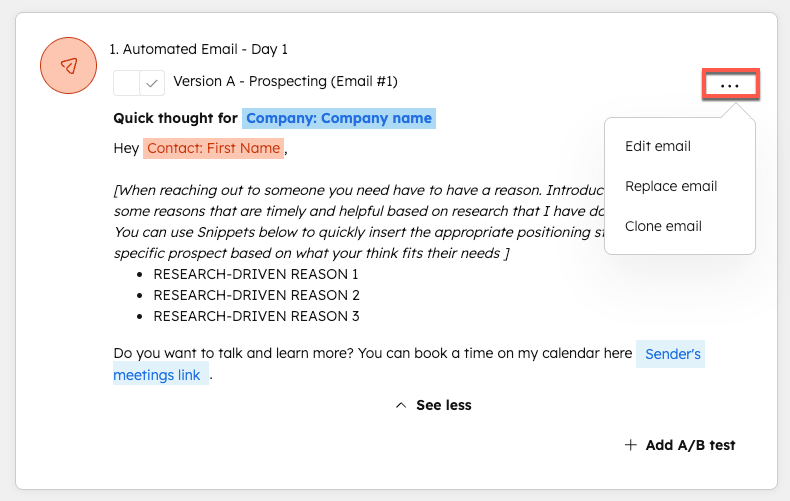
Inside AiSDR, create a new campaign and select your HubSpot list as the prospect source. Set the sequence to 4-5 steps: Day 1 initial email, Day 3 follow-up, Day 7 value-add, Day 12 breakup. In the email editor, reference HubSpot properties using AiSDR's variable syntax (the contact's first name field or company name field as inline tokens). Enable AiSDR's AI personalization layer to auto-generate opening lines from LinkedIn activity or company news. Set sending limits to 50-80 emails per mailbox per day to protect deliverability, and connect warm mailboxes you have already ramped.
AiSDR fires a webhook on reply and on meeting booked. In n8n, create a workflow with a Webhook Trigger node. Add a Switch node: if the payload contains 'meeting_booked', update the HubSpot deal stage to 'Meeting Scheduled' and notify the assigned rep in Slack. If the payload contains 'reply' and sentiment is positive, set a HubSpot contact property 'Hot Reply = true' and create a HubSpot task for the rep. For negative replies, update 'AiSDR Eligible = false' so the contact exits the source list automatically.
The trap I see most often: Teams map the HubSpot list once at setup and forget that HubSpot active lists are dynamic. If you change the list filters after AiSDR has already enrolled contacts, AiSDR does not retroactively unenroll them. Contacts who no longer match the list criteria keep receiving emails until their sequence ends. This is how you accidentally email a closed-won customer.
Fix: add a dedicated "AiSDR Stop" workflow in HubSpot.

Trigger: Contact no longer meets list criteria
OR Deal Stage = Closed Won
OR Deal Stage = Closed Lost

Action 1: Set property "AiSDR Eligible = false"
Action 2: Set property "Enrolled in Sequence = true"
   (forces exclusion filter to catch them)
Action 3: Create task for rep: "Review outreach status"

This runs independently of AiSDR and acts
as a circuit breaker regardless of sync timing.
Tools in This Stack and When to Swap Them
Don’t default to AiSDR just because it has the most native HubSpot wiring. The right choice depends on where your actual constraint is. Volume shops with simple copy should look at Instantly first. Deliverability-obsessed teams should look at Smartlead. AiSDR earns its price tag specifically when HubSpot is your control plane and you need the AI personalization to draw from CRM context rather than scraping LinkedIn cold.
Which outbound engine fits your setup?
Choose AiSDR if

- You want AI-personalized email at scale with HubSpot as the control plane
- Your team lacks bandwidth to manually write sequence variations
- You need activity logged back to HubSpot without a middleware layer
Choose Smartlead if

- Deliverability and mailbox rotation are your primary concern
- You want granular sending controls and inbox warm-up built in
- You are comfortable writing your own copy or using lighter AI assist
Choose Instantly if

- You need unlimited mailboxes on a flat fee
- Your sequences are simpler (3 steps or fewer) and volume is the lever
- HubSpot sync is nice-to-have rather than mission-critical
For the enrichment layer, Clay remains the best option I’ve found when contacts enter HubSpot thin. The waterfall approach (LinkedIn first, then a data provider fallback like Lusha or Fullenrich) means you are not paying premium rates for data you could get cheaper elsewhere. See the Clay enrichment table walkthrough for the exact column setup.
For automation glue, n8n beats Zapier here. Full stop. The webhook routing logic in Step 5 has conditional branches that would burn Zapier task credits fast enough to sting at any real sending volume. n8n’s self-hosted option also keeps your contact data off a third-party SaaS server, which matters if you work with enterprise clients who have data residency requirements.

The Workflow in Production
Once this is live, the operating rhythm is genuinely low-touch. I check three things on a weekly cadence: reply sentiment distribution in AiSDR (if negative replies climb above 15%, something in the sequence copy or targeting is off), HubSpot task completion rate for hot reply follow-ups (if reps are ignoring tasks, the Slack alert format needs a rethink), and mailbox health scores (anything below 85% in AiSDR’s deliverability dashboard is a flag worth addressing before it becomes a bounce problem).
HubSpot Research consistently shows personalized outreach sequences outperforming generic ones by a substantial margin on open and reply rates. AiSDR’s value is in closing that personalization gap at volume without a human writing each opener. The Salesforce State of Sales report puts SDR time spent on manual tasks at over 60%. That is the exact problem this stack is built to reclaim.
If you are also pulling intent signals into this workflow, the Vector and n8n visitor signal workflow is worth reading as a complementary layer for prioritizing which contacts enter the AiSDR list first. Pairing intent-scored contacts with enriched HubSpot properties is where this whole setup starts to feel like an actual system rather than a collection of tools pointed at each other.
The stack is not magic. AiSDR handles the top of the conversation well. The moment a reply gets nuanced (detailed technical question, pricing negotiation, referral to a different stakeholder) a human needs to take over. Wire that handoff cleanly in n8n and you have outbound that scales without burning your domain reputation or your reps’ patience.
Sources
Frequently asked questions
Does AiSDR integrate natively with HubSpot?
Yes, AiSDR has a native HubSpot integration that syncs contacts bidirectionally and logs email activity back to contact records automatically.
Can AiSDR replace a human SDR entirely?
AiSDR handles initial outreach, follow-ups, and basic objection handling autonomously, but most teams keep a human in the loop for late-stage replies and high-value accounts.
What data does AiSDR pull from HubSpot to personalize emails?
AiSDR reads contact properties, company properties, and lifecycle stage from HubSpot to personalize subject lines, openers, and call-to-action copy.
How do I prevent AiSDR from emailing contacts already in active HubSpot sequences?
Use a HubSpot active list filtered by enrollment in sequences, then exclude that list in AiSDR's contact sync settings before launching a campaign.
Is n8n required to run AiSDR with HubSpot?
No, n8n is optional. The native integration handles most sync needs, but n8n adds value for conditional routing, Clay enrichment triggers, and Slack alerting on hot replies.