Connect Gmail, Kixie, and Pipedrive: Full SDR Integration Setup
 By Ian Chamberland 10 min read
 TL;DR
Connect Gmail, Kixie, and Pipedrive by installing the Kixie PowerCall Chrome extension, enabling the Pipedrive integration inside Kixie's dashboard, and then using n8n or Zapier to sync Gmail activity back into Pipedrive contact timelines automatically.
On this page
SDR teams running Pipedrive hit the same wall every time: calls are in Kixie, emails are in Gmail, and the CRM has none of it unless someone logs it manually. That manual gap destroys pipeline visibility. In my experience it is usually what breaks rep accountability reviews, not effort or call volume. This guide walks through the full integration setup, what works natively, where the native setup falls short, and how to close the gap with n8n so your Pipedrive records actually reflect a complete conversation history.
Why all three tools need to be wired together
Kixie’s native Pipedrive integration is genuinely good for calls. It auto-logs duration, recording links, and call outcomes to the matching contact record without any rep action. That part works without middleware. Where it breaks down is email.
Kixie’s Chrome extension adds click-to-call buttons inside Gmail, but Gmail activity itself does not flow back to Pipedrive through Kixie’s native connector. Full stop.
Pipedrive ships its own Gmail add-on, which lets reps manually pin an email thread to a deal or contact. Useful, but not automatic. The moment a rep is sending more than 20 emails a day, manual logging falls off completely. I’ve seen this cause real problems in pipeline reviews when leadership assumes a contact is cold because the timeline looks empty, but the rep has been actively emailing all week. The deal gets deprioritized. Then it closes somewhere else.
The architecture that actually works: Kixie handles the dialer-to-Pipedrive sync natively, and n8n handles Gmail-to-Pipedrive sync via a Gmail trigger and Pipedrive API write. Together they give you a complete activity timeline with zero rep-side effort.
The full setup, step by step
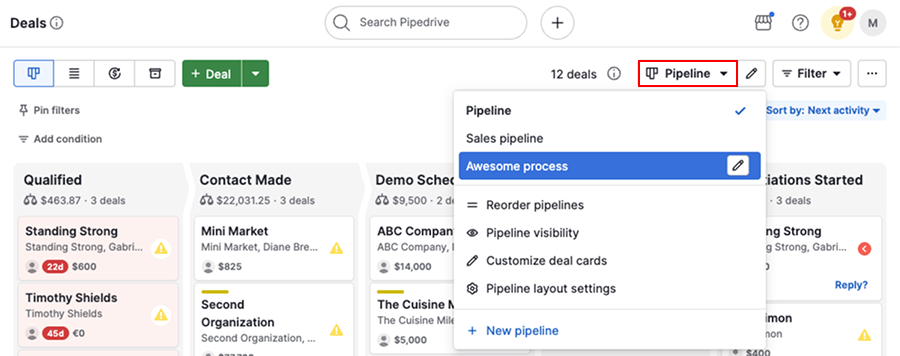
Install the Kixie PowerCall Chrome extension from the Chrome Web Store. Log into your Kixie dashboard, go to Integrations, and select Pipedrive. You will be prompted to authorize via Pipedrive OAuth. Once connected, Kixie starts matching calls to Pipedrive contacts by phone number and logging call records automatically. Test with one outbound call to confirm the activity appears on the correct contact timeline before rolling out to the team.
Inside Kixie's settings, define your call dispositions: Connected, Voicemail, No Answer, and so on. In your Pipedrive integration settings within Kixie, map each disposition to a matching Pipedrive activity type. When a rep marks a call as 'Voicemail Left,' Pipedrive logs it as a Voicemail activity type rather than a generic call. That distinction makes pipeline filtering actually useful. Skip this step and every call looks identical in the CRM.
From the Google Workspace Marketplace, install the Pipedrive for Gmail add-on. This surfaces a Pipedrive sidebar inside Gmail where reps can manually associate an email thread with a contact or deal. It is not automatic, but it covers edge cases where a rep has a meaningful async conversation that should be formally logged. Treat it as the exception path, not the primary sync mechanism.
In n8n, create a new workflow with a Gmail trigger node set to fire on new emails matching your domain's sent items or a specific label (for example, 'Pipedrive-log'). Add a Pipedrive node to search for a matching contact by email address. If a match is found, write a Note or Activity to that contact record with the email subject, snippet, and timestamp. If no match is found, route to a Slack notification so a rep can manually create the contact. Set the workflow to poll Gmail every 5 minutes.
Before writing to Pipedrive, add an n8n Function node that checks whether an activity with the same Gmail Message-ID already exists on the contact. Pipedrive's API returns activity notes, so you can query by subject string or store the Message-ID as a custom field on the activity. Without this check, a re-run or webhook retry logs the same email two or three times, and your timelines become noise. This step takes 20 minutes and saves hours of cleanup later.
Make an outbound call from Kixie, send a follow-up email from Gmail, then check the Pipedrive contact timeline. You should see the call activity logged by Kixie with disposition, and the email logged as a note by n8n, within a 5-minute window. If either is missing, check Kixie's integration logs first, then n8n's execution history. The most common failure: the email address on the Gmail sent item does not match what is stored in Pipedrive, usually because of a nickname alias versus a full domain address.
The gotcha: Gmail aliases and Pipedrive contact matching
The most common break point I see in this setup is contact matching. Kixie matches by phone number, which is reliable. The n8n Gmail-to-Pipedrive match goes by email address, which is fragile the moment your team uses aliases.
The trap: Your rep’s Gmail is john@company.com but the Pipedrive contact has j.smith@prospect.com and the email was sent to a CC’d alias. The n8n search returns zero results, the workflow hits the “no match” branch, and the email never logs. You find out three weeks later when a deal falls through and the timeline looks completely empty, even though the rep was emailing twice a week.
// n8n Function node: extract all recipients
// and search Pipedrive for each one
const toAddresses = $input.item.json.to || [];
const ccAddresses = $input.item.json.cc || [];
const allRecipients = [...toAddresses, ...ccAddresses];

// Return array for downstream Pipedrive
// search node to iterate over
return allRecipients.map(email => ({
  json: { searchEmail: email.trim().toLowerCase() }
}));
The fix is to extract all To and CC addresses from the Gmail payload and run a Pipedrive contact search against each one. First hit wins. This adds one extra loop in n8n but makes matching resilient to multi-recipient threads, which describes most real sales emails.
If you are running into broader sequence leakage issues beyond just Gmail logging, the post on why your sales sequence software is leaking leads covers the systemic version of this problem.
Dialer alternatives if Kixie is not the right fit
Kixie is not the only dialer with a native Pipedrive connector. Confirm you are on the right tool before committing to the setup above.
Which dialer to pair with Pipedrive
Choose Kixie if

- Your team needs PowerCall multi-line dialing to hit 3x to 5x more dials per hour
- You want SMS sequences and call coaching built into one platform
- You are running a dedicated outbound SDR team where dialer efficiency is the top metric
Choose JustCall if

- You need a lower per-seat cost with solid Pipedrive native logging
- Your team is smaller and does not need multi-line parallel dialing
- You want AI call scoring without paying Kixie's higher tier pricing
Choose Aircall if

- Call analytics and team performance dashboards matter more than raw dial volume
- You are running a blended inbound and outbound team sharing one phone system
- Your ops team wants deep call data piped into a BI tool or data warehouse
My honest take on the JustCall vs. Aircall question: for pure outbound SDR teams, Kixie’s PowerCall dialing mode is the differentiator and the other two do not match it. If you are weighing whether to migrate from Aircall to JustCall, that post covers the transition in detail.
What if your team is on HubSpot, not Pipedrive?
The same three-tool architecture works on HubSpot, but the native integrations are tighter out of the box. HubSpot’s Gmail extension auto-logs sent emails to contact timelines without middleware, which removes the n8n Gmail sync step entirely. Kixie also has a HubSpot native integration that mirrors the Pipedrive one. The tradeoff is HubSpot’s cost at scale. For teams already on Pipedrive, building the n8n bridge is the right call rather than switching CRMs just to get automatic email logging.
If you are on HubSpot and seeing workflow failures affecting deals, the post on HubSpot automations costing you deals is worth reading before layering more automations on top.
Getting this into production without breaking existing workflows
The setup above is additive. You are not replacing anything the team already does. Kixie’s integration writes call activities as a separate record type, so there is no collision with existing manually logged activities. The n8n Gmail workflow writes Notes, not Activities, which keeps the two data types visually distinct inside Pipedrive’s contact timeline.
One thing to lock down before going live: make sure your n8n instance uses a production-grade Gmail OAuth credential scoped to read-only sent mail, not full inbox access. Least-privilege access matters here for two reasons. First, security. Second, it reduces the surface area of Gmail API rate limits you will hit if the workflow misfires and loops. The Gmail API quota is 250 quota units per user per second, and a runaway n8n trigger can burn through that in minutes if the credential has unnecessary permissions.
Once the integration is running, your Pipedrive contact timelines become a genuine audit trail. Call dispositions from Kixie. Emails from the n8n sync. Manual notes from the Gmail add-on for the important async threads. That is the kind of CRM hygiene that makes pipeline forecasting trustworthy rather than aspirational.
Sources
Frequently asked questions
Does Kixie integrate directly with Pipedrive?
Yes. Kixie has a native Pipedrive integration that logs calls, texts, and voicemails directly to the matching contact or deal record. You enable it inside the Kixie dashboard under Integrations.
Can I log Gmail emails to Pipedrive automatically?
Pipedrive's Gmail add-on logs emails to contact timelines, but it requires manual action per thread. For fully automatic logging, you need n8n, Zapier, or Make to push Gmail activity to Pipedrive via API.
What is the best dialer for Pipedrive in 2026?
Kixie, JustCall, and Aircall all have native Pipedrive integrations. Kixie wins on PowerCall multi-line dialing; JustCall wins on price per seat; Aircall wins on call analytics depth.
Does Kixie work with Gmail?
Kixie's Chrome extension surfaces click-to-call buttons inside Gmail, but it does not natively sync Gmail email activity back to Pipedrive. That sync requires a middleware like n8n or Zapier.
How long does it take to set up Kixie and Pipedrive together?
The native Kixie and Pipedrive connection takes under 30 minutes. Adding Gmail activity sync via n8n adds another one to two hours for the workflow build and testing.
Free Newsletter
Get new posts by email.
Migration guides, tool comparisons, and pricing breakdowns from real RevOps and GTM stacks, sent as they publish.
No spam. Unsubscribe anytime.
Enjoying this? Share it with your team.
Keep reading

Some links are affiliate links. Disclosure.