Diagnose Cold Email Deliverability Gaps with Smartlead
 By Ian Chamberland 9 min read
 TL;DR
If your open rates have collapsed, the problem is almost never your copy. It is your infrastructure, and Smartlead gives you the clearest signal for where to fix it.
On this page
You rewrote the subject lines. You shortened the copy. You pulled a fresh list from Apollo. Open rates are still 9%. I’ve watched teams spin their wheels on messaging for weeks chasing a problem that was never about messaging. Copy is rarely the culprit at that level of underperformance. Infrastructure almost always is. The most reliable way to actually diagnose it, rather than guess, is to treat deliverability like a stack trace: work backwards from symptoms to root cause, layer by layer.
The symptom-first framework for deliverability diagnosis
Most RevOps operators treat deliverability as a binary: either emails land or they do not. The reality is a gradient, and each symptom maps to a different layer of the stack. Before you touch a single sequence setting, match what you are observing to where the failure is actually happening.
Here are the five layers I work through, in order, every time a sequence underperforms. My opinionated take: if you are not starting with Google Postmaster before anything else, you are debugging blind.
Pull your Google Postmaster dashboard for every domain you are sending from. If spam rate is above 0.1%, stop the sequence. Postmaster is free and shows spam rate, domain reputation, and IP reputation. If you do not have Postmaster set up, that is your first problem, full stop.
Lists from Clay enrichments, scraped LinkedIn exports, or ZoomInfo pulls all contain catch-alls and role-based addresses. ZeroBounce's API scrubs spam traps, catch-alls, and disposables. I run every list above 500 contacts through it before upload. Hard bounce rates above 2% will tank sender reputation faster than any spam word in your copy.
Navigate to the Inbox Management panel in Smartlead. Each connected inbox shows a health score, warmup status, and daily send count. If one inbox has a health score below 70, pull it from the rotation immediately. Do not wait for the aggregate campaign stats to surface the problem.
Use MXToolbox or Google Admin Toolbox to verify all three records are correctly aligned for every sending domain. Misaligned DMARC is a silent deliverability killer. Emails still send; they just land in spam. I have seen sequences showing a 95% open rate in Smartlead's tracker but a 6% real open rate because tracking pixels were loading from spam folder previews.
If you are provisioning inboxes at volume through Mailforge, confirm each inbox has completed its warmup ramp inside Smartlead's warmup pool. Mailforge provisions the infrastructure; Smartlead handles the warmup reputation. The handoff is manual and easy to skip when you are standing up 20 inboxes at once.
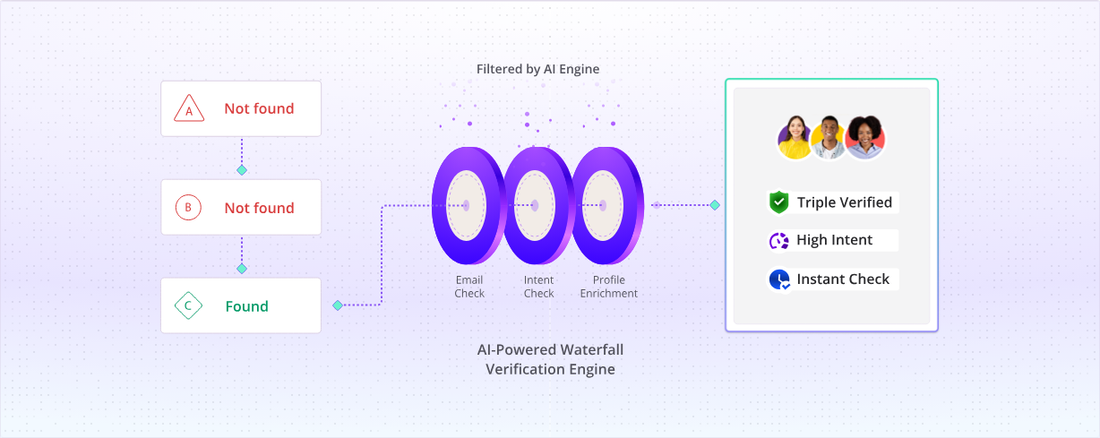
The infrastructure layer: where Mailforge and ZeroBounce fit
The mistake I see most often when teams compare sales engagement platforms for cold email is treating Smartlead or Instantly as the whole stack. They are not. The sending platform sits on top of an infrastructure layer you also need to manage deliberately.
Mailforge is where I provision sending domains and inboxes when I need more than five or six accounts. It handles domain registration, Google Workspace or Microsoft 365 provisioning, and basic DNS record setup in bulk. What it does not do is warm those inboxes or manage sequence logic. That is Smartlead’s job. Keep those responsibilities clearly separated or you will spend hours debugging a problem that is actually a process gap.
The trap: Provisioning 20 Mailforge inboxes, connecting them to Smartlead, and launching sequences on day one. Fresh inboxes with zero warmup sending at full volume look exactly like a spam operation to Google’s filters, because functionally they are. I have watched this obliterate an entire sending domain in under two weeks.
Mailforge inbox provisioning checklist:
1. Register domain (age it 7+ days before any send)
2. Set SPF, DKIM, DMARC on each domain
3. Connect inbox to Smartlead warmup pool
4. Run warmup at 3-5 emails/day for 21 days minimum
5. Check Smartlead health score > 80 before sequence launch
6. Cap daily sends at 30-40/inbox for first 30 days
ZeroBounce belongs at the front of this pipeline, not as an afterthought. Their email validation API integrates directly with most Clay workflows, so you can validate at enrichment time rather than before upload. Running validation at enrichment rather than at campaign launch is the single highest-impact deliverability improvement I have made in my own outbound. Do it there, not as a last-minute scrub.
If you want a deeper look at the full deliverability audit process beyond just platform settings, the cold email deliverability audit playbook I wrote covers the DNS and reputation layers in more detail.
How to choose the right platform for your situation
Compare Sales Engagement Platforms for Cold Email
Choose Smartlead if

- You want per-inbox health scoring and granular deliverability diagnostics
- You are managing more than 10 sending inboxes and need rotation built in
- You want warmup and sequencing in one platform without stitching tools together
Choose Instantly if

- You want a cleaner UI and faster campaign setup with less configuration overhead
- Your list is under 5,000 contacts and you do not need deep per-inbox analytics
- You are running straightforward sequences and deliverability is not yet a diagnosed problem
Choose Mailforge if

- You need to provision 10 or more sending inboxes at once without manual DNS setup
- You want a clean infrastructure layer separate from your sequencing tool
- You are building a system where inboxes rotate across multiple campaigns
Choose ZeroBounce if

- Your bounce rate has crept above 1.5% and you need to clean existing lists now
- You are pulling lists from multiple enrichment sources and need a single validation layer
- You want spam trap detection and catch-all resolution before any sequence launch
If you are evaluating whether to move your list management and sequence execution from Apollo into Instantly, the migrate Apollo to Instantly guide walks through the contact data export process without losing sequence enrollment history.
And if you have already identified that your Pipedrive sequences are the delivery bottleneck rather than your cold email tool, diagnosing Pipedrive sequence delivery gaps covers a parallel diagnostic workflow.
Fix the foundation before you optimize the message
The Litmus 2024 State of Email found that sender reputation accounts for more inbox placement variance than content filtering in most major ISPs. That tracks with my own testing across multiple campaign builds. If you are seeing flat open rates, run the diagnostic stack in order: Postmaster reputation check, ZeroBounce list scrub, Smartlead per-inbox health audit, DNS alignment verification, then warmup review. Only after you have cleared all of that should you look at your copy. The Smartlead platform gives you more diagnostic surface area for that process than any other tool I have used in this category. Pair it with Mailforge for infrastructure and ZeroBounce for list hygiene and you have a stack that surfaces the actual problem instead of masking it with a sharper subject line.
Sources
Frequently asked questions
How do I know if my cold email sequence has a deliverability problem?
Open rates below 20% on warmed inboxes, or reply rates under 1% with no bounce spikes, usually signal a spam folder problem rather than a messaging problem. Check your sender score and DMARC alignment first.
Does Smartlead help with email deliverability?
Yes. Smartlead includes built-in inbox rotation, warmup via its own warmup pool, and a verification step before sequences launch. It is one of the more deliverability-focused platforms when you compare sales engagement platforms for cold email.
How does Smartlead compare to Instantly for deliverability?
Both support inbox rotation and warmup pools, but Smartlead's analytics surface per-inbox health scores more granularly. Instantly edges ahead on UI simplicity; Smartlead wins on diagnostic depth.
What is Mailforge used for in cold email?
Mailforge is an infrastructure layer for provisioning and warming cold email inboxes at scale. It pairs well with Smartlead or Instantly as the sending platform sitting on top.
Should I use ZeroBounce before every cold email campaign?
Yes, especially for lists older than 90 days. ZeroBounce's catch-all detection and spam trap scrubbing meaningfully reduce hard bounce rates, which directly protect your sending domain.
Free Newsletter
Get new posts by email.
Migration guides, tool comparisons, and pricing breakdowns from real RevOps and GTM stacks, sent as they publish.
No spam. Unsubscribe anytime.
Enjoying this? Share it with your team.
Keep reading


Some links are affiliate links. Disclosure.